Does anyone knows how to make yahoo accs?
Also does anyone know how to skip chaptcha or solve it for outlook mail creation?
Create Yahoo & Outlook Accounts + Bypass Captchas (2026)
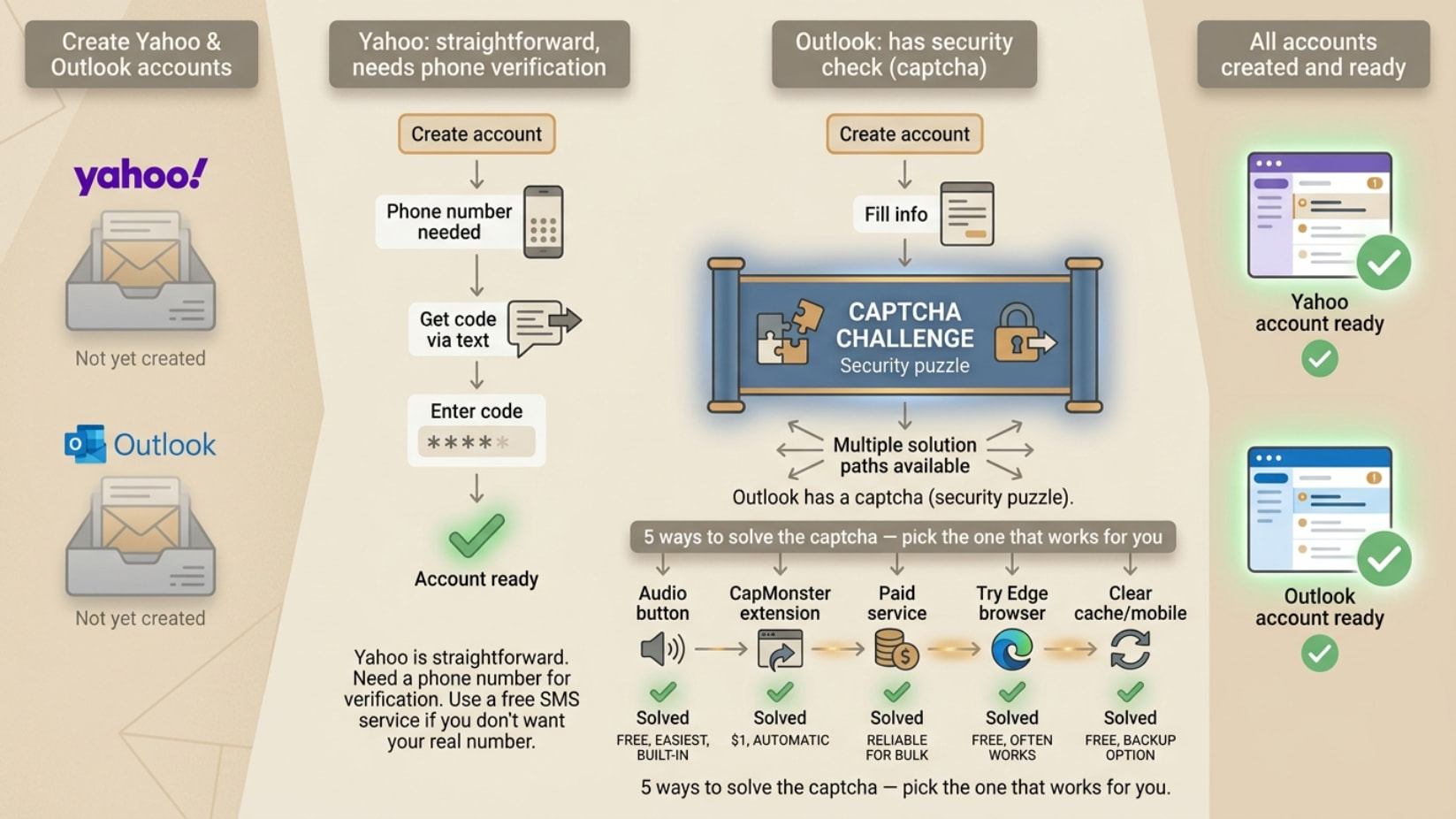
Creating accounts is straightforward. The trick is handling Outlook’s captchas without getting stuck — multiple ways work.
Yahoo
Setup: login.yahoo.com → Create account → Fill info → Phone OTP (text message verification) → Done
Phone OTP services (if not using real number):
- 5sim.net ← most popular for Yahoo
- smspool.net
- onlinesim.io (paid, reliable)
- receive-smss.com
- sms24.me
Tips: Pick US/UK/Canada numbers · Refresh number page before use · Submit Yahoo form FIRST, check SMS site second · Use fresh numbers, not recycled · If OTP doesn’t arrive in 2 min, try different number
Outlook Captcha Types
FunCaptcha (Arkose Labs) — Hardest. Rotating 3D objects puzzle. Most common on Outlook in 2026. Must rotate image to correct position.
Image Click Captcha — Medium difficulty. Click all images matching a category (e.g. “click all traffic lights”).
Text/Audio Captcha — Easiest. Type letters/numbers shown in image. Has audio alternative for accessibility.
5 Captcha Solutions
METHOD 1: Audio Captcha (FREE, BUILT-IN)
When captcha shows, click  speaker icon → listen → type what you hear.
Why: Audio captchas are significantly easier than visual FunCaptcha puzzles. Works best with headphones. If unclear, click refresh for new audio challenge.
METHOD 2: Paid Captcha Services (RELIABLE FOR BULK)
These solve any captcha type:
| Service | FunCaptcha | Price |
|---|---|---|
| 2captcha.com |  |
~$1–3/1000 |
| anti-captcha.com | |
~$2/1000 |
| CapMonster Cloud | |
~$0.60/1000 |
| capsolver.com | |
~$1/1000 |
| DeathByCaptcha | |
~$1.39/1000 |
How to use (2captcha example):
- Register at 2captcha.com
- Add $1–5 credit
- Use their browser extension OR API
- Extension auto-detects + solves Outlook captcha automatically
- Signup completes without you doing anything
METHOD 3: CapMonster/Capsolver Extension (EASIEST, $1 CREDIT)
- capmonster.cloud or capsolver.com — create account, add $1
- Install Chrome/Firefox extension
- Go to Outlook signup
- Extension detects + solves FunCaptcha automatically in 3–10 seconds
Compatible: FunCaptcha, reCAPTCHA, hCaptcha · Chrome, Firefox, Edge · Outlook, Yahoo, Gmail
METHOD 4: Clear Cache + Try Again
Sometimes captcha triggered by: cookies flagging you as bot · VPN/proxy use · too many accounts from same IP
Fixes:
- Clear all browser cookies and cache
- Try different browser
- Disable VPN/proxy temporarily
- Use real home IP for signup
- Try mobile phone browser instead of PC
- Try incognito/private mode
METHOD 5: Microsoft Edge Browser
Trick: Microsoft trusts Edge more than Chrome/Firefox for Outlook signups. Captcha difficulty often LOWER on Edge. Sometimes skipped entirely.
How: Open Microsoft Edge (built into Windows) → Go to outlook.live.com → Complete signup normally → Captcha may be simpler or absent.
Pro Tips
- Audio captcha first — free, built-in, much easier than visual FunCaptcha
- CapSolver extension best value — $1 credit solves hundreds automatically
- Mobile signup avoids hard captchas — FunCaptcha significantly easier on mobile
- Home IP matters — VPNs trigger harder captchas; use real IP for easiest experience
- Time matters — creating accounts off-peak hours (late night) often triggers fewer/easier captchas
- Refresh doesn’t help FunCaptcha — if stuck on rotating puzzle, use audio option instead
Action Plan
YAHOO:
→ 5sim.net for phone OTP
→ Pick US number
→ login.yahoo.com create account normally
→ Done in 2 min
OUTLOOK CAPTCHA:
1st: Try audio captcha (free, built-in)
2nd: Try Microsoft Edge browser (free)
3rd: Try mobile phone browser (free)
Best: CapMonster extension ($1, automatic)
 !
!