 Your ISP Just Went Blind — No VPN, No Subscription, No Middleman
Your ISP Just Went Blind — No VPN, No Subscription, No MiddlemanOne-click Firefox launcher that hides everything your internet provider used to spy on.
The “Invisible Browsing” Cheat Code
You walk away knowing exactly how to browse without your ISP logging every site you visit — using free tools, zero monthly fees, and no trust required in sketchy VPN companies.
 Why This Actually Matters
Your internet provider sees everything by default — every site, every search, every late-night rabbit hole.
This program flips that off. No subscription. No app store. No “trust us bro” privacy policy.
You become noise in a crowd of millions using the same Cloudflare door.
 What You Get
 ISP blackout — They see you’re online. That’s it. No sites, no searches, no categories.
 No VPN needed — Free Cloudflare tech does the heavy lifting
 Auto-clean profiles — Every session starts fresh, dies clean
 One-click launch — Pick a mode, hit go, done
 WebRTC blocked — Your real IP stays locked down
 $0/month forever — No trials, no upsells, no “premium tier”
 The Program In Action

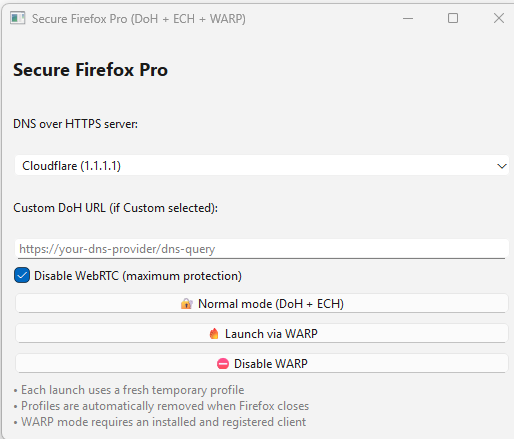
Two modes:
- Normal (DoH + ECH) — Maximum privacy, zero intermediaries, your data never touches Cloudflare’s proxy
- WARP mode — Adds Cloudflare’s free proxy layer, hides your IP from websites too
 The Creator’s Philosophy
“Why did I do this simple mode? Yes, because I hate intermediaries in the form of VPN and DNS companies and with such a simple program I created an information vacuum between me and the provider. No intermediaries.”
 What Your ISP Sees Now vs Before
📊 The Before/After Reality Check
 WHAT YOUR PROVIDER SEES NOW
(in configuration: DoH + ECH, without WARP)
- IP address
- Country and city
- Connection time
- Duration of sessions
- Volume of transmitted data
- IP of CDN nodes (Cloudflare, Google, Fastly)
- The fact of using TLS/HTTPS
 WHAT THE PROVIDER DOESN’T SEE
(this is the most important thing)
- DNS queries
- Domain names
- Site names
- Site categories
- Site topics
- Search queries
- Page URLs
- Paths inside the site
- HTTP headers
- Forms and fields
- Logins and passwords
- Page texts
- Images and videos
- Downloadable files
- Keywords
- SNI / server name
- Which site is on CDN
- Which page is open
- Which article is being read
- Which video you’re watching
- Which account you’re using
WHAT DPI AND FILTERS ADDITIONALLY CANNOT SEE
- Which sites to block
- Which categories to filter
- Which topics to analyze
- Which domains to log
- Which services you visit
- Which social networks you use
- What news you’re reading
- What medical websites you open
- What personal resources you visit
THE KEY TRUTH
Your provider only knows right now:
- You’re online
- You’re from Paris
- You’re connected to Cloudflare
- You’re transferring so many megabytes
AND NOTHING ELSE.
He doesn’t know:
- Where you’re going
- What you’re reading
- What you’re looking for
- What you’re looking at
- What you’re thinking about
Proof It Works
Cloudflare Encrypted SNI Test
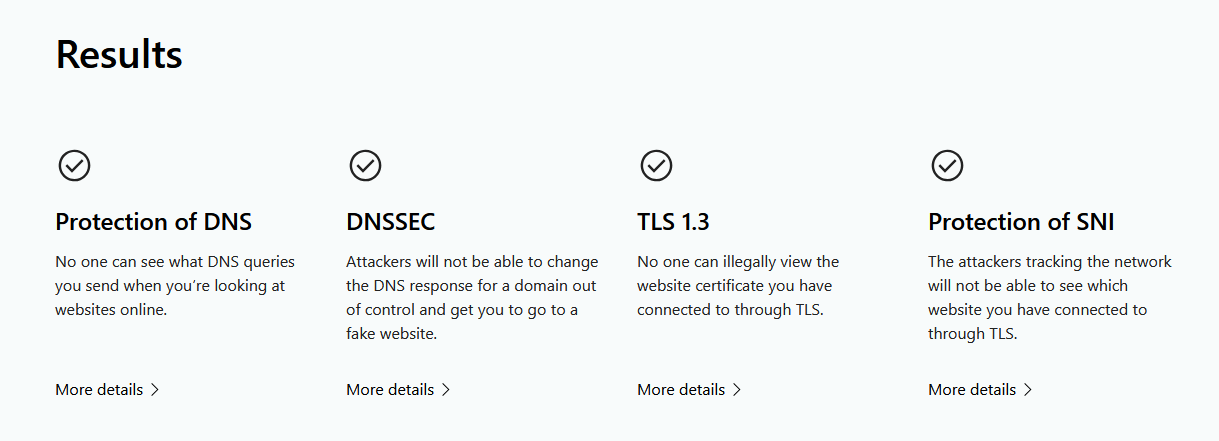
DNS Leak Test

 How It Actually Works (No Tech Degree Required)
🎓 The 60-Second Explainer
Three technologies working together:
| Tech | What It Does | Analogy |
|---|---|---|
| DoH (DNS over HTTPS) | Encrypts your “where is this website?” questions | Asking for directions in a sealed envelope |
| ECH (Encrypted Client Hello) | Hides which specific site you’re visiting | Knocking on a door that looks like every other door |
| Temp Profiles | Starts fresh every time, leaves nothing behind | Burner phone energy |
The magic combo: Your ISP sees you talking to Cloudflare. Cloudflare talks to the actual site. ISP never sees the handoff.
No VPN tunnel. No monthly fee. No company storing your browsing history “for service improvement.”
 The Program — Two Modes
⚡ Mode 1: Normal (DoH + ECH Only)
Maximum privacy with zero intermediaries.
- Your DNS queries go encrypted to Cloudflare’s resolver
- ECH hides the site name during connection
- ISP sees: “User connected to Cloudflare IP”
- ISP doesn’t see: Which of the millions of Cloudflare sites you visited
Best for: Daily browsing, keeping ISP blind, no extra software needed
🔥 Mode 2: WARP (Adds Cloudflare's Free Proxy)
Extra layer — your IP gets masked too.
- Everything from Mode 1, plus:
- Traffic routes through Cloudflare WARP (free tier)
- Sites see Cloudflare’s IP, not yours
- Requires installing Cloudflare WARP client (free)
Best for: When you want sites AND your ISP both blind to your real IP
 Setup Guide (5 Minutes)
🛠️ Step-by-Step Installation
Requirements
- Windows PC
- Firefox installed (default path:
C:\Program Files\Mozilla Firefox\) - Python 3.8+ with PyQt6
- (Optional) Cloudflare WARP client for Mode 2
Step 1: Install Python Dependencies
pip install PyQt6
Step 2: Save the Script
Create secure_firefox.py and paste the code below.
Step 3: Run It
python secure_firefox.py
Step 4: Pick Your Mode
- Normal mode = Click “
 Normal mode (DoH + ECH)” → Done
 - WARP mode = Install WARP first, then click “ Launch via WARP”
(Optional) Install Cloudflare WARP
Download from: https://1.1.1.1/
 The Full Code
📜 secure_firefox.py — Copy This Entire Block
import sys
import os
import subprocess
import tempfile
import shutil
from datetime import datetime
from pathlib import Path
from PyQt6.QtWidgets import (
    QApplication, QWidget, QVBoxLayout, QLabel,
    QPushButton, QComboBox, QLineEdit, QMessageBox,
    QCheckBox
)
from PyQt6.QtCore import QTimer

# Paths — adjust if your Firefox is installed elsewhere
FIREFOX_PATH = r"C:\Program Files\Mozilla Firefox\firefox.exe"
WARP_CLI = r"C:\Program Files\Cloudflare\Cloudflare WARP\warp-cli.exe"

class SecureFirefoxLauncher(QWidget):
    def __init__(self):
        super().__init__()
        self.setWindowTitle("Secure Firefox Pro (DoH + ECH + WARP)")
        self.setGeometry(300, 300, 520, 420)
        self.temp_profiles = []

        layout = QVBoxLayout()

        title = QLabel("Secure Firefox Pro")
        title.setStyleSheet("font-size: 18px; font-weight: bold;")
        layout.addWidget(title)

        layout.addWidget(QLabel("DNS over HTTPS server:"))
        self.dns_combo = QComboBox()
        self.dns_combo.addItem("Cloudflare (1.1.1.1)", "https://cloudflare-dns.com/dns-query")
        self.dns_combo.addItem("Quad9 (9.9.9.9)", "https://dns.quad9.net/dns-query")
        self.dns_combo.addItem("Google (8.8.8.8)", "https://dns.google/dns-query")
        self.dns_combo.addItem("Custom", "")
        layout.addWidget(self.dns_combo)

        layout.addWidget(QLabel("Custom DoH URL (if Custom selected):"))
        self.custom_dns = QLineEdit()
        self.custom_dns.setPlaceholderText("https://your-dns-provider/dns-query")
        layout.addWidget(self.custom_dns)

        self.webrtc_check = QCheckBox("Disable WebRTC (maximum protection)")
        self.webrtc_check.setChecked(True)
        layout.addWidget(self.webrtc_check)

        self.normal_btn = QPushButton("🔐 Normal mode (DoH + ECH)")
        self.normal_btn.clicked.connect(self.launch_normal)
        layout.addWidget(self.normal_btn)

        self.warp_btn = QPushButton("🔥 Launch via WARP")
        self.warp_btn.clicked.connect(self.launch_warp)
        layout.addWidget(self.warp_btn)

        self.warp_off_btn = QPushButton("⛔ Disable WARP")
        self.warp_off_btn.clicked.connect(self.disable_warp)
        layout.addWidget(self.warp_off_btn)

        info = QLabel(
            "• Each launch uses a fresh temporary profile\n"
            "• Profiles are automatically removed when Firefox closes\n"
            "• WARP mode requires an installed and registered client"
        )
        info.setStyleSheet("color: gray;")
        layout.addWidget(info)

        self.setLayout(layout)

    def get_dns(self):
        dns_url = self.dns_combo.currentData()
        if self.dns_combo.currentText() == "Custom":
            dns_url = self.custom_dns.text().strip()
            if not dns_url or not dns_url.startswith("https://"):
                QMessageBox.warning(self, "Error", "Please enter a valid DoH URL (starts with https://)")
                return None
        return dns_url

    def create_profile(self, dns_url):
        profile_temp = tempfile.TemporaryDirectory(prefix="SecureFF_", dir=Path.home())
        profile_dir = Path(profile_temp.name)

        webrtc = "false" if self.webrtc_check.isChecked() else "true"

        userjs_content = f"""
// DNS over HTTPS
user_pref("network.trr.mode", 3);
user_pref("network.trr.uri", "{dns_url}");
user_pref("network.trr.bootstrapAddress", "1.1.1.1");
user_pref("network.trr.wait-for-A-and-AAAA", true);
// ECH / Encrypted Client Hello
user_pref("network.dns.echconfig.enabled", true);
user_pref("network.dns.use_https_rr_as_altsvc", true);
user_pref("network.http.http3_ech_fallback", true);
// HTTP/3 and privacy
user_pref("network.http.http3.enabled", true);
// Privacy and leaks
user_pref("browser.privatebrowsing.autostart", true);
user_pref("browser.cache.disk.enable", false);
user_pref("browser.cache.memory.enable", false);
user_pref("places.history.enabled", false);
user_pref("media.peerconnection.enabled", {webrtc});
user_pref("network.prefetch-next", false);
user_pref("network.dns.disablePrefetch", true);
user_pref("network.http.referer.XOriginPolicy", 2);
"""
        (profile_dir / "user.js").write_text(userjs_content, encoding="utf-8")

        self.temp_profiles.append(profile_temp)
        return str(profile_dir)

    def is_warp_registered(self):
        try:
            result = subprocess.run([WARP_CLI, "registration", "show"],
                                   capture_output=True, text=True, timeout=8)
            return "Not registered" not in result.stdout
        except Exception:
            return False

    def ensure_warp_registered(self):
        if self.is_warp_registered():
            return True

        reply = QMessageBox.question(
            self, "WARP not registered",
            "WARP client is not registered.\n\nWould you like to register it now?\n(Cloudflare consent window will appear)",
            QMessageBox.StandardButton.Yes | QMessageBox.StandardButton.No
        )

        if reply != QMessageBox.StandardButton.Yes:
            return False

        try:
            subprocess.run([WARP_CLI, "registration", "new"],
                           check=True, timeout=45)
            QMessageBox.information(self, "Success", "WARP has been registered.")
            return True
        except Exception as e:
            QMessageBox.critical(self, "Registration error", f"Failed to register WARP:\n{str(e)}")
            return False

    def get_warp_status(self):
        try:
            result = subprocess.run([WARP_CLI, "status"],
                                   capture_output=True, text=True, timeout=6)
            return result.stdout.lower()
        except Exception:
            return "error"

    def launch_firefox(self, profile_dir):
        args = [
            FIREFOX_PATH,
            "-no-remote",
            "-profile", profile_dir,
            "-private-window"
        ]
        subprocess.Popen(args)

    def launch_normal(self):
        dns = self.get_dns()
        if not dns:
            return
        profile = self.create_profile(dns)
        self.launch_firefox(profile)
        QMessageBox.information(self, "Launched", "Normal secure mode (DoH + ECH)")

    def launch_warp(self):
        if not os.path.exists(WARP_CLI):
            QMessageBox.critical(self, "Error", "warp-cli not found.\nPlease install Cloudflare WARP.")
            return

        if not self.ensure_warp_registered():
            return

        dns = self.get_dns()
        if not dns:
            return

        status_before = self.get_warp_status()

        if "connected" in status_before:
            QMessageBox.information(self, "WARP already active", "WARP is already connected — launching Firefox.")
        else:
            try:
                subprocess.run([WARP_CLI, "connect"], check=True, timeout=20)
                for _ in range(12):
                    if "connected" in self.get_warp_status():
                        break
                    QTimer.singleShot(1000, lambda: None)
            except Exception as e:
                QMessageBox.warning(self, "WARP issue", f"Failed to connect WARP:\n{str(e)}\nLaunching without WARP.")
                self.launch_normal()
                return

        profile = self.create_profile(dns)
        self.launch_firefox(profile)
        QMessageBox.information(self, "WARP mode", "Firefox launched via WARP (IP hidden)")

    def disable_warp(self):
        if not os.path.exists(WARP_CLI):
            QMessageBox.warning(self, "Error", "warp-cli not found")
            return

        try:
            subprocess.run([WARP_CLI, "disconnect"], check=True, timeout=15)
            QMessageBox.information(self, "Success", "WARP disabled")
        except Exception as e:
            QMessageBox.warning(self, "Disable error", f"Failed to disable WARP:\n{str(e)}")

    def closeEvent(self, event):
        for tmp in self.temp_profiles:
            try:
                tmp.cleanup()
            except:
                pass
        super().closeEvent(event)


if __name__ == "__main__":
    app = QApplication(sys.argv)
    window = SecureFirefoxLauncher()
    window.show()
    sys.exit(app.exec())
 Verify Your Setup
✅ Test URLs After Launching
| Test | URL | What You Want to See |
|---|---|---|
| ECH + Secure DNS | https://www.cloudflare.com/ssl/encrypted-sni | All green checkmarks |
| DNS Leak Test | https://dnsleaktest.com/ | Only Cloudflare servers (no ISP DNS) |
| WebRTC Leak | https://browserleaks.com/webrtc | No local IP showing |
| ECH Status | https://defo.ie/ech-check.php | “SSL_ECH_STATUS_SUCCESS” |
 Deep Research: The Full Technical Picture
🔬 DoH (DNS over HTTPS) — Deep Dive
What It Actually Does
Your browser normally asks “where is reddit.com?” in plain text over port 53. Anyone watching (ISP, WiFi admin, government) sees that question.
DoH wraps that question in HTTPS encryption on port 443. Now it looks like regular web traffic. Your ISP sees you talking to Cloudflare, but can’t read the question.
The Numbers
- ~13.7% of global DNS traffic now uses DoH
- DoH on port 443 is indistinguishable from regular HTTPS traffic
- ISPs can block known DoH servers by IP, but can’t detect DoH in general traffic
DoH Providers Comparison
| Provider | URL | Logs? | Speed |
|---|---|---|---|
| Cloudflare | https://cloudflare-dns.com/dns-query |
Deleted in 25 hours | Fastest |
| Quad9 | https://dns.quad9.net/dns-query |
No personal data | Fast |
https://dns.google/dns-query |
Some logging | Fast | |
| NextDNS | https://dns.nextdns.io |
Configurable | Fast |
The Cloudflare Trust Question
Cloudflare’s privacy policy (audited annually by KPMG):
- Logs deleted within 25 hours
- No personal data sold
- No user tracking for ads
- Transparency reports published
The tradeoff: You’re trusting Cloudflare instead of your ISP. Cloudflare’s business model is enterprise services, not selling your data. Your ISP’s business model often is selling your data.
🔐 ECH (Encrypted Client Hello) — Deep Dive
The SNI Problem ECH Solves
Even with encrypted DNS, the first message your browser sends to a website includes the site name in plain text. This is called SNI (Server Name Indication).
Without ECH: Your browser announces “I want pornhub.com” in cleartext before encryption starts.
With ECH: Your browser says “I want cloudflare-ech.com” — the real destination is encrypted inside.
How It Works
- Browser asks DNS for site’s ECH public key (via HTTPS record)
- Browser encrypts the real site name with that key
- Browser sends “outer SNI” (cloudflare-ech.com) + encrypted “inner SNI” (actual site)
- Cloudflare decrypts and routes to the real site
- ISP only ever sees “cloudflare-ech.com”
Current Support (2025)
| Browser | ECH Support | DoH Support |
|---|---|---|
| Firefox | Yes (default) |
Yes |
| Chrome | Yes (with DoH) |
Yes |
| Safari | No |
No |
| Edge | Yes |
Yes |
| Platform | ECH Support |
|---|---|
| iOS Safari | No |
| iOS Firefox | No ECH |
| Android Chrome | Yes |
| Android System | No (DoT only) |
ECH Coverage
- ~10% of top 1 million websites support ECH
- ~99.9% of top 10K sites use CDNs that enable ECH
- Cloudflare is currently the only major provider supporting ECH at scale
Countries Blocking ECH
- Russia — Actively blocking ECH since November 2024
- China — Blocking via Great Firewall
- Iran — Blocked alongside other encryption
🌐 ODoH (Oblivious DoH) — The Next Level
What ODoH Adds
Regular DoH: Cloudflare sees your IP + your DNS queries
ODoH: Separates these via proxy architecture:
- Proxy sees your IP but not your queries (encrypted)
- Target sees your queries but not your IP
- Neither can link you to your browsing
How to Enable ODoH
Using dnscrypt-proxy, add to dnscrypt-proxy.toml:
# Enable ODoH servers
odoh_servers = true
server_names = ['odoh-cloudflare', 'odoh-crypto-sx']

# ODoH sources
[sources.odoh-servers]
urls = ['https://raw.githubusercontent.com/DNSCrypt/dnscrypt-resolvers/master/v3/odoh-servers.md']
cache_file = 'odoh-servers.md'
minisign_key = 'RWQf6LRCGA9i53mlYecO4IzT51TGPpvWucNSCh1CBM0QTaLn73Y7GFO3'

[sources.odoh-relays]
urls = ['https://raw.githubusercontent.com/DNSCrypt/dnscrypt-resolvers/master/v3/odoh-relays.md']
cache_file = 'odoh-relays.md'
minisign_key = 'RWQf6LRCGA9i53mlYecO4IzT51TGPpvWucNSCh1CBM0QTaLn73Y7GFO3'

# Route through relays
[anonymized_dns]
routes = [
    { server_name='odoh-cloudflare', via=['odohrelay-crypto-sx', 'odohrelay-surf'] }
]
🦊 Arkenfox Hardening — Level Up Firefox
What Arkenfox Is
A comprehensive user.js template that hardens Firefox privacy/security beyond defaults. The program already sets good prefs — Arkenfox goes further.
Key Settings to Add
Add these to the userjs_content in the program for maximum hardening:
# Anti-fingerprinting (breaks some sites)
user_pref("privacy.resistFingerprinting", true);
user_pref("privacy.resistFingerprinting.letterboxing", true);

# Disable WebGL (fingerprinting vector)
user_pref("webgl.disabled", true);

# First-party isolation
user_pref("privacy.firstparty.isolate", true);

# Spoof English for all sites
user_pref("privacy.spoof_english", 2);

# Disable telemetry
user_pref("toolkit.telemetry.enabled", false);
user_pref("toolkit.telemetry.unified", false);
Auto-Update Arkenfox
The Arkenfox project provides an updater script:
# Download to your profile folder
curl -O https://raw.githubusercontent.com/arkenfox/user.js/master/updater.sh
chmod +x updater.sh
./updater.sh
🕵️ Browser Fingerprinting — The Other Tracking Method
What Fingerprinting Is
Even without cookies, sites can identify you by collecting:
- Screen resolution
- Installed fonts
- Browser plugins
- Canvas rendering
- WebGL renderer
- Audio context
- Timezone
- Language settings
Combined, these create a unique “fingerprint” — 83.6% of browsers are uniquely identifiable.
This Program vs Fingerprinting
| Protection | This Program | Mullvad Browser | Tor Browser |
|---|---|---|---|
| DNS hidden | |
|
|
| SNI hidden | (ECH sites) |
|
|
| IP hidden | ( with WARP) |
(with VPN) |
|
| Fingerprint uniform | |
|
|
The Tradeoff
- This program: Fast, free, ISP-blind — but sites can still fingerprint you
- Mullvad Browser: Uniform fingerprint across all users — some site breakage
- Tor Browser: Maximum uniformity — slow, many sites block it
Quick Fingerprint Hardening
Add to the program’s userjs_content:
user_pref("privacy.resistFingerprinting", true);
Warning: This breaks some sites (timezone wrong, canvas blocked, etc.)
🏢 Corporate Networks — Why This Won't Work at Work
How Corporations Defeat DoH + ECH
-
Block DoH entirely
- Firewall blocks known DoH server IPs
- Or decrypts HTTPS to inspect DNS queries
-
Strip ECH from DNS responses
- Corporate DNS server removes ECH configuration
- Browser falls back to plaintext SNI
-
Block the canary domain
- Blocking
use-application-dns.nettells browsers not to use encrypted DNS
- Blocking
-
TLS interception
- Install corporate root CA on your device
- Decrypt and inspect all HTTPS traffic
The Reality
If you’re on a corporate network with managed devices, they can see everything regardless of your browser settings.
This program is for personal devices on ISP/home networks.
📱 Mobile Support — The Messy Reality
iOS
- Safari: No ECH, No DoH
- Firefox: DoH, No ECH
- System-wide: No encrypted DNS without VPN
Android
- Chrome: DoH, ECH (GREASE)
- System “Private DNS”: DoT only (not compatible with ECH)
- Firefox: DoH,
 Partial ECH
Best Mobile Option
Firefox on Android with DoH enabled + Cloudflare WARP app (or Mullvad VPN).
iOS users: Use a VPN. There’s no good DoH + ECH solution on iOS currently.
🔗 JA4 TLS Fingerprinting — Why Your Browser Has a Signature
What It Is
Your browser’s TLS “handshake” has a unique signature based on:
- Cipher suites offered
- TLS extensions
- Ordering of parameters
Sites like Cloudflare use this to detect bots vs real browsers.
Why It Matters for You
It doesn’t, really. JA4 fingerprinting targets automation tools (scrapers, bots). Real browsers like Firefox have “known good” fingerprints.
If you’re using this program with Firefox, you look like a normal Firefox user to JA4 detection.
If You’re Running Automation
Python requests library = instant detection. Use Playwright/Puppeteer with real browser engines instead.
 Full Comparison: This vs Everything Else
📊 Complete Privacy Stack Comparison
| Feature | This Program | This + WARP | Paid VPN | Mullvad Browser + VPN | Tor Browser |
|---|---|---|---|---|---|
| ISP sees DNS | No |
No |
No |
No |
No |
| ISP sees SNI | No (ECH) |
No |
No |
No |
No |
| ISP sees your IP | Yes |
Yes |
No |
No |
No |
| Sites see your IP | Yes |
No |
No |
No |
No |
| Fingerprint protection | No |
No |
No |
Yes |
Yes |
| Speed | Fast | Fast | Medium | Medium | Slow |
| Cost | $0 | $0 | $60-144/yr | $60/yr | $0 |
| Trust required | Minimal | Cloudflare | VPN company | Mullvad | Volunteers |
| Works on corp network | No |
No |
Maybe | Maybe | Maybe |
When to Use What
| Threat Model | Best Solution |
|---|---|
| ISP logging my browsing | This program |
| Sites tracking my IP | This program + WARP or VPN |
| Cross-site fingerprinting | Mullvad Browser + VPN |
| Government-level adversary | Tor Browser + Tails OS |
| “I just want more privacy” | This program — you’re already ahead of 95% |
Honest Limitations
🎯 What This Does NOT Do
| Still Visible | Why |
|---|---|
| Your IP address | Sites still see it (use WARP mode to hide) |
| That you’re online | Your ISP knows you’re connected |
| Data volume | They see “2GB transferred” but not what |
| Connection to Cloudflare | They see the destination IP (but not which site behind it) |
| Browser fingerprint | This doesn’t spoof your browser identity |
This is NOT:
- A full VPN replacement for all use cases
- Protection against a targeted government investigation
- Anonymous for logging into personal accounts
- Effective on corporate/school networks
This IS:
- ISP-level privacy for normal browsing
- Zero-cost, zero-subscription, zero-intermediary
- Way better than raw browsing
- A solid foundation to build on
 Upgrade Paths
⬆️ From Good to Maximum Privacy
Level 1: This Program (Current)
- DoH + ECH + temp profiles
- ISP blind to browsing
- $0/month
- Rating: 6/10
Level 2: Add WARP Mode
- Everything above + IP hidden from sites
- Still free
- Rating: 7/10
Level 3: Add Arkenfox Hardening
- Add fingerprint resistance prefs
- Some site breakage
- Rating: 7.5/10
Level 4: Mullvad Browser + Mullvad VPN
- Uniform fingerprint across all users
- IP hidden via VPN
- $5/month, no account needed
- Rating: 9/10
Level 5: Tor Browser
- Maximum anonymity
- Very slow
- Many sites block it
- Rating: 9.5/10
The Bottom Line
Your ISP used to have a front-row seat to your entire internet life.
Now they see: “User in Paris connected to Cloudflare. Transferred some data. Session ended.”
That’s it. No VPN subscription. No app store download. No company storing your history.
Just Python, Firefox, and Cloudflare’s free infrastructure doing what billion-dollar surveillance systems can’t undo.
Expanded & restructured with collapsible sections so you don’t drown in walls of text — @SRZ
No intermediaries. No subscriptions. No excuses.
Your move.


 The place where we can create our own VPN?
 !
!