You hit Reset this PC → Remove everything. Feels gone. It usually isn’t.
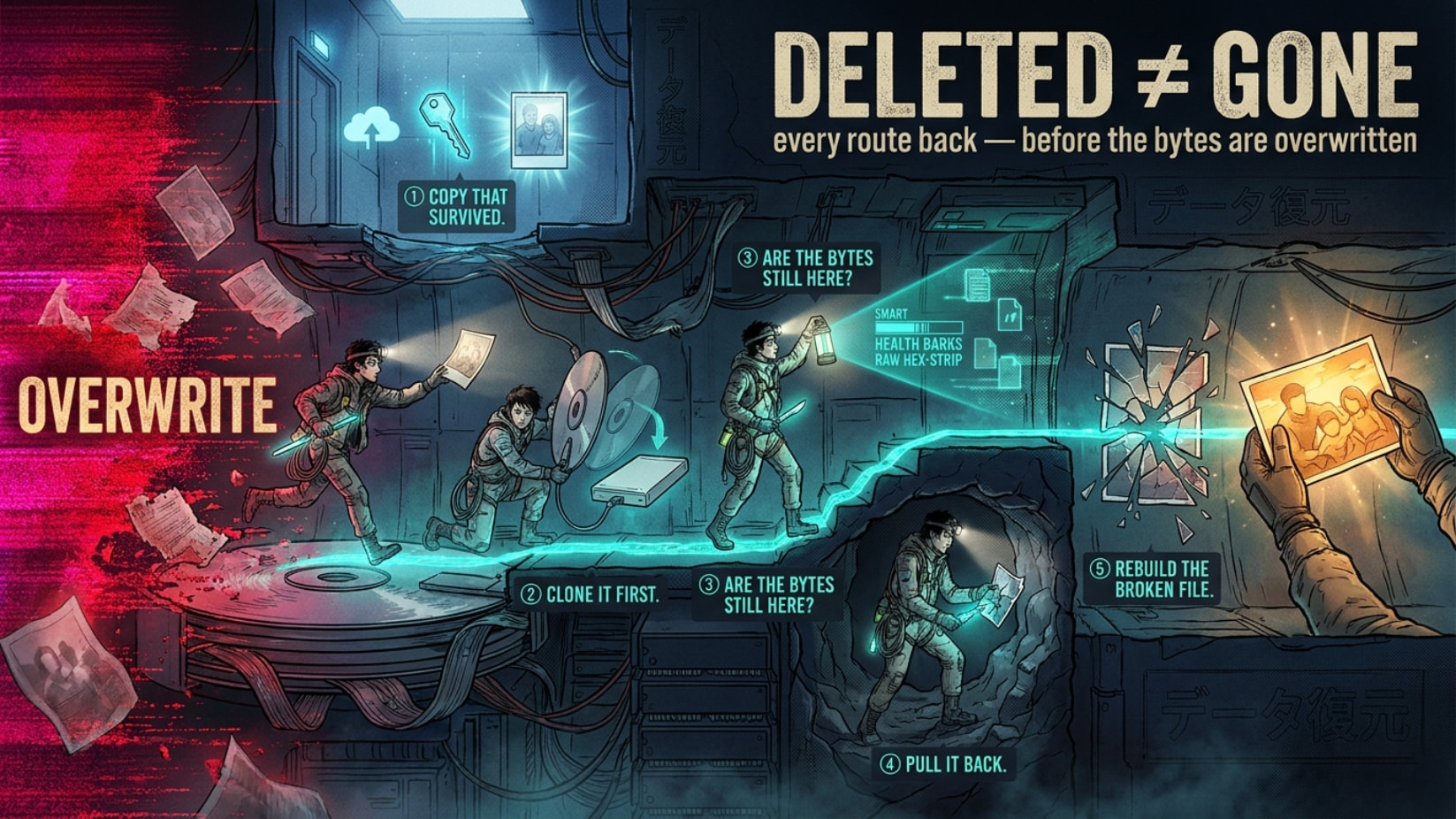
A file only really dies when every copy of it is gone — cloud, backup, leftovers, and the raw bytes overwritten on disk. Miss one and it comes back. Below is every route to a copy, easiest → hardest. Know nothing or know everything — start at the top, stop when you win.
copy survived? ─▶ image the drive ─▶ data still there? ─▶ recover ─▶ repair
👀 5 times this quietly saves your ass
Same core move every time: chase the copy that survived.
 Relative “sped up” the laptop with a reset — 6 years of baby photos “gone.” Half were in OneDrive the whole time; the rest carved back off the drive.
 You sold/returned a laptop and “wiped” it — the buyer pulls your tax docs and logins, because a normal reset erases names, not the bytes.
 A dashcam/GoPro clip you need won’t play after recovery — one healthy clip from the same camera rebuilds it.
 Laptop suddenly demands a 48-digit BitLocker code — that code is sitting in your own Microsoft account, free.
 A backup USB stick reads “0 bytes / needs format” — that’s a 5-minute controller fix, not a dead stick.
🔑 the copy Microsoft stashed in your own account
BitLocker = drive encryption. If it was on and the reset killed the key, the data is scrambled — but Windows auto-saved the unlock key to your MS account at setup. Grab it from any device:
myrecoverykey · account → devices · work/school: aadrecoverykey · where-is-my-key map
Cloud sync you forgot was on (Windows syncs Desktop/Docs/Pics by default for lots of people):
OneDrive → folders, then Recycle bin, then version history (two separate stages) · Google Drive trash · Google Photos trash (60 days) · Dropbox · Mega · iCloud “Recently Deleted”
Found it? Close the tab. Done.
🩹 the Windows.old lie everyone repeats
“Remove everything” does not make a Windows.old folder — that’s the other reset. What it does leave:
C:\$SysReset\Logs\setupact.log — proves when + how it ran (ref)ReAgent.xml and sometimes a Lost Files folder = straight recoverable (breakdown)
⚡ touch that drive and you kill it — do this instead
Every boot / download / install overwrites your files. Work from a copy (a bit-for-bit image), recover from that.
Boot read-only (look, can’t touch): CAINE (read-only by default) · SIFT · Tsurugi · Paladin
Clone it: ddrescue (+ GUI, viewer) · dying/clicking drive → OpenSuperClone/HDDSuperClone (skips failing heads) · ddrutility images only the used space · Windows-easy: FTK Imager (free, previews deleted files), Guymager, OSFClone
🔬 5-min check: is your data even down there
Before scanning for days, ask the drive:
- Healthy or dying? CrystalDiskInfo / smartmontools
- SATA drive secure-erased?
hdparm -I /dev/sdX (ref)
- NVMe (stick-shaped SSD) actually wiped? nvme-cli →
nvme sanitize-log
- Dead simple:
dd if=/dev/sdX bs=1M count=100 | hexdump -C (or binwalk -E). Zeros = gone. Old junk = recoverable.
 40%+ of “wiped” SSDs still had files (2023 study). Assume it’s there till the raw read says no.
🧰 pick the right tool or waste a week
Match the tool to what broke:
👻 that 'dead' SSD? don't believe them
“SSD + TRIM = gone” is wrong more than they admit. TRIM = the SSD’s auto-wipe of deleted blocks. But:
- Pull power fast to beat the cleanup (Rossmann)
- Many USB-SSD cases don’t pass TRIM through at all → data survives
- Some drives still hand back old bytes on a raw read (dfir.ru)
Full when-it-works: Forensic Focus · ElcomSoft. Yank power → image via a cheap adapter → run the raw-read check.
🔧 recovered but won't open? the fix nobody posts
Carved files come out broken — the index (the part saying “here’s every frame”) got left behind.
- untrunc — rebuilds a busted MP4/MOV from a healthy clip off the same camera (GoPro, DJI, phone)
- JpegDigger — greyed/broken JPEGs
- ffmpeg — re-wrap partial media, save the segments that survived
🖼️ even a nuked drive leaves photo ghosts
Windows keeps preview copies of every photo you ever viewed:
- Thumbcache Viewer — pulls them (the 1024px ones = a usable copy) · grab all “file existed” traces: KAPE
- Had System Restore / shadow copies (or a 2nd drive that wasn’t reset)? Full snapshots → ShadowExplorer (browse + export) · libvshadow from an image
💾 backup stick won't mount? different game
Dead / 0-byte / write-protected USB = controller problem, not files.
ChipGenius reads the chip ID → flashboot iFlash hands you the exact repair tool → deeper repo usbdev.ru
 That repair does a low-level format — it wipes the stick. It revives the device, not your data. For the data: image it first, or send it for chip-off.
🎯 yank the exact stuff you lost
- Browser passwords/history: NirSoft + DB Browser for SQLite opens recovered Chrome/Firefox databases
- Outlook mail:
scanpst.exe (already on your PC) repairs a recovered .pst/.ost
- Code repo: recover the
.git folder, then git reflog / git fsck brings back “lost” commits
- Crypto wallet: carve the
wallet.dat, then btcrecover if the password/seed is half-remembered
- BitLocker image + key: dislocker mounts it on Linux, copy files out
☠️ when no software saves you
Physically dead (clicking, not spinning)? Lab territory:
- HDDGuru forums (firmware/chip-level crowd) · PC-3000 / DeepSpar · chip-off for dead SSDs
- The honest ceiling: NIST 800-88 — exactly when data is truly unrecoverable (verified overwrite, crypto-erase). Hit that wall → only a surviving copy saves you (back to top)
Top to bottom, stop when you win: cloud copy → image → confirm bytes exist → recover → repair. That’s the whole game.
Deleted just means forgotten. Overwritten means gone. Everything before that is still yours to take.
 they can be recovered using a particular software…Tried it long times ago, I was shocked
 !
!