IJust format my hard drive partition during window Installation. Any way to Recover my deleted partition
Follow the Guide from here: https://www.active-undelete.com/howto_restore_part.htm (Try only if it meet with what your plan is, otherwise, find something else)
And there are many Recovery software that can Restore deleted files and partition and system volumes. Top 10 listed here: https://www.handyrecovery.com/best-data-recovery-apps.html
For recovery purposes, MiniTool Partition Wizard & AOMEI Partition Assistant & Recuva would be good choice.
Check below post!
6 Likes
thank you bro … let me check . then i will update their .. 
Sure, Consider them but first try this cmd ones.
How to recover deleted partition using CMD?
If you think your problem was caused by Loss of volume label, drive letter, partition name or Diskpart clean command, you can try this method and learn how to recover data from deleted partition using command prompt.
Step 1. Find the lost partition in Disk Management. You can press Win + R and type diskmgmt.msc in the Run window, and then press OK to open Disk Management. If a partition is deleted, the disk space will be marked as Unallocated. Remember the partition size.
Step 2. Run CMD as administrator.
Step 3. Type diskpart in the window and press Enter.
Step 4. Type list disk and press Enter key. After that, you will see all disks on the computer.
Step 5. Type select disk # and press Enter (Replace # with the number of the hard drive that contains lost partition).
Step 6. Type list volume and press Enter .
Step 7. Type select volume # and press Enter (replace # with the number of lost partition).
Step 8. Type assign letter=# and press Enter (Replace # with an available drive letter).
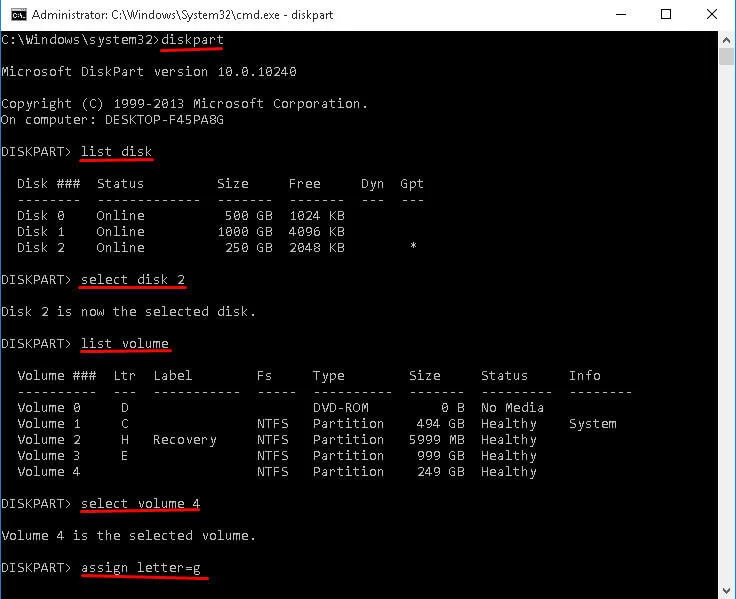
Step 9. Exit this window and see if you can access that partition.
EDITED.
3 Likes
bro partition showing but i just format by mistake and now i’m not able to recover my important data
and allocated but with zero percent useage 
just get nothing after partition recovery from Aomei wizard…
@Junaid_Khan First of all, remember, you can’t get the same Partition get recover as it was, If you think that way, It’s not possible that any Tool or Software may Revert that Partition on the changes that you have made while installing a new OS or deleted/formatted the partition yourself.
You can just get the files/volume from that Disk space you have lost if the files have good strength to get recovered. AOMEI is a good one, but not that worth but try something handier. continue reading…
Furthermore, As I said before, a bunch of software have options in Advanced tool to get those files or volume, each and every software has its functions. Example: https://www.diskgenius.com/how-to/recover-formatted-partition.php This is a complete Tutorial made by product owners, just read and see if it meets what you’re looking for, don’t just download and run read what it can do. Also remember, Scanning has 2 option, Deep scan, and simple scan, so make sure you’re deep scanning if the software has that option.
Honestly, I never faced this kind of issue so I never was given a Try to too many software, Mini Partition Tool, AOMEI, and Recuva I have used so far and they have given some results but Recuva is better for search and recovering deleted files, and MiniTool for partition recovery, Because, using too many software/tool my make your Disk indexes weak and reduce the Disk health. I gave you links above not to just download and run, I added those links for you to read the functions if it suits then try otherwise, no need.
Now do me a Favor, Forget all above replies, Uninstall that AOMEI completely, reboot your system, and Just try both of these ones by one.
1. Recuva Professional > Get it from here It’s easy to use and it will do the deed to find deleted files, best in finding files. See it can find what you have lost in the partition or what you’ve deleted recently.
Password of Recuva RAR: SaM-OneHack
2. MiniTool Partition Tool Wizard - Get it from here Do not update the version. it’s Pro version, Free version also exist at the official site. it will also do the deed, same as Recuva, but this Tool known for Recovering Partition and data recovery from the entire HDD. If it cannot sort out the delete partition files or partition if it can’t no do anything no other tricks/tools may ever work! check both Tutorials below of MiniTool Wizard.
- Recover Lost Data from Hard Drives: https://www.partitionwizard.com/help/data-recovery.html
- Partition Recovery: https://www.partitionwizard.com/help/partition-recovery.html
If the above 2 still not works for you, Then try this Video Tut: https://www.youtube.com/watch?v=XI4y6HnpjEg and see if it could be handy, it also refers to install Data Recovery Professional software.
Good luck!
5 Likes
thanks bro for your help . i’m able to get my data … but not completely 
Congratulations @Junaid_Khan! I hope you got the answer. After captain @Aina himself come forward to help you.
 !
!