I also got stuck. If anyone here on this forum knows please let us know what to do after this steps. Thanks in advance.
can confirm, this method still works!
Yes it’s still working
 Works
Works

Thank you for the tutorial!
still working all this time later… amazing.. thank you @Aina !!
It has been working seamlessly so far. Huge shout out to @Aina for this.
However I would like to ask/confirm if Microsoft automatically renews my license or I have to do that on my own?
I ask this because of the attached screenshot. I knew my trial is going to end soon so I was looking if we can extend it manually or Microsoft does it on its own.
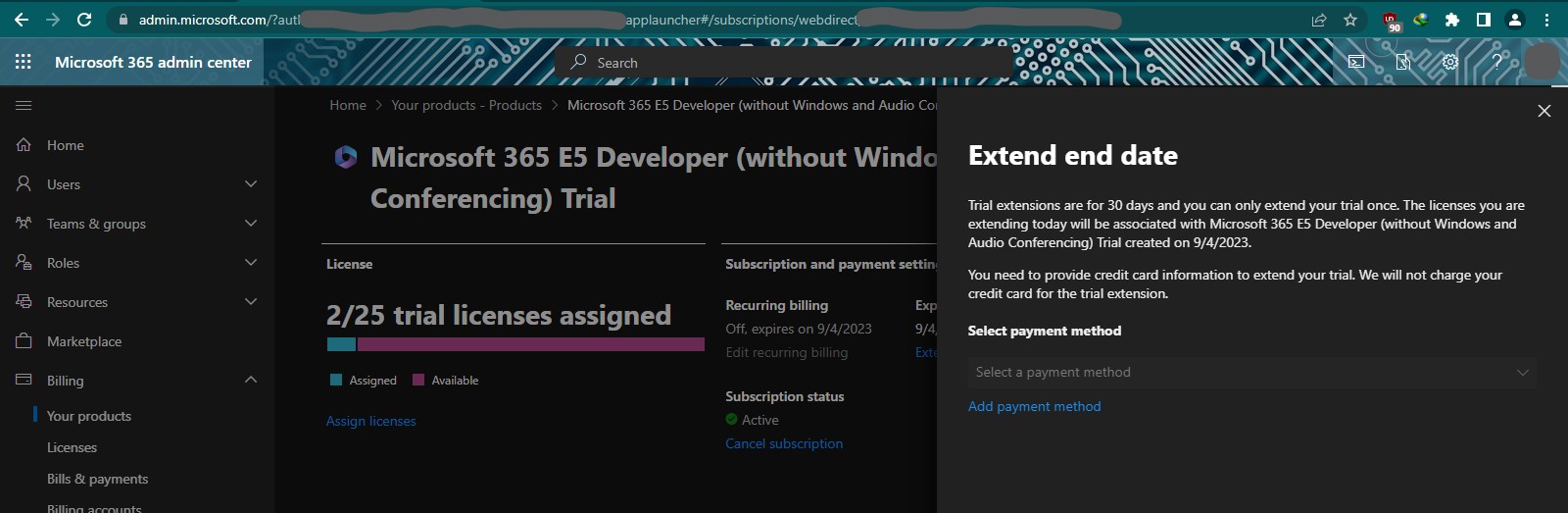
Hi! Can you please tell how you had it renewed?
Just use SharePoint or visit Microsoft products do some work that they remind you as active user.
Automatic your account will be renewed
I am using from 352 days ago.
@Jaccob Hi Bro, as long as you keep one of the Microsoft 365 apps active, Microsoft will renew your license automatically.
the onedrive option in step 10, not available anymore!!!
i just skipped step 10 went to dashboard and added onedrive
couldn’t download from office.com, so i just used the one included in win10 since i know it’s the same.
problem is it doesn’t have all features so it refers you to online pages but i managed to finish the steps regardless.
all things worked as described got the 5To storage and all
but when i tried to assign it to the active user i noticed many users were there, is that normal ???
can i delete them ?? yes
***update
just sample or imaginary users you can delete
Graciously Thank you
did you do anything in particular ? or are you indeed using the service as intended ? in this case it doesn’t count
is it possible or there is a script (python/js…) to automate the renewal ??
@Jaccob
the 30 Days Trial you showing i think is different product from what’s being demonstrated here


1 Like
Thank you very much it’s working fine
Working Flawless. Much appreciated
Can someone give a bit more detail on how to upgrade to 25TB? I have sent a ticket to Microsoft asking for an upgrade. It doesn’t seem like I got the upgrade.
@AFNukedealer First use 5TB then think about 25TB
Unless you used up the space at least 90%+ then you can ask Microsoft to increase the space for you.
I recently reset my mobile device and now I am unable to log in to my account. Both the sign-in page and the authenticator are requesting a verification code that was sent to the authenticator. Any solution @Aina
 !
!