It worked like a charm, thank you maaate
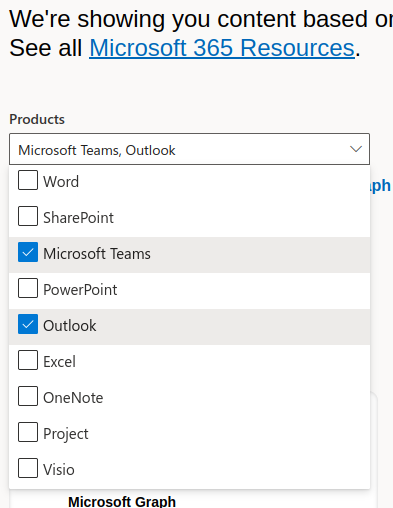
@M1c4i
Have you tried the standard solutions? Browser cache cleared, other browser used, private mode/incognito…
Or maybe you forgot to use 171 infront of your number? You could try to call yourself if you have a other phone. It should not work without 171 (you have to use 0171 if you call from Germany) if not use 49 171 and then your number.
If you are german, here is a website about it in german https://www.cm.com/de-de/blog/wie-formatiert-man-internationale-telefonnummern/
You could try any of these applications listed here https://forum.telugudjmusic.com/t/bypass-sms-verification-of-any-website-service-any-country/60123
Search for SMS or SMS Verfification on this Forum and you will find plenty topics.
@Pramit_Singh You can use sharepoint instead. It is very similar in short it just has more features than OneDrive and is therefore a bit more complex and is more business oriented. You can read more about it here https://www.cloudwards.net/sharepoint-vs-onedrive/
You can also get 25TB storage for Sharepoint  The same as with OneDrive applies… (You don’t have/get the 25TB right away).
If you still want to use OneDrive it would be great if you could take a picture of the whole screen. Right now I can unfortunately only guess why OneDrive does not show up. Normally it should be displayed underneath of Viso. The Picture should look the same/similar as the ones mentioned by SaM
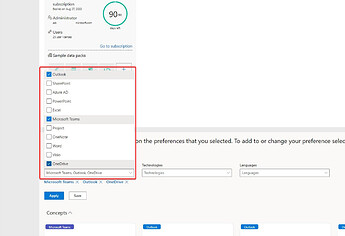
You can also add OneDrive manually later, but this is much more complicated. And should only be done by experienced MS admins… I will not create a tutorial for this, because it would be extremely time consuming…!
I do have the same kind of problems !
I looked it in the microsoft forum .. I’m not alone

Click on Settings and you can find OneDrive from there
This is awesome!! Thanks @Aina
@Sunny_Sun Is it a german number? If so then check this…
If not then please tell from which country your phone number is.
Good Job! Thanks
Fala ai Eli, fiz minha subcricao agora, e queria saber se a sua foi mesmo renovada pra todo o sempre hahaha… vlw
Thank you so much, i just tried and work 
Thanks a lot but got stuck with number verification error and after waiting for 2/3 days and tried again, it worked finally, now i have 5tb onedrive storage.
Thanks this worked for me now.
Tried everything I can it isn’t working for me. Firstly I cannot find onedrive in products dropdown section. Secondly I cannot find the admin app at office.com because the site looks completely different. Thanks for any help you can provide.
Those are dummy accounts buddy 
thank you for this one♥
@jidemaniax
First, please tell me what you have tried so far and where/what your problem is. That way I know where you need help/support.
1.OneDrive is not visible in the dropdown
If it doesn’t show up, you can navigate to Microsoft 365 Resources. On the dropdown page ( I mean this page See image)
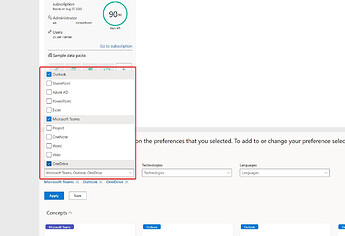
there should be a message that looks like this We are showing you content based on the preferences that you selected. To add or change and so on) At the end there is a blue reference url (Microsoft 365 Resources) that you need to click on. There you can now have the settings to select Dropbox
- Admin Portal, you can find the Admin Portal here: https://portal.office.com/adminportal/home#/homepage. If this URL doesn’t work for you, just google admin portal office and look for the URL aka.ms > adminportal, that should be the second or third one.
I have one question, If I open two accounts on my PC, is there any problem I will face? Anyone can advice!
@RAR
Can you be a bit more specific?
Do you want to connect both account with Office? Or what are you planning to do? Depends on how you will connect these accounts and if you use Windows which liscense you have (Home, Pro …) and also what type of account it is. Private, Business or education.
What is “a problem” for you? One problem could be OneDrive but that depnes on how use use your stuff…
Do you mean open two account in a browser? If so, you could easily use a second browser, a new/other profile or Incognito/private Mode.
Hi all, first I want to make it clear that I’m not complaining, the instructions is perfect and works, I only have problem with the SMS, because its say that my phone was not aproved. I also try some others from my sons and friends and this even does not work.
I do not know how to solve this, any help will be appreciated.
Thank you @Aina for more this information, very usefull to all.
 !
!