Looking for abit of help if i can from the community … long story short i have a samsung galaxy note 9 i found a while back. NOT STOLEN just to clarify lol. I tried to find its owner but eventually gave up. So i would like to use it for myself. It is FRP locked as some numpty hard reset it . So i managed to reinstall the firmware but forgot about binary weight for the phone, at the time my mind was else where and realised as it was to late so now it is stuck in bootloop. I have the correct firmware now but cant seem to get it onto the phone. Any ideas or solutions would be great. Im not a hundred percent sure whether or not it will remove the FRP lock but either way is there anybody that could assist with that too it would be greatly appreciated. Thanks peeps
One number on the phone decides everything — flash below it and it bootloops, flash at it or above and it lives
Both of your problems trace to the same thing: the binary version. You flashed firmware older than the binary already burned into the phone — Samsung blocks that with a fuse, and a half-written flash is your bootloop. It can’t be downgraded, ever. So the fix isn’t a magic tool, it’s the right file: full firmware at the same binary or higher.
Get it booting again
#
do this
grab
1
Force Download Mode — hold Bixby + Vol-Down, keep holding, then plug USB into the PC. It boots there even from a bootloop
—
2
On that screen read RP SWREV — the number after U or S (e.g. U9) is your binary. Your file must be ≥ this
—
3
Pull the exact full firmware for SM-N960F + your region at that binary — all four files, BL·AP·CP·CSC
Your last flash was missing files. Load all four slots, never AP alone — a lone AP on a fresh binary is exactly what bootlooped it. HOME_CSC keeps data, plain CSC wipes; either boots.
Then the FRP lock
Flashing stock boots the phone but leaves FRP on — it’s a separate wall. Two ways through, easiest first:
Route A — the combination trick (free, no extra tools)
Flash a COMBINATION file for N960F at your binary (single AP file). It boots into a factory OS with Settings open → toggle OEM Unlocking on → reboot to Download → flash the full stock firmware from the table above. FRP clears on the way. Get the combination at your binary from samfw.com/frp (pick the build whose binary matches yours).
Route B — a one-click FRP tool (fastest, needs the phone reachable)
From the setup screen: open the keypad on Emergency call, dial the test-mode code (three symbols, *#0#* — Samsung’s own service code), plug into PC, run SamFW FRP Tool (free), pick the COM port, hit Remove FRP. Grab it from samfw.com/tool. Works once the phone reaches the welcome screen after Step 4.
One-line sanity check
RP SWREV reads U9 → your firmware and any combination file must read U9 or higher. Match that one number and this phone is yours. Region on the phone doesn’t match your area? Any CSC of the same binary flashes fine — DBT or XEU are safe catch-alls.
 … long story short i have a samsung galaxy note 9 i found a while back. NOT STOLEN just to clarify lol. I tried to find its owner but eventually gave up. So i would like to use it for myself. It is FRP locked as some numpty hard reset it
  . So i managed to reinstall the firmware but forgot about binary weight for the phone, at the time my mind was else where and realised as it was to late so now it is stuck in bootloop. I have the correct firmware now but cant seem to get it onto the phone. Any ideas or solutions would be great. Im not a hundred percent sure whether or not it will remove the FRP lock but either way is there anybody that could assist with that too it would be greatly appreciated. Thanks peeps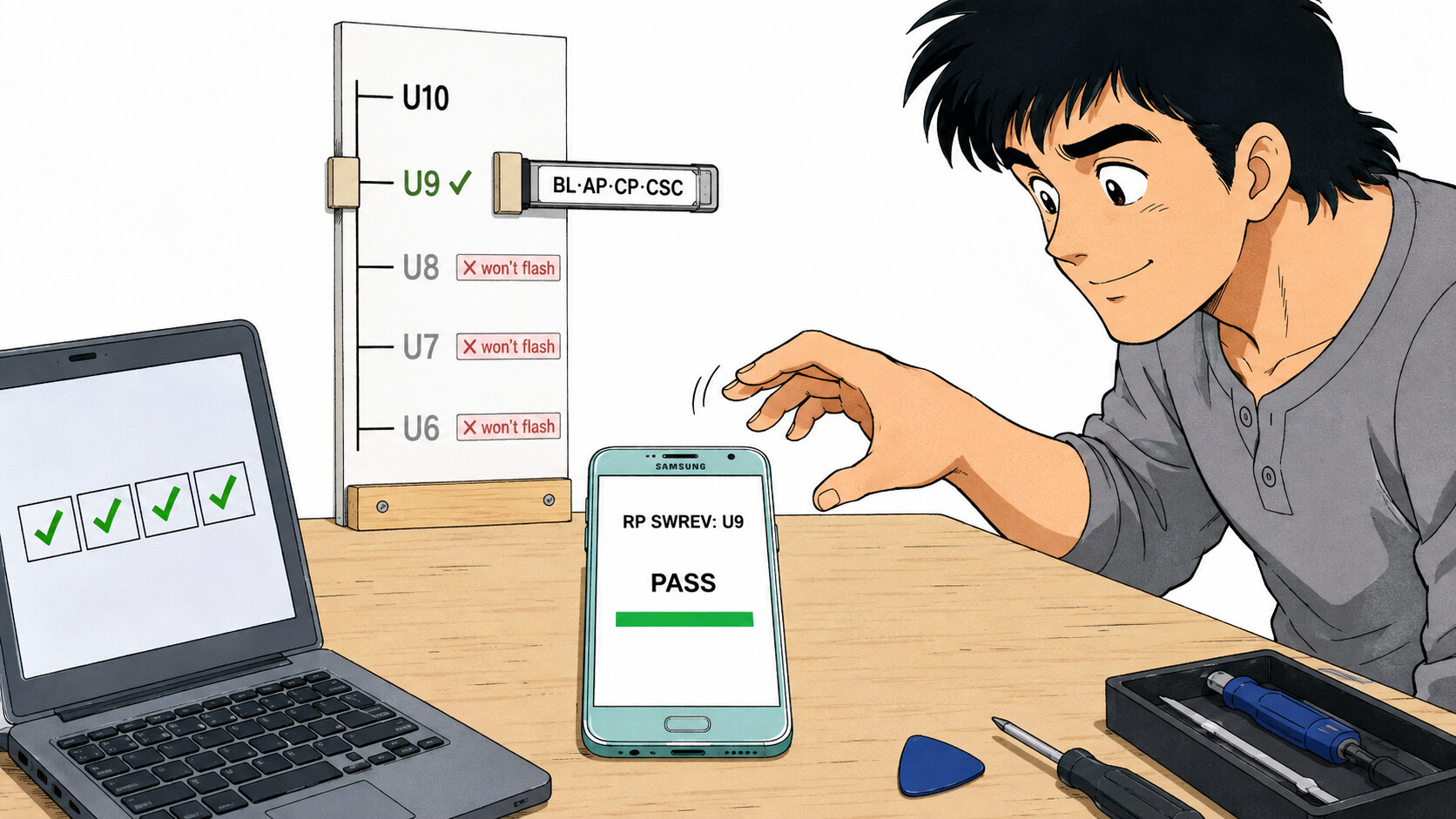
 One number on the phone decides everything — flash below it and it bootloops, flash at it or above and it lives
 Get it booting again
 Your last flash was missing files. Load all four slots, never AP alone — a lone AP on a fresh binary is exactly what bootlooped it.
  Then the FRP lock
 One-line sanity check
 !
!