SmartTube: Free “YouTube Premium” For Your TV (Without Subscribing To Anything)
One-Line Flow: Install SmartTube from the official GitHub once, kill every YouTube ad on your TV forever, and still keep your normal account, history, and subs.
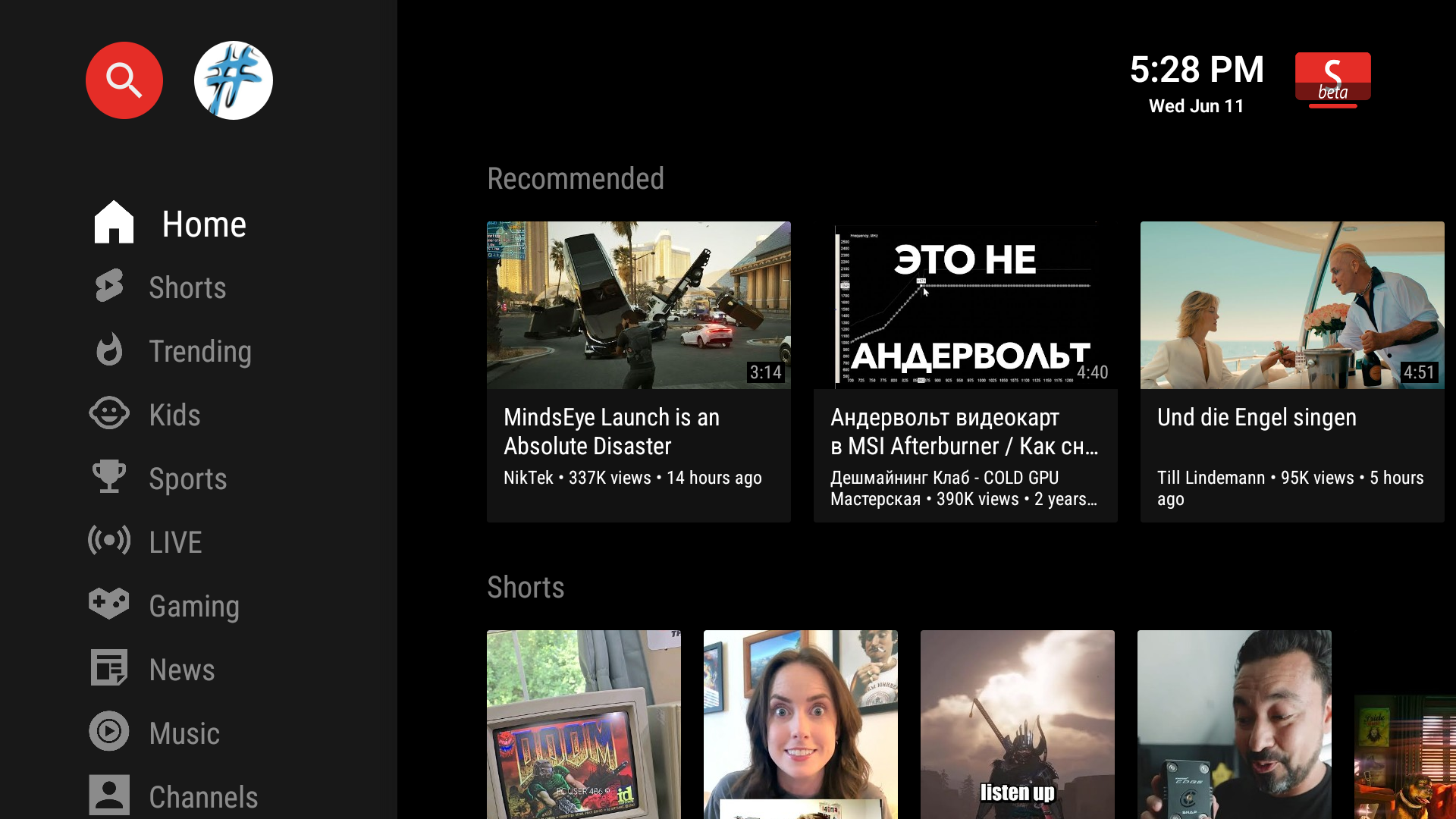
 What is SmartTube?
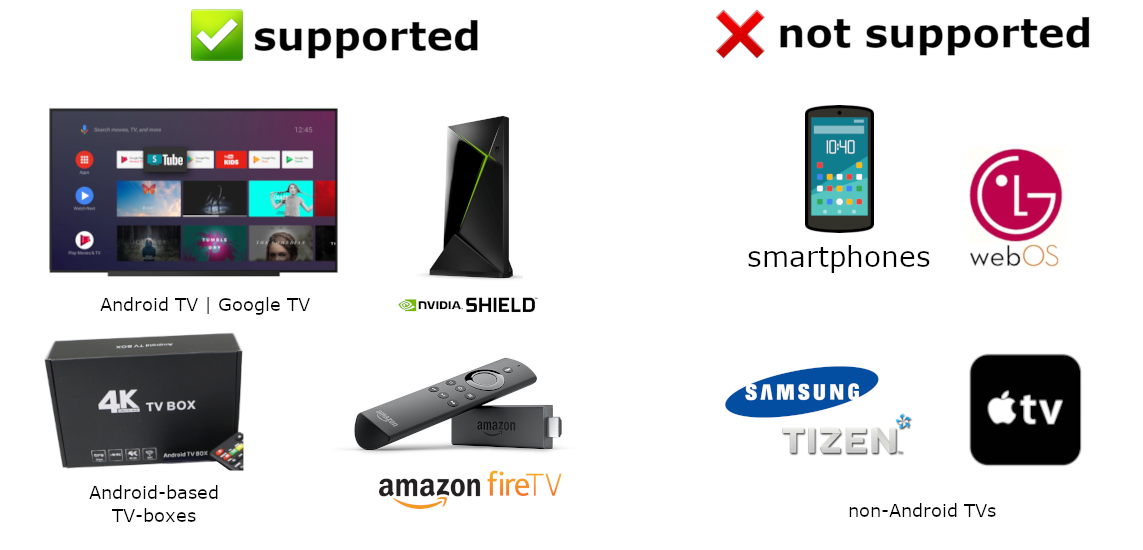
SmartTube is a free, open-source YouTube app for Android TV / Google TV / Fire TV / TV boxes.
It does the stuff YouTube Premium should’ve done from day one:
- No ads. No mid-rolls. No “skip ad” button. Nothing.
- Up to 4K / 8K, 60fps, HDR if your TV + internet can handle it.
- Works with your normal YouTube account (subs, history, playlists).
- Works even on TVs/boxes without Google services.
- Remote-friendly UI built for big screens, not stretched phone garbage.
Main project:
https://github.com/yuliskov/SmartTube
Releases page:
https://github.com/yuliskov/SmartTube/releases
 Quick recap of the drama (why people panicked)
Short soap opera version:
- Developer’s build machine got malware.
- Old SmartTube builds (around versions 30.43–30.47) were marked risky.
- Google Play Protect and Amazon started freaking out and blocking the app.
- Dev wiped those builds, rotated the signing key, and released a clean, re-signed build (30.56 Stable and up).
What this means for you:
- Uninstall any ancient SmartTube you randomly grabbed months ago.
- Only install from the official links in this post.
- If you installed SmartTube during the “sus” window and you’re paranoid, factory-reset your TV/box once and move on with life.
 How to install SmartTube the lazy way (Android TV / Google TV / Fire TV)
Goal: clean, safe install with zero shady APK websites.
 Install Downloader
- On your TV, open Play Store (or Amazon Appstore on Fire TV).
- Search for “Downloader by AFTVnews” and install it.
 Allow unknown apps (once)
- Go to TV Settings → Apps / Security → Install unknown apps.
- Allow it for Downloader.
 Use the official SmartTube links
Inside Downloader, either:
-
Type this in the URL box:
kutt.it/stn_stable→ Stable build
kutt.it/stn_beta→ Beta build
(they both redirect to the official GitHub release),
or -
Use the official Downloader codes:
- Stable:
28544 - Beta:
79015
- Stable:
Download → Install → Done.
No extra magic. No third-party stores. No “mod apk” nonsense.
 Which APK do you pick on GitHub?
On the releases page you’ll see different files:
arm64-v8a→ 99% of modern TVs / boxes / sticks. Start with this.armeabi-v7a→ very old / cheap 32-bit Android boxes.x86→ emulators / weird Intel mini-PC setups.
If you don’t know, just grab arm64-v8a.
If it refuses to install, then try armeabi-v7a.
 First-time setup: the switches worth flipping
Once SmartTube is installed:
1. Sign in without typing your life story with the remote
- Open SmartTube → hit Sign in.
- Use the on-screen TV code flow on your phone/laptop.
- You’re now in with your normal YouTube account. History, subs, playlists — all there.
2. Turn on SponsorBlock (optional but beautiful)
-
Go to Settings → SponsorBlock.
-
Enable it and pick what to auto-skip:
- Sponsored segments
- “Smash that like button” nagging
- Intros/outros
- Fake “intermissions” in music videos
You can still whitelist channels you actually want to support.
3. Lock your quality and stop blurry surprises
- Open any video → press the HQ button.
- Set default quality (e.g. 1080p or 4K) so YouTube doesn’t randomly drop you to 480p because your ISP sneezed.
4. Smooth playback (if things stutter)
-
In Settings → Player, pick:
- Codec: VP9 for most devices, AVC/H.264 if your box is ancient.
- Buffer: Medium or High if your internet is moody.
You don’t need to understand codecs; just try VP9, if it dies, use AVC.
 Quick fixes for the usual “wtf is this” moments
 Videos not playing at all?
- Update inside app: Settings → About → Check for updates.
- Change codec in the HQ menu (AV1 → VP9 → AVC).
- If you use hardcore ad-blocking DNS/VPN, turn it off once to test.
 Constant buffering?
- In Settings → Player, set buffer to High.
- In HQ menu, drop max quality to 1080p.
- Avoid Wi-Fi from the neighbor’s microwave. Ethernet is king.
 Play Protect screaming at you?
- Check your version: if you’re on 30.56 Stable or newer, you’re on the new clean signature.
- Make sure you installed from kutt.it/stn_stable / kutt.it/stn_beta or directly from the official GitHub, not a random site.
- If your TV “disabled” the app, re-enable it in Settings → Apps → Disabled.
 Extra power without nerd mode
Simple backup so you don’t lose your setup
- Inside SmartTube: Settings → Backup & Restore.
- Use Google Drive backup if available.
- If you ever factory-reset or move to a new TV, you can pull everything back in a couple of taps.
Quick remote tricks
- Long-press a video → add to playlist, mark “watch later”, etc.
- Long-press channel → hide or pin.
- Use Settings → General → Key remapping to turn left/right into “next video” instead of scrubbing if you prefer.
 What if your TV is not Android?
You can’t install SmartTube directly, but you’re not completely doomed.
- Samsung (Tizen) → check community projects like TizenTube:
https://github.com/reisxd/TizenTube - LG (webOS) → YouTube AdFree for webOS:
https://github.com/webosbrew/youtube-webos - Roku → Playlet (YouTube alternative client):
https://github.com/iBicha/playlet
Or just plug in a cheap Android TV / Google TV / Fire TV stick. One small box solves everything.
 Tools that play nice with a SmartTube lifestyle
For phone / PC:
- NewPipe – Android app with downloads + background play:
https://github.com/TeamNewPipe/NewPipe - LibreTube – YouTube via Piped backend with privacy focus:
https://github.com/libre-tube/LibreTube - FreeTube – Desktop YouTube app (Windows/macOS/Linux):
https://github.com/FreeTubeApp/FreeTube - Invidious & Piped web frontends – ad-free YouTube in the browser:
https://github.com/iv-org/invidious
https://github.com/TeamPiped/Piped – docs: https://docs.piped.video - yt-dlp – command-line monster for downloading:
https://github.com/yt-dlp/yt-dlp
SmartTube on TV + any of these on phone/PC = full YouTube control, no paid Premium needed.
 Security + “don’t be dumb” section
Golden rules:
-
Only download from:
- https://github.com/yuliskov/SmartTube
- https://github.com/yuliskov/SmartTube/releases
- Official site: https://smarttubeapp.github.io
- Short links:
kutt.it/stn_stable,kutt.it/stn_beta
-
Avoid:
- Random APK mirrors
- Sites using SmartTube/SmartTubeNext name but not linking to the GitHub
- “Modified” or “plus” variants promising magical features
If anything feels off, check the official places:
- Telegram (news + chat):
t.me/SmartTubeEN
t.me/SmartTubeNewsEN - GitHub issues + wiki:
https://github.com/yuliskov/SmartTube - XDA thread:
https://xdaforums.com/t/apk-smarttubenext-android-tv.3949377/
 Summary: What you actually do
- Install Downloader on your TV.
- Open it and go to
kutt.it/stn_stableor use code28544. - Install SmartTube (arm64-v8a for most people).
- Sign in with your YouTube account via TV code.
- Turn on SponsorBlock + set your preferred quality.
- Delete the stock YouTube app from your home screen and never look back.
Enjoy YouTube on your TV the way it should’ve been from the start.
 !
!