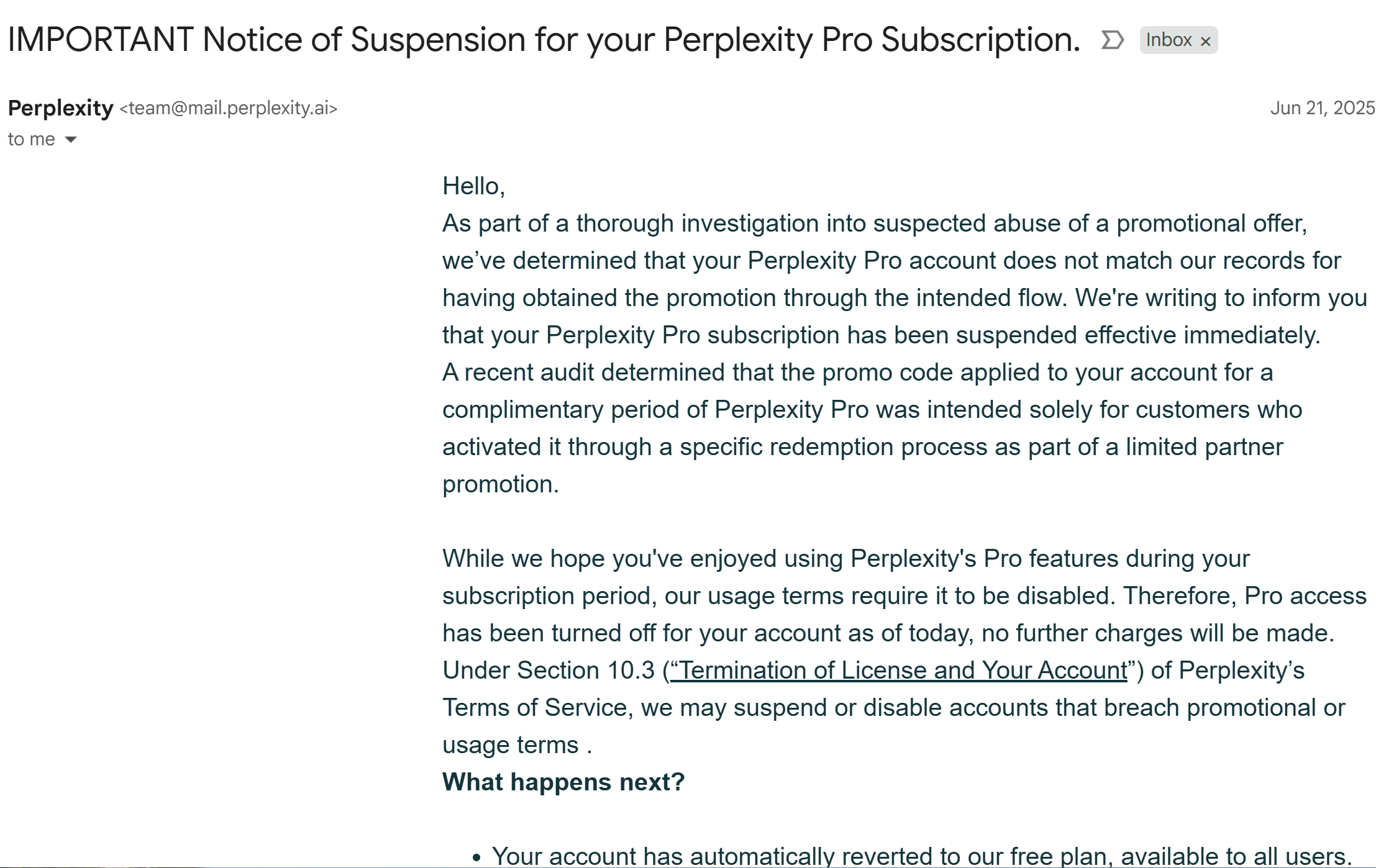
Somebody shared a promo code here on Onehack, for Perplexity Pro (1 year). It worked and I sent it to some family members who had their own google accounts and chrome profiles. After a few days, 2 accounts got downgraded to the free tier. These 2 accounts were the ones that were used the most, the other ones barely get used. Any tips or tricks to save the other pro accounts from being downgraded?
codes from Samsung Galaxy Store or telecom/banks are validated and safe. Many confirmed success this way without suspensions .
may be wrong vpn or something went wrong during steps… can’t say!
drop the exact method, how you did it?
2 Likes
samsung offer is not really a cheat code or hack ppl are getting what perplexity wanted them to get and they catching up on other promo codes
Yesterday my account downgraded to free tier I use promo code here on Onehack, for Perplexity Pro (1 year).
Not the Samsung Galaxy method, someone shared a promo code a few weeks ago. Trying to save the rest of the accounts lol.
1 Like
“𝗔𝗰𝗰𝗼𝘂𝗻𝘁𝘀 𝗴𝗲𝘁𝘁𝗶𝗻𝗴 𝘀𝘂𝘀𝗽𝗲𝗻𝗱𝗲𝗱” on Perplexity Pro have become a common concern among users, especially those accessing services through shared or regionally discounted accounts. A consolidated user discussion has revealed the exact triggers, causes, and preventive strategies to maintain account stability.
 Key Reason Behind Suspensions
The most reported cause is accessing Perplexity Pro through datacenter proxies, VPNs, or accounts from discounted regions (like India or Pakistan), which triggers their fraud detection systems. If usage patterns seem inconsistent with the account’s origin (e.g., IP geolocation mismatch), Perplexity may automatically suspend or flag the account.
 Recommended Fixes & Best Practices
1. Stick to Residential IPs Only
Use a trusted residential proxy (not datacenter) to mimic natural usage patterns. Avoid any VPN that frequently changes your location.
2. Keep IP Geo-Consistent
Maintain the same country IP from which the account was registered. For example, if your account was activated in India, always use an Indian IP.
3. Stop Using Shared Credentials
Accounts circulated publicly or sold in bulk are more prone to bans. Create and use your own individual Pro account.
4. Avoid Suspicious Automation or API-Like Behavior
Rapid-fire queries, excessive crawling, or automated tasks can flag you for abuse. Use the interface like a normal user, not a bot.
 Tips to Maximize Longevity
 Avoid switching IPs too often. Each switch might trigger internal audits.
 Do not log in from multiple devices in different regions.
 If you are using Pro features extensively, stay under radar with minimal usage during peak hours.
 Trusted Services & Tools
These services are known to offer better privacy alignment with account-origin requirements.
Furthermore guidance on this subject to avoid being suspended:
If you’re using Perplexity Pro through alternate sign-up methods or shared credentials, you may have encountered sudden account suspensions. This comprehensive fix compiles all key insights and proven tips from the community to help you avoid getting flagged or banned.
 Issue Overview
Many users reported that their Perplexity Pro accounts—especially those obtained from giveaways or third-party sources—get suspended within days. This is due to Perplexity’s automated detection systems that monitor for suspicious usage or multiple logins from different IPs.
Effective Solutions & Fixes
1. Use a Clean Browser Profile
- Avoid using browsers tied to your Google account or that store auto-login cookies.
- Prefer incognito mode or create a separate browser profile with no extensions, bookmarks, or history.
2. Change IP with Each Session
- Use a residential VPN or mobile hotspot instead of standard data center proxies.
- Always clear cookies or use a browser with built-in isolation (like Brave’s Private Window with Tor).
3. Don’t Use Publicly Shared Accounts
- Many accounts get banned simply because too many people log in from different locations.
- If the account was shared on forums, there’s a high risk it’s flagged already.
4. Avoid Rapid, Heavy Usage
- Perplexity monitors query frequency and API load. Keep interactions natural and spaced out.
- Do not integrate Pro with browser automation or scraping tools.
 Long-Term Tips to Stay Safe
- Buy verified Pro accounts from trusted sellers or use trial offers with unique emails/IPs.
- Limit account to 1 IP address, avoid logging in from multiple devices or countries.
- Keep Perplexity sessions short and natural. Treat it like a real user would.
 Bonus Insight
One user suggested using Telegram channels that share fresh accounts with strict usage rules. These are often tied to a dedicated VPN IP or come pre-configured to reduce ban risk.
By following these community-tested precautions, you can significantly extend the lifespan of your Perplexity Pro account and reduce the chances of suspension.
 Community Insight
Users consistently report that once they switched to clean, residential IPs within the account’s origin country, their suspension issues disappeared. Avoid free tools and stick with reputable IP masking solutions.
By 𝗳𝗼𝗹𝗹𝗼𝘄𝗶𝗻𝗴 𝘁𝗵𝗲𝘀𝗲 𝗴𝘂𝗶𝗱𝗲𝗹𝗶𝗻𝗲𝘀, users have successfully preserved access without interruptions. Treat your account like a bank login—don’t trigger flags, and you’ll be safe.
 Use Free Alternatives: 25+ Free Perplexity AI Alternatives For Smart AI-Powered Research
Good luck & Happy learning! 
3 Likes
 !
!