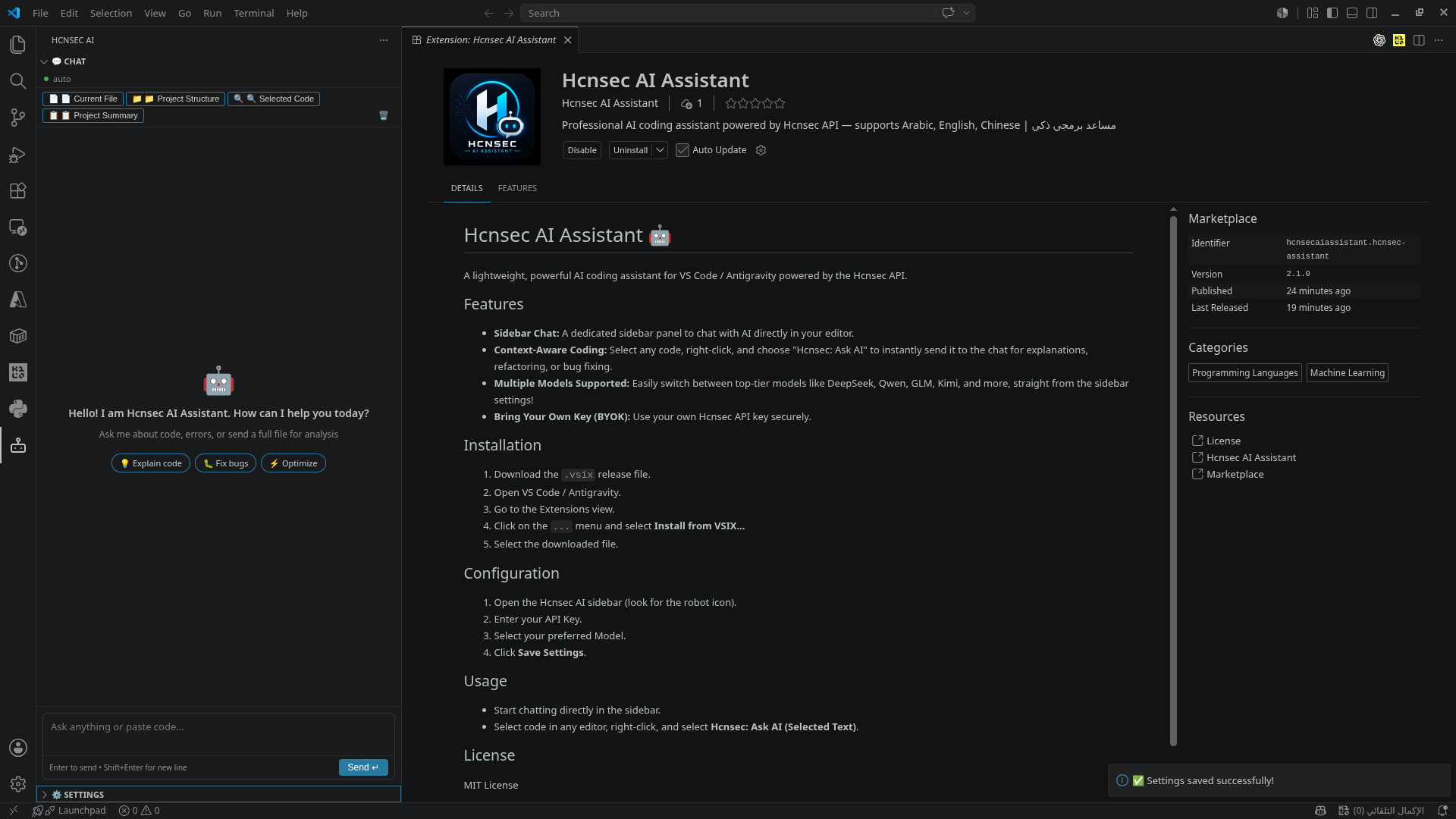
Paying for Copilot or Cursor? There’s a relay gateway handing new accounts promotional API credits — one sk- key, OpenAI-compatible, drops straight into VS Code. Kimi K2, DeepSeek R1, Qwen3 Max, Claude Sonnet, all from one endpoint.
Register → make a token → paste it in your editor. Three steps, no card.
Full disclosure: I built the VS Code extension in this guide (source on GitHub, MIT). No referral links anywhere — and everything below works with any OpenAI-compatible client, not just mine.
━━━━━━━━━━━━━━━━━━━━━━
📋 Every model on the gateway — Kimi, Claude, DeepSeek, Qwen, GPT
One key, all of these:
├─ Kimi K2 Thinking
├─ Moonshot 128K
├─ Claude 3.7 Sonnet Thinking
├─ Claude 3.5 Sonnet
├─ DeepSeek R1
├─ DeepSeek Coder
├─ Qwen3 Max
├─ Qwen2.5 Coder
└─ GPT models (availability varies)
 That’s the real pull of an OpenAI-compatible gateway: swap between any of them without changing your editor, compare answers from several models side by side, and use whichever one suits the task — all on a single API key.
⚙️ Step 1–4 — Register, generate the sk- key, install, configure
1. Create the account
→ api.hcnsec.cn/sign-up
2. Generate your key
├─ Open Tokens / API Keys
├─ Click Add Token
├─ Set quota to Unlimited (this means “no separate cap on this key” — it does NOT mean unlimited credits; the account balance is still what you spend)
└─ Copy the key starting with sk-
3. Install the extension
├─ Open VS Code → Extensions view (Ctrl + Shift + X)
├─ Search Hcnsec AI Assistant
├─ Click Install
└─ Reload VS Code if prompted
 Marketplace listing · GitHub source
4. Configure
Base URL https://api.hcnsec.cn/v1 · paste your sk- key · pick a model.
🔍 Check what you're actually getting — one curl before you build on it
Relay gateways route your request to whichever upstream is cheapest for them. That’s how the pricing works, and it’s fine — but you should know what answers you, not assume.
Run this first. It takes five seconds:
curl https://api.hcnsec.cn/v1/models -H "Authorization: Bearer sk-YOUR-KEY"
 You get the exact model IDs the gateway serves. Use those strings, not the marketing names — a wrong model ID is the #1 cause of “it connects but nothing happens.”
Check your real balance the same way:
curl https://api.hcnsec.cn/api/usage/token -H "Authorization: Bearer sk-YOUR-KEY"
↳ Returns total_granted / total_available / unlimited_quota. That’s your actual credit, straight from the source.
Sanity check on any relay: look at the model field echoed back in the response and confirm it matches what you asked for.
🧠 Which model for which job — and the planner/executor split that actually works
| Task | Model | Why |
|---|---|---|
| Fast code completion, boilerplate, unit tests, helper functions | Qwen2.5 Coder / Qwen3 Max | Cheap, fast, trained on code — the everyday workhorse |
| Long files, whole-repo refactors | Moonshot 128K / Kimi K2 Thinking | 128k context holds an entire codebase at once |
| Hard debugging, architecture decisions | DeepSeek R1 | Reasoning model — thinks before answering |
| Code-specific generation | DeepSeek Coder | Tuned purely for code output |
| Production-ready code | Claude 3.7 Sonnet Thinking / 3.5 Sonnet | Strongest at clean, working output |
 Agent Mode — two models, one job:
If the extension supports Agent Mode, this is the setup that works:
DeepSeek R1          ->  planner   (designs the implementation strategy)
Claude 3.7 Sonnet    ->  executor  (generates the production-ready code)
↳ Not a random pairing — Aider benchmarked R1-as-architect + Sonnet-as-editor and it topped their polyglot leaderboard at a fraction of the cost: the benchmark writeup.
Reasoning model = one that works through the problem step by step before replying — slower, better at hard logic.
🔧 Same key, other editors — Cline, Roo Code, Continue, Kilo Code, Aider
The key is OpenAI-compatible, so any of these take it. Set Base URL https://api.hcnsec.cn/v1, paste the sk-, pick a model ID from the /v1/models list.
├─  Cline — OpenAI-compatible setup · has Plan/Act modes for the planner+executor split
├─ Roo Code — setup · Architect vs Code modes · per-mode model profiles
├─ Continue — apiBase config
├─ Kilo Code — setup
└─  Aider (terminal) —
 OPENAI_API_BASE + --model openai/<name> · architect mode · keep keys out of shell history
 Roo Code uses native tool calling — if agent actions misfire on any relay, that’s the first thing to test.
🛟 When the promo credits run dry — official free tiers for these same models
Promotional credits are promotional. When they’re gone, these give you the same models direct from the source, free:
├─  Google AI Studio — generous free Gemini tier, OpenAI-compatible endpoint available
├─ OpenRouter free models — a rotating set of :free models, one key, OpenAI-compatible
├─ ModelScope — daily free Qwen inference quota
├─ DeepSeek Platform — R1 and Coder direct, cheapest official rates
└─  Ollama or LM Studio — run Qwen Coder / DeepSeek on your own machine. Serves an OpenAI-compatible
 /v1 on localhost, so every editor above connects with zero changes and nothing to revoke
The pattern worth stealing: the editor doesn’t care where the endpoint lives. Gateway today, official API tomorrow, your own laptop after that — same config box.
🏗️ Run the gateway layer yourself — New API and LiteLLM, self-hosted
This site runs New API (open source). You can run the identical stack and point it at your own upstream accounts:
├─  Install guide — Docker, Compose, 1Panel, or binary
├─ Ready docker-compose.yml
└─ First-run walkthrough — add channel → make token → point client at https://your-host/v1
Or LiteLLM — a proxy that fronts many providers at once:
├─  Docker quickstart — your own
 /v1 and your own sk-
├─  Virtual keys with real budgets — per-tool keys, spend caps, model allowlists
├─  Fallbacks and retries — one dead upstream doesn’t stop your IDE
└─ Add any OpenAI-compatible upstream — including this gateway, as one channel among several
End state: your editor points at your endpoint forever. Providers become swappable parts instead of single points of failure.
━━━━━━━━━━━━━━━━━━━━━━
The short version: register, generate the key, curl /v1/models to see what you really have, then paste it into whichever editor you already use. Credits are promotional and provider terms change — build the setup so swapping the endpoint is a one-line edit.
A key you can point anywhere is worth more than credits you can only spend in one place.
 !
!