 Run AI Bots on Your Computer — From a Normal-Looking App
Run AI Bots on Your Computer — From a Normal-Looking App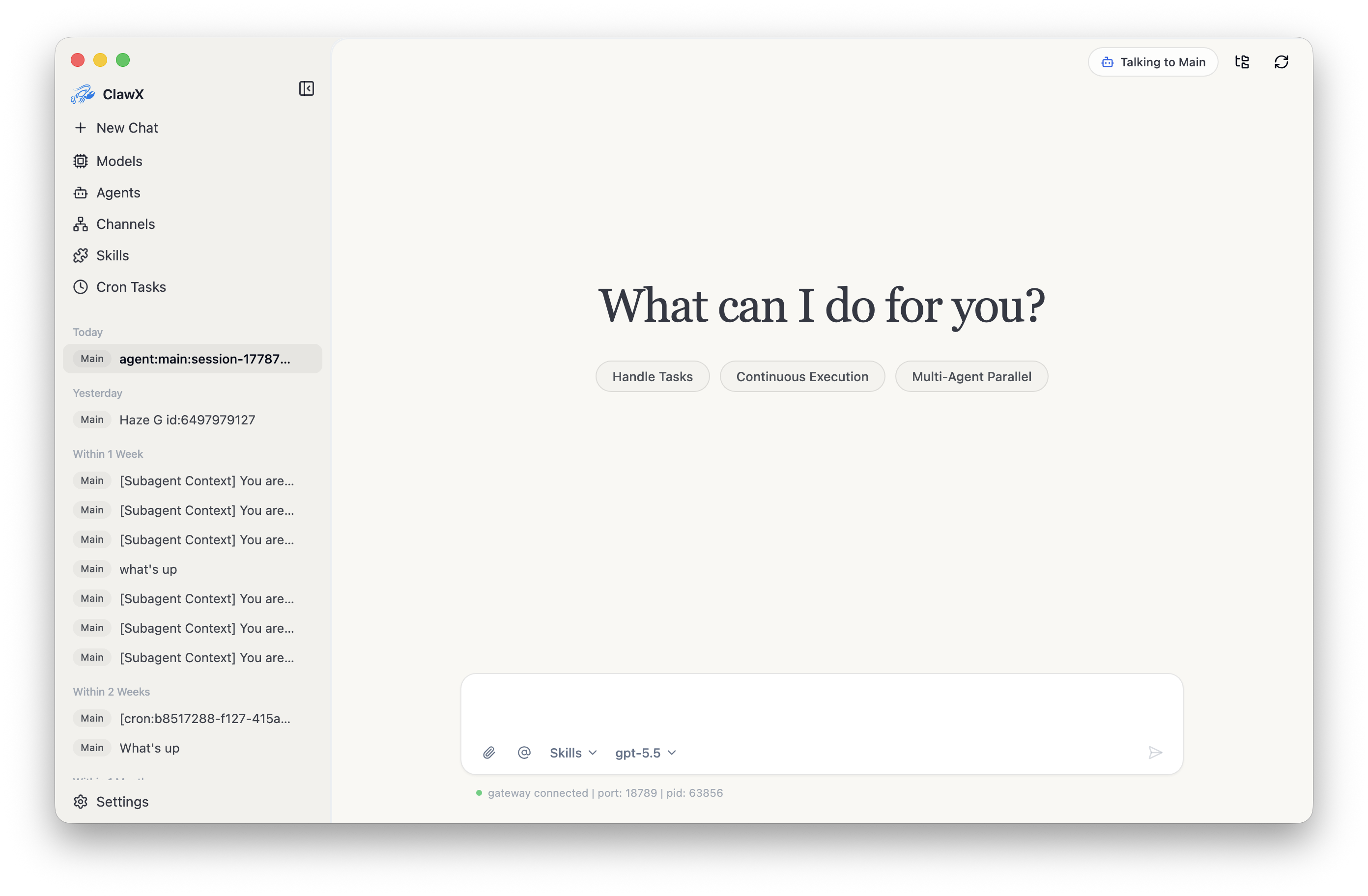
OpenClaw is powerful. Until ClawX, you needed a hacker-movie black screen to use it.
free · open-source · desktop-app
Quick translation first: an AI agent is a tiny bot that does a task for you — answer mail, watch a price, summarize a doc. OpenClaw is the engine that runs those bots. Free, powerful, open-source.
The catch — until last week, you ran it through a terminal (the black box where you type weird commands like in a hacker movie) and edited YAML (a settings file you write by hand, no auto-correct, one wrong space breaks everything). Not “use the tool.” More like “learn the secret handshake first.”
🧱 What OpenClaw alone feels like
| Step | What it actually is |
|---|---|
| Open the terminal | A blank black box. You type. It judges you. |
| Edit YAML configs | Hand-write a settings recipe. Wrong space = whole thing breaks. |
| Set environment variables | Tell your computer secret values to remember (passwords, paths, keys). |
| Run → fix → repeat | The setup-as-side-quest loop |
The brains are great. The doorway to the brains is a brick wall.
🚪 What ClawX changes
ClawX is a normal desktop app — buttons, menus, windows, like Spotify or Slack. It wraps OpenClaw inside it. You install one thing and your AI bots just work.
| Now | What it really means |
|---|---|
| One-click install | Download → double-click → ready. Same as installing any app. |
| Setup wizard | Walks you through entering your API key (your AI’s password for OpenAI or Anthropic). |
| Add a bot | Pick from a built-in list — like installing a Chrome extension. |
| Schedule it | Pick a time. Bot runs on its own. (Same idea as a phone alarm.) |
| Chat | Normal chat box. Markdown formatting, full history. |
 The OpenClaw engine is still doing the heavy work — you just never have to look at it.
 Why this matters: “edit YAML” filters out 95% of curious people who’d otherwise try AI agents. ClawX puts the door back.
⚙️ Under the hood (skim if you don't care)
| Thing | What it really is |
|---|---|
| Electron | The toolkit Discord, Slack, and VS Code use to make a desktop app. |
| React 19 | The UI building blocks. Why the screens feel modern. |
| TypeScript | A safer version of JavaScript — fewer “why did it break” surprises. |
| Cron scheduler | Auto-runs tasks. A phone alarm, but for your AI. |
| OS keychain storage | Your API key sits where macOS/Windows already keep passwords. |
| OpenAI + Anthropic + more | Plug in whichever AI you already pay for. |
 What you need: macOS 11+, Win 10+, or Linux (Ubuntu 20.04+) · 4 GB RAM (8 GB nicer) · 500 MB free · an OpenAI or Anthropic account.
 Heads-up — fresh project. 34 stars at time of writing, no pre-built installer on the Releases page yet. You either build it from source (instructions in the README) or watch Releases and grab one when it drops. If “build from source” sounds scary, that’s fine — give it a few weeks. Projects like this drop installers fast.
Quick Hits
| Want | Do |
|---|---|
 See the GUI See the GUI |
github.com/ValueCell-ai/ClawX → |
 Project site Project site |
clawx.dev |
 What OpenClaw is What OpenClaw is |
github.com/OpenClaw |
 Wait for installer Wait for installer |
Releases page |
The pattern’s old: Git → GitHub Desktop. Docker → Docker Desktop. The most powerful tool rarely wins. The one that doesn’t make you suffer on day one usually does.
ClawX hands you the keys. The manual stays in the drawer.
 !
!