 Your ThinkPad’s Hidden Switchboard — Free
Your ThinkPad’s Hidden Switchboard — FreeLEDs, fan, backlight, real battery wear — one tiny tray app. Zero Lenovo bloat.
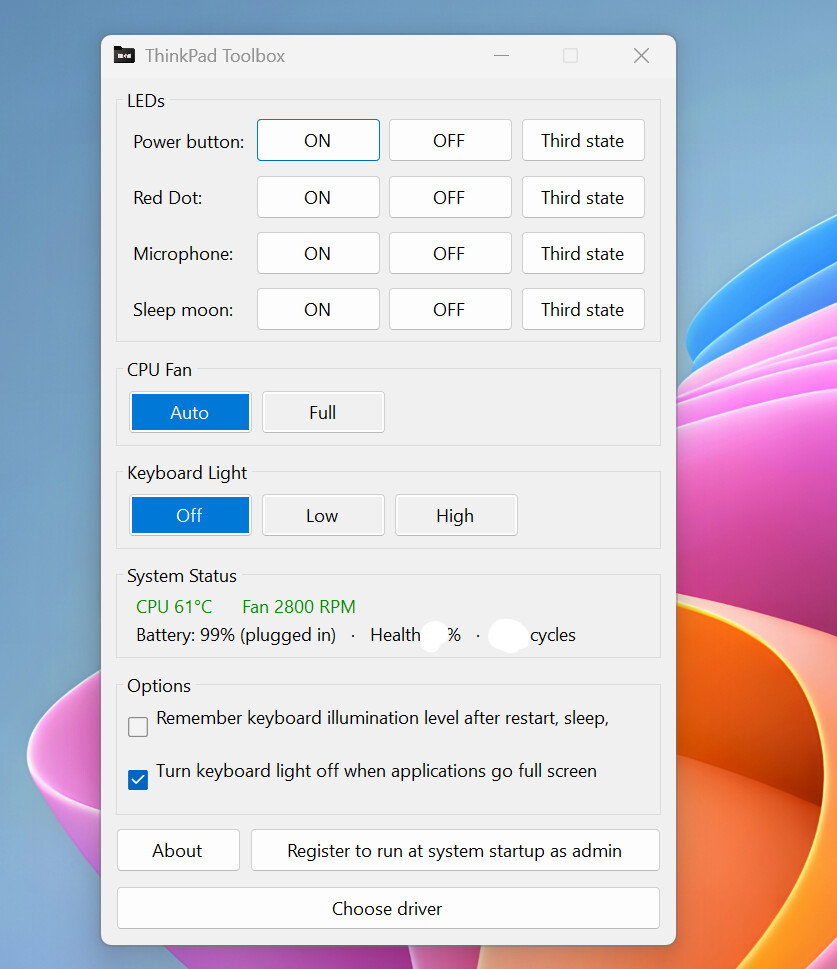
4 LEDs · 2 fan modes · 3 glow levels · live temp, RPM & battery cycles — one 52 MB window.
🎚️ Every switch Lenovo left in the dark
| Flip | Does |
|---|---|
| LEDs | Power, red dot, mic-mute, sleep-moon → On / Off / Blink |
| CPU fan | Auto (firmware decides) or Full (max cooling, now) |
| Keyboard light | Off / Low / High + remember level + auto-dim on fullscreen |
| Status | Live CPU temp (reddens when hot), fan RPM, battery charge / health / cycle count |
 Cycle count = full charge-drain rounds the battery has done. The honest wear gauge Lenovo hides.
🔌 The Win 11 driver wall — and the pass through it
The app can’t touch the hardware from normal Windows. It needs a driver — a low-level pass that lets software poke the chip directly. Two of them:
| Driver | Deal |
|---|---|
| WinRing0 | Old default. Dies on locked-down Win 11. |
| PawnIO | Modern, signed. Works even with the wall up. |
Memory Integrity (aka Core Isolation) = a Win 11 security wall, on by default on new machines, whose whole job is blocking old drivers like WinRing0. The installer detects it and ticks Install PawnIO for you — leave it ticked, done.
Force it later: hold Shift on launch, pick PawnIO. Standalone build → pawnio.eu.
⬇️ Running in 2 minutes — no .NET install
1. Grab the installer from Releases — self-contained, no separate .NET runtime.
2. SmartScreen warns (installer’s unsigned) → More info → Run anyway.
3. Keep Install PawnIO ticked if shown → app lands in your tray.
Needs: Win 10/11 64-bit · an actual ThinkPad (the chip is ThinkPad-only — other laptops have nothing to talk to) · admin rights (auto-elevates).
💥 Where this quietly earns its spot
 Recording a call or sleeping in a bright room — that blinking mic/red LED? Off in one tap.
 Exporting video, gaming, compiling and it’s cooking — slam the fan to Full before it throttles.
 Buying a used ThinkPad — read the real cycle count before you trust a seller’s “battery like new.”
 Movie fullscreen and the keyboard glow washes the panel — auto-dim kills it, hands-free.
 Locked-down work Win 11 where old LED/fan tools just died — this one still runs, via PawnIO.
🔦 One dead LED started all this
It started with one small LED I couldn’t turn off. Subtle enough to ignore, persistent enough to annoy. I found ValiNet’s ThinkPad LED Control and it did the job beautifully. Then Windows 11 tightened its driver rules — Memory Integrity blocked the old WinRing0 driver, and I didn’t want a tool I rely on to quietly stop working one update later. So I rebuilt it on .NET 8, added the signed PawnIO driver, and folded in the things I’d always wished it had: fan control, keyboard backlight, and live temp, fan, and battery readouts.
🧾 Whose shoulders it stands on
| Piece | Credit |
|---|---|
| ThinkPad LED Control | ValiNet — the base it’s built on |
| TPFanControl | The embedded-controller access approach |
| PawnIO | Signed driver by namazso → pawnio.eu |
Source + app → ThinkPad-Toolbox. MIT License, © 2026 Aung Ko Ko. WinRing0 © OpenLibSys.org.
Not affiliated with Lenovo. “Lenovo” and “ThinkPad” are their trademarks.
The switches were baked into the chip all along — Lenovo just never cut you a key.
 !
!