 Ranks every model by speed on your RAM and GPU, or on any machine you type in instead
Ranks every model by speed on your RAM and GPU, or on any machine you type in insteadAI models you run on your own PC are 2–40 GB files. Too big for your memory and it just won’t load — and you find that out after the download.
llmfit reads your RAM, cores and GPU first, then stamps every model:
Perfect ·
Good ·
Marginal ·
Too Tight
…with an estimated speed and the best compression your machine can hold. Free, MIT, no account.
brew install AlexsJones/llmfit/llmfit   # macOS / Linux
scoop install llmfit                    # Windows
uvx llmfit                              # no install

llmfit                                  # opens this ⤵
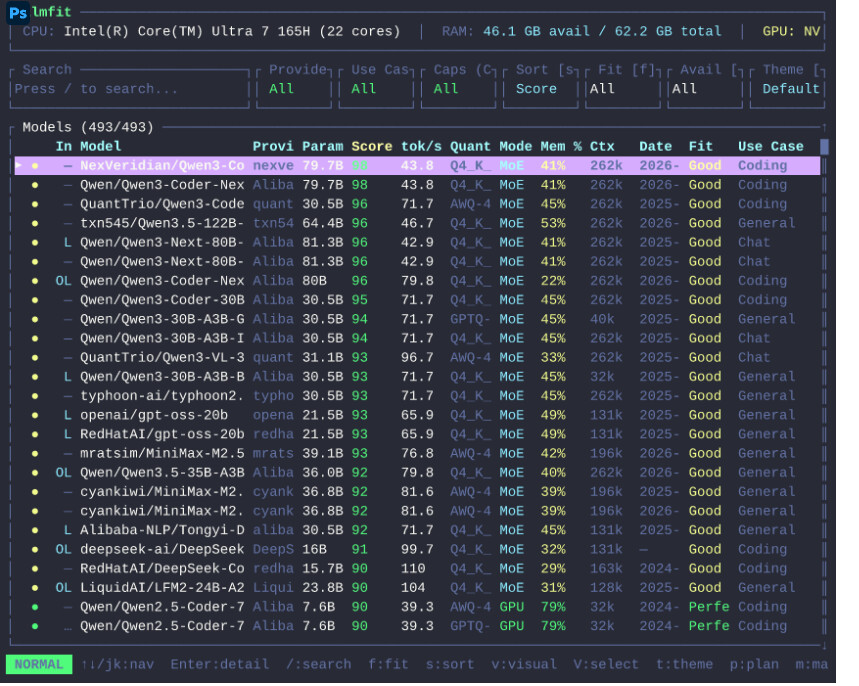
 https://github.com/AlexsJones/llmfit
Everything below is one keypress inside that screen 
 |
what it hands you |
|---|---|
 S |
type any VRAM, RAM or core count — every row re-scores against a machine you don’t own yet |
 p |
backwards: name a model, get the minimum VRAM, RAM and cores it needs |
 b |
real speeds measured by people on your exact chip, plus 27 other cards under H |
 I |
bench your own box against whatever you already have running |
 d D |
pull it via Ollama, llama.cpp, LM Studio or MLX — history and deletion in D |
 f a P U C L R |
filter by fit, installed, provider, use case, capability, license, runtime |
 v → c |
line several models up side by side |
 A t |
retune the speed maths · 10 themes |
When numbers disagree: your own runs → people on identical hardware → public benchmark medians → the formula.
🧰 Shell, scripts, and a phone on the same wifi
llmfit quietly starts a dashboard on 0.0.0.0:8787 — open it from your phone. --no-dashboard kills it.
llmfit --memory=24G --ram=64G fit          # score a build you're pricing
llmfit plan "Qwen/Qwen3-4B" --context 8192 # hardware needed for one model
llmfit recommend --json --use-case coding  # top picks for scripts and agents
llmfit bench --all --share                 # measure, then PR the results back
llmfit serve --host 0.0.0.0 --port 8787    # REST API
llmfit info "<model>"                      # what a number assumed, and how to check it
llmfit doctor                              # hardware report when detection reads wrong
OLLAMA_HOST="http://192.168.1.100:11434" llmfit points it at a GPU box in another room.
 MoE counted properly: Mixtral 8×7B looks like 46.7B parameters, but only ~12.9B fire per token — 23.9 GB drops to ~6.6 GB. And quantisation is walked Q8_0 → Q2_K instead of assumed, then retried at half context before anything is called Too Tight.
 !
!