 Play Minecraft With Friends For Free — Mod Store, Auto-Installer, Built-In Chat
Play Minecraft With Friends For Free — Mod Store, Auto-Installer, Built-In ChatOne indie launcher = Minecraft + Modrinth + theme shop + friends chat. Free forever. No browser needed.
One free desktop app, three things bundled: play Minecraft (offline-mode = no Mojang account required, or premium-mode if you own it), install mods with one click (no browsing, no manual folder hunting), and chat with friends inside the app while you play.
Catch: it’s a brand-new indie tool, so Windows freaks out a little on first install. Two-minute fix. Walked through below.
🎁 What you actually get (the launcher's whole kit)
| Feature | What it does in plain English |
|---|---|
 Universal Launcher Universal Launcher |
Launches any Minecraft version. Offline Mode = pick any username and play (no Microsoft account). Premium Mode = real Microsoft login if you own the game. |
 Built-in Modrinth browser Built-in Modrinth browser |
Modrinth is the App Store for Minecraft mods. This launcher pulls it inside the app — search, click, installed. No more hunting through ten browser tabs. |
 Auto-installs mod loaders Auto-installs mod loaders |
Fabric, Forge, NeoForge, OptiFine, Quilt — one click each. (Mod loader = the engine the mods plug into. Different mods need different ones, like how some power tools need different battery packs.) |
 Mod Inspector + Trash Bin Mod Inspector + Trash Bin |
A mod crashing your game? Right-click → trash. Mod stays recoverable for when you want it back. No more deleting files and praying. |
 Live Global Chat + DMs Live Global Chat + DMs |
10-minute ephemeral chat (messages auto-disappear), up to 10 friends, end-to-end encrypted DMs. Built into the launcher. |
 Theme shop + idle coins Theme shop + idle coins |
App earns “coins” while open. Spend them on 9 UI themes (Enderman, Midnight Black, Classic Craft, etc.). Pure cosmetic — doesn’t affect the game. |
 Creator Hub Creator Hub |
Edit thumbnails and server icons inside the app. Track download stats live. Useful if you make content. |
What makes this one different: most free Minecraft launchers do the launching. Some add mod browsing. Almost none glue the social stuff (chat, friends, DMs) on top. This one bundles all three.
📥 How to install — 4 steps, the Windows gate explained
Step 1 — Grab the installer
Two mirrors, pick whichever loads faster:
| Source | Link | Size |
|---|---|---|
 GitHub releases GitHub releases |
v1.1.3 latest | 74 MB |
 itch.io page itch.io page |
awake-games.itch.io | 74 MB |
Both serve the same Craft.CanvaS.Setup.1.1.3.exe. GitHub is the developer’s primary release; itch.io is the friendlier landing page with screenshots.
Step 2 — Tell Windows to chill out
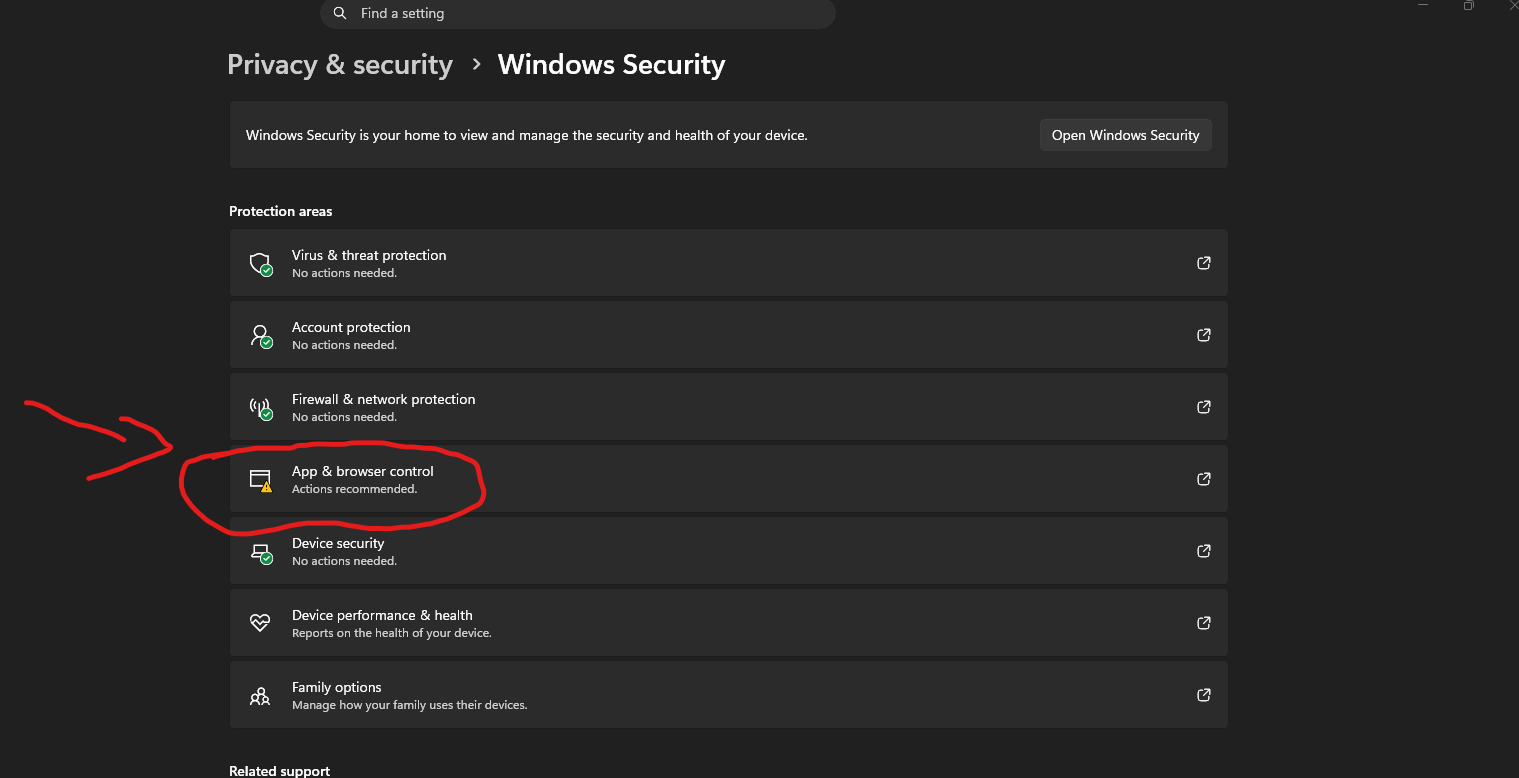
Windows 11 has a feature called Smart App Control — basically a strict bouncer that blocks any app it doesn’t already recognize. Indie tools like this one always trip it because Microsoft hasn’t “vouched” for them yet. The walkthrough:
 Settings → Privacy & Security → Windows Security → App & browser control
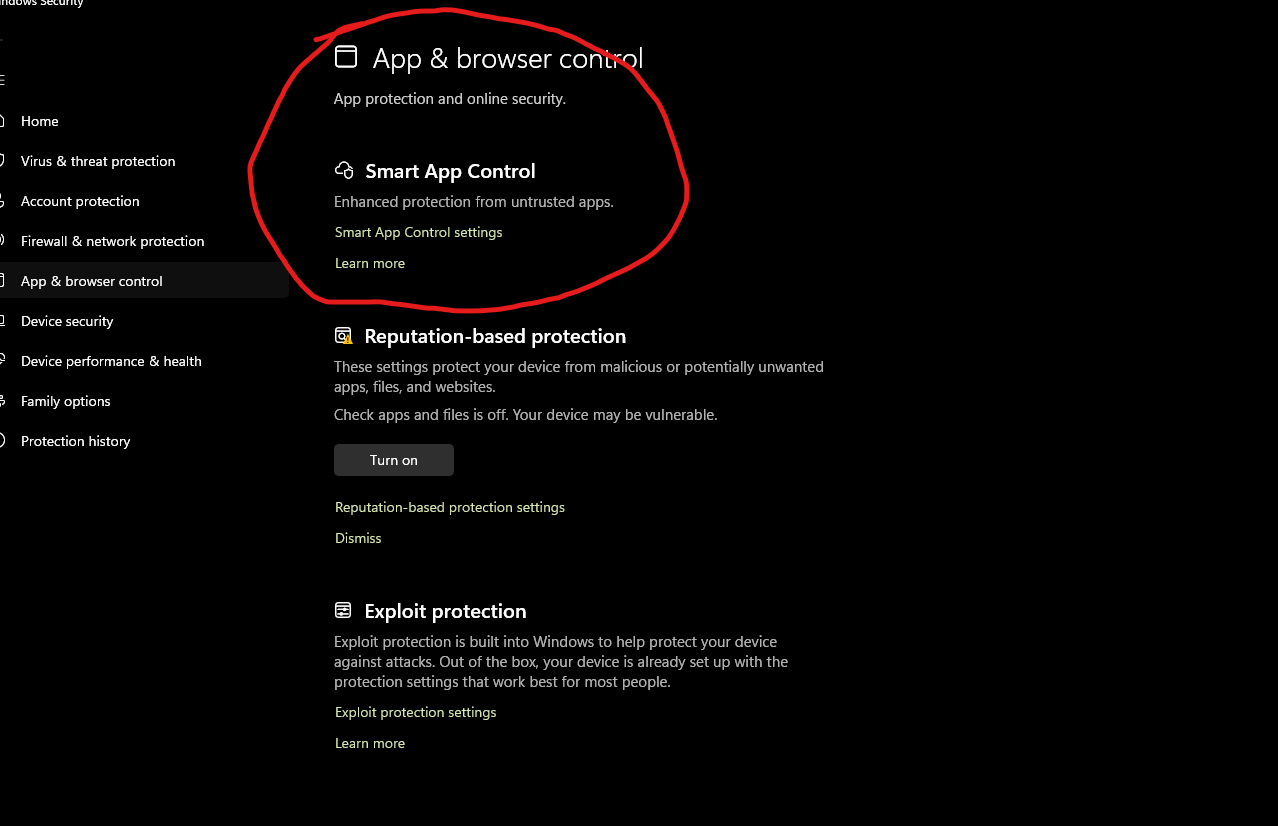
Click “Smart App Control” at the top of the page
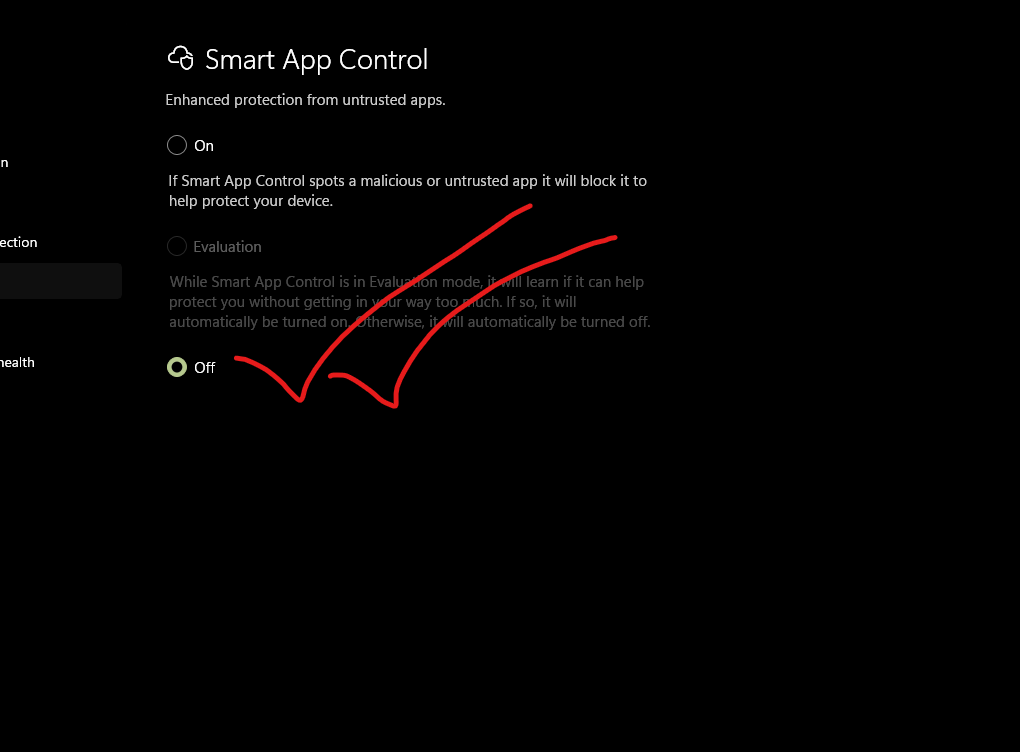
Switch it to OFF
Step 3 — Run the installer (the simpler popup)
Even with Smart App Control off, you’ll still see a blue “Windows protected your PC” screen the first time. That’s a separate, milder check called SmartScreen — basically Windows shrugging “huh, I don’t know this one.” Just:
Click More info → click Run anyway at the bottom.
That’s it. Installer runs.
Step 4 — Sign in or skip
When the launcher opens:
- Got Minecraft? → Click Premium Mode → Microsoft login → all your skins/worlds load
- Don’t? → Click Offline Mode → pick any username → play instantly
The “free Cloud Profile” the OP mentions is just for saving your in-app coins and themes — it’s not a Mojang account workaround, it’s just the launcher’s own user system. Email signup, no card.
🛒 How the mod store works (the real party trick)
Old way to install a Minecraft mod:
- Open browser → go to Modrinth → search → download
.jarfile - Find your
.minecraft/modsfolder (Hidden inAppData. Hunting time.) - Drag the file in
- Hope you got the right Minecraft version + mod loader combo
- Launch. Crash. Try again.
New way inside Craft CanvaS:
- Click “Mod Browser” → search → click Install
- App auto-detects your version + loader, drops the mod in the right folder
- Done
.jarfiles.
🪞 Honest catches — read before going all-in
Free indie tool, so a few real things to know:
| Catch | What it actually means for you |
|---|---|
| Brand-new project | GitHub repo has 2 stars, 1 contributor, ~9 commits. It works, but it’s not “trusted brand” levels of polish. Source is public on GitHub — anyone can read every line. |
| Offline Mode = single-player + offline servers | You can play solo and join servers that allow “cracked” connections. You can’t join Hypixel, Realms, or any premium-only server — those check your Microsoft account. That’s a Mojang lock, not the launcher’s. |
| Banner ads inside the app | Dev disclosed this transparently — small, non-intrusive, pays for the cloud servers that run the chat + sync. You can usually ignore them, no popups. |
| Auto-updater | App updates itself when new versions drop (called “OTA” — Over-The-Air, same idea as your phone updates). v1.1.3 fixed a few crashes; v1.0.0 Legacy is on the download page if newer versions break for you. |
| Windows-only right now | No Mac or Linux build yet. Anyone on those platforms — wait or use Prism Launcher instead (cross-platform, audited, similar vibes minus the social/theme stuff). |
.exethrough VirusTotal.com — drop the file in, get scans from 70+ antivirus engines. Indie installers usually show 0–2 false positives (heuristic flags), which is normal for unsigned apps. Anything more than 5 = step away.
🔗 Links + project status
| Link | What’s there |
|---|---|
 Latest release (v1.1.3) Latest release (v1.1.3) |
The current installer + changelog |
 itch.io project page itch.io project page |
Friendly landing page with screenshots |
 GitHub source code GitHub source code |
Read the code. MIT license — fork it if you want. |
| Discord (link in the GitHub release notes) |
Live updates, bug reports, chat with the dev directly |
 VirusTotal VirusTotal |
Drop the .exe in, get a 70-engine scan in 30 seconds |
 Quick Hits
| Want | Do |
|---|---|
 Play Minecraft right now, no account Play Minecraft right now, no account |
→ Install → Offline Mode → any username |
| Play with your real account |
→ Install → Premium Mode → Microsoft login |
| Install mods without a browser |
→ Open Mod Browser tab → search → click |
| Don’t want to disable Smart App Control |
→ Skip Step 2 → use More info → Run anyway in Step 3 |
| Check the installer is clean |
→ Drop the .exe on virustotal.com |
Download the launcher and start playing minecraft free with friends — and give this post a  to spread among the people. What’s the first mod you’re installing?
 !
!