 Launch iOS & Android Emulators From Your Mac Menu Bar — 2 Clicks
Launch iOS & Android Emulators From Your Mac Menu Bar — 2 ClicksTiny free Mac app. No Xcode, no Android Studio. Click → emulator boots. 2.7k+  on GitHub.
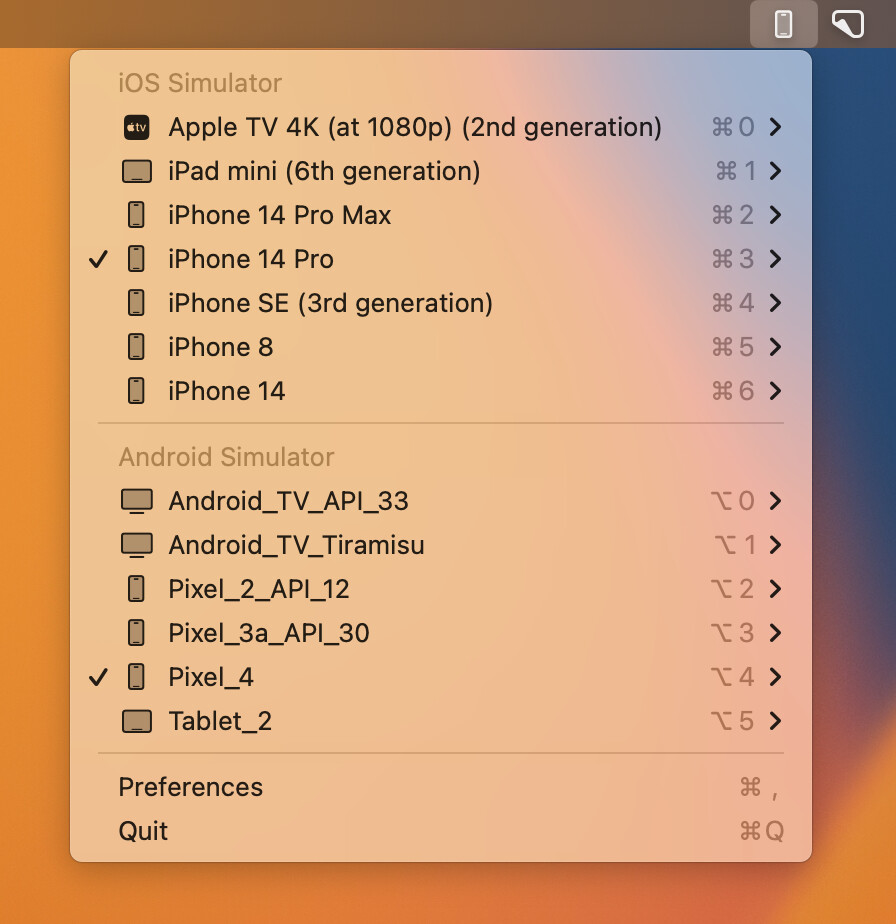
 Skip the 5GB IDE just to test on a phone. MiniSim lives in your menu bar, fires up any emulator in seconds.
 Repo: github.com/okwasniewski/MiniSim
🧠 What it actually does
You’re building an app, you want to test it on an iPhone or Pixel. Normally you’d open Xcode (Apple’s massive coding app) OR Android Studio (Google’s massive coding app), wait 30 seconds for it to load, dig 4 menus deep, then click “Run.”
MiniSim is a tiny icon in your Mac’s top bar. Click it → list of every iPhone / iPad / Pixel / TV emulator you have → click one → it boots. No IDE needed.
Emulator = a fake phone running inside your Mac. Menu bar = the top strip on macOS where wifi/battery icons live. MiniSim adds itself there.
🍿 What you get
| Loot | Plain English |
|---|---|
| Launch iOS emulators |
iPhone, iPad, Apple TV — every simulator you’ve got |
 Launch Android emulators Launch Android emulators |
Every AVD (Android Virtual Device) you’ve created |
 Cold boot Android Cold boot Android |
Restart fresh when something’s stuck |
 Silent Android Silent Android |
Run emulators with audio muted — your bluetooth headphones thank you |
 Copy device UDID / name / ADB ID Copy device UDID / name / ADB ID |
One-click clipboard for custom CLI commands |
 Toggle accessibility (a11y) Toggle accessibility (a11y) |
Test Talkback on Android with one click |
 Default launch flags Default launch flags |
Pre-configure how emulators boot |
 Global shortcut Global shortcut |
⌥ + ⇧ + e opens the menu instantly |
 Indicates running devices Indicates running devices |
Visual badge so you know what’s live |
 Lightweight + native Lightweight + native |
Pure Swift, almost zero RAM use |
📥 Install — 30 seconds
Easiest (Homebrew, the Mac package installer):
brew install --cask minisim
Or grab the .app directly:
GitHub Releases → download MiniSim.app.zip → unzip → drag to Applications.
Bonus: Raycast extension (control MiniSim via keyboard launcher) → install MiniSim Raycast extension.
xcrunandsdk/emulatorunder the hood.
🎮 Use it — daily flow
- Open MiniSim → it sits in the top-right menu bar
- Hit
⌥ + ⇧ + e(or click the icon) - List of every iPhone + every Pixel + every TV emulator
- Click one → boots in seconds
- Need to copy that emulator’s ADB ID for a script? Right-click → Copy
🛡️ Catch check
| Q | A |
|---|---|
| Mac only? | Yes. macOS menu-bar app, written in Swift + AppKit. |
| Free forever? | Yes, MIT license, open source, 2.7k |
| Replaces Xcode / Android Studio? | No — pairs with them. You still need them installed once. |
| Safe? | Open source, 83 forks watching the code, no telemetry |
| Lightweight? | Sub-50MB RAM at idle. Doesn’t slow your Mac. |
| Windows / Linux? |  Mac only Mac only |
 Simple-pimple: install with one
 brew command → emulator picker now lives in your Mac’s top bar → click any iPhone or Pixel to boot it in seconds. No more opening Xcode/Android Studio just to launch a damn phone.
The mobile dev productivity hack hiding in plain sight on GitHub.
 !
!