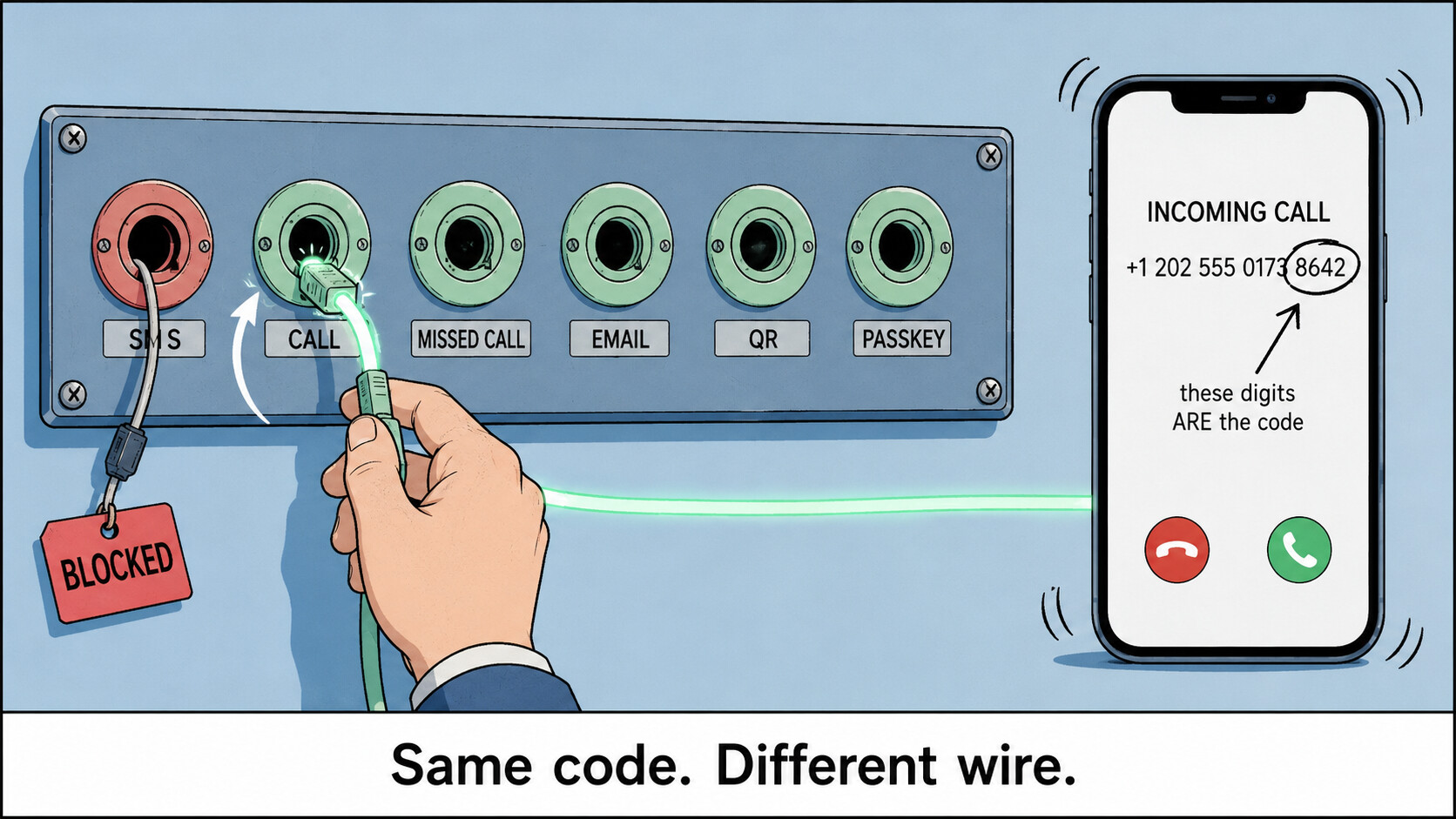
 INCOMING… ▸ DON’T ANSWER ▸ THE NUMBER CALLING YOU IS THE CODE
INCOMING… ▸ DON’T ANSWER ▸ THE NUMBER CALLING YOU IS THE CODEThat is one of six ways Telegram will verify you. SMS is only one of them — and it’s the lane Telegram guards hardest, which is why your code often never got sent at all.
You weren’t failing the check. You were queueing on the one closed road.
 Do this first — 60 seconds, any phone, any country
1. Type your number.  Then TOUCH NOTHING.
2. Let the "Sending you an SMS in m:ss" countdown run to zero.
3. Tap "Didn't get the code?" at the bottom.
4. READ THE LABEL — it names the lane queued next:
      "Get code on this phone"   → voice / missed call
      "Send the code as an SMS"  → SMS retry
      "Get a code via Fragment"  → Fragment
5. Keep tapping through the cycle.  Do NOT restart the app —
   restarting drops you back to SMS and burns your timers.
That link is not a complaint button. It fires auth.reportMissingCode — it hands Telegram your operator’s network ID so its routing logs your carrier as swallowing codes, and the wording changes to name the next pipe. Official app only; on a modded client the link is inert.
Why “just tap Call me” never worked for you. That button doesn’t exist unless Two-Step Verification is already on. Telegram’s own FAQ: dictated call codes are “only available for accounts that have two-step verification enabled”. Every guide has you pressing a button your account was never shown.
 One question splits the entire answer
| Logged in on any device right now? | |
|---|---|
 Yes — old phone, tablet, laptop, a forgotten web tab Yes — old phone, tablet, laptop, a forgotten web tab |
You can retire SMS permanently, today →  |
 No — locked out cold No — locked out cold |
Three routes exist, and only three →  |
🅰 Still have a session — kill SMS for good (Passkey · the hidden Login Email row · QR · 2FA · session timers)
Do these now, while you still can. Every one of them is prevention, not rescue.
 Passkey — face/finger replaces the code, forever
Settings > Privacy and Security > Passkeys > Add Passkey (iOS: > Passkey > Create Passkey). It saves into Google Password Manager / iCloud Keychain / 1Password, so it survives losing the phone. Every future login screen then offers log in using passkey instead of a number. Shipped Dec 2025 — what it is. Official apps only; update first.
 Login Email — the row Telegram hides from you
Once set, all future login codes go to your inbox instead of your SIM. The catch: the setup row is gated client-side and on most phones simply isn’t drawn. Two ways to make it appear —
├─ The language gate (iOS). The row renders if you already have one, or your number starts +7, or the app’s language is Russian. So: Settings > Language > Русский → back to Settings > Privacy and Security → the Login Email row is now there → add + verify → Settings > Language > English.
└─ The budget flood. On official mobile: start a login, request the SMS code, enter it, back out, request again, repeat. The server eventually pops its own set up Login Email prompt.
Android’s row only appears when an email is already set — it’s a change-email row, not an add one. The server can still refuse outside its rollout regions. You need at least one deliverable code during setup. Keep 2FA on too: anyone knowing your number can start a 7-day email-reset. Lane spec: core.telegram.org/api/auth
 “Sign in with Google” — on official Android with Play Services, when the server flags it, a Sign in with Google link appears under the code box. One tap makes that address your Login Email. Absent on de-Googled ROMs, Huawei, and any third-party client.
 Two-Step Verification —
 Settings > Privacy and Security > Two-Step Verification → password → set the recovery email. This is the switch that puts the voice-call lane into your resend chain later. Honest: the recovery email only ever receives a password reset code, never a login code — that’s the single most repeated mix-up on this topic.
 QR login — a whole device, no code at all
Open web.telegram.org/k or Telegram Desktop; both show Log in by QR Code before asking for a number. Scan it from Settings > Devices > Link Desktop Device — from inside that menu, not a camera app. That’s where most people give up. How it works
 Stop Telegram reaping your last session —
 Settings > Devices → set sessions self-destruct to the longest option, then Privacy and Security > Account self-destruct → longest (default kills the account after 18 idle months). Every route above dies with your last session.
 my.telegram.org/auth — an official login surface with SMS removed by design: the page states it sends the code via Telegram, not SMS. Same at telegram.org/deactivate, which frees a number from a dead account so it can be re-registered fresh.
 TgAuth (repo) — mints a portable session key from one successful login; paste it back later and your in-app code appears live on the page. Solves “I registered on a number I no longer have.” That key is your account — treat it like a root password, and it’s unaudited third-party code. Keeping one official session alive does the same job with none of the risk.
🅱 Zero sessions — the voice run, Telegram's 3 unlisted login mailboxes, the support form
1 — Make the line able to ring, then take the call lane.
Turn on Wi-Fi Calling / VoLTE (Settings > Network & internet > SIMs > Calls; iOS Settings > Cellular > Wi-Fi Calling) and turn off DND and Silence Unknown Callers. Then run the 60-second sequence at the top. Two different things can arrive:
├─ Dictated call — a robot reads 5 digits aloud, twice. Needs 2FA already on.
└─ Missed / flash call — sentCodeTypeMissedCall: a call rings once and cuts. Do not answer — there’s no audio, it’s closed by design. The last digits of the calling number are the code. Official Telegram for Android fills them in itself if you allowed the Phone permission — the permission everyone reflexively denies. Otherwise read them off Phone > Recents. iOS can’t do this at all.
2 — The three mailboxes that exist only inside the Android client. None is on any Telegram web page. Match the mailbox to the exact on-screen error:
| Error on screen | Write to | Subject |
|---|---|---|
| Code never arrives | [email protected] |
+<number> Android Registration/Login Issue <version> (<build>) |
| Invalid phone number | [email protected] |
Invalid phone number: +<number> |
| This phone number is banned | [email protected] |
Banned phone number: +<number> |
Body: your number in full international form, device, OS/SDK, app version, locale, then the problem in plain English. Never add #enableSMS — that’s a developer queue for third-party app authors, not a user login issue.
3 — telegram.org/support — the only lane that works with zero sessions and zero codes. Four fields; paste the exact error string and name your carrier. Answered by volunteers: no ticket, no SLA, sometimes no reply.
4 — @smstelegram — Telegram’s FAQ explicitly blesses this account and says to DM it your number. Check the handle character by character; the lookalikes are all theft. Nobody official ever asks for your code.
5 — Already inside but acting restricted? @SpamBot states your limit status and appeals it — but only once you’re logged in.
Straight answer: if the number itself is banned, none of this revives it. Only a different number does.
 Read your error before trying anything else
Same screen, different walls — and each one leaves a different door open.
| What you get | What it actually means | Door still open |
|---|---|---|
PHONE_NUMBER_INVALID |
Not a real assignable mobile number — the classic VoIP range | Get a real mobile-range number; test it first |
PHONE_NUMBER_BANNED |
The number is burned, often by its previous owner | Only a different number — or recover@ if it’s inherited |
PHONE_NUMBER_FLOOD |
Too many code requests / too many accounts on it | Stop re-requesting. Wait hours. Then switch lane once |
FLOOD_WAIT_X |
Wait exactly X seconds. Literal | Waiting. A VPN does nothing — this is scoped to the number |
PHONE_CODE_EXPIRED |
You were slow | Request a fresh one |
SESSION_PASSWORD_NEEDED |
Not an error — a green light. The code step passed | Just type your 2FA password |
 Official dictionary: core.telegram.org/api/errors · machine-readable errors.json · offline grep: Telethon errors.csv · per-method error sets at tl.telethon.dev
🧪 Test a number BEFORE you burn it — free VoIP / line-type lookups
A VoIP-flagged range is the exact class Telegram refuses. Check first, spend second.
├─ IPQualityScore free lookup / HLR variant — VOIP flag, carrier, live-subscriber, prepaid. Browser, no signup, a few per day.
├─ numverify — 100 free/month, key-based: apilayer.net/api/validate?access_key=KEY&number=… → read line_type + carrier. Loop it over candidates and build a will-clear list.
└─ Abstract line-type checker — 190+ countries, tie-breaker.
If any tool says VoIP, treat the number as dead on arrival. Accuracy drops outside major markets — a good SIM occasionally reads Unknown.
Honest gap: there is no maintained public ledger of “which numbers clear Telegram today.” The channels selling that are selling the burned ranges. A line-type check is the only real-time signal that exists.
⚖️ Keep a SIM alive forever without paying — and the 4 countries where it can't work
Outside North America, incoming is free to you by market rule — the caller’s side pays. That makes a dormant prepaid SIM a permanent zero-cost receiver.
 Check this first — receiving-party-pays markets: USA · Canada · Hong Kong · Singapore. There, your balance is charged to receive, so a zero-balance SIM structurally can’t deliver a code, and dormancy is only ~30–60 days. Everywhere else is calling-party-pays with 90–365 day windows. Apply the filter before choosing where to source a number — this alone kills weeks of wasted effort.
 The self-renewing loop. India’s consolidated consumer regulations (Ch. IV, Reg. 11–12) bar disconnection for 90 days of non-usage — and Reg. 12(3) grants a fresh 90 days after any qualifying activity. Then the hinge: both Airtel and Vodafone Idea told the regulator in writing that an incoming call counts as usage — an incoming SMS does not.
So the pipe you pick changes the outcome twice. Waiting for the SMS delivers a code and lets the line die anyway. Taking the call delivers the same code and re-arms the 90-day clock. Same login, opposite result.
Also: TRAI’s prepaid FAQ Q3 — incoming stays available at zero balance during validity. Screenshot it for the store clerk who insists you must recharge.
├─  Philippines — Joint Circular 05-12-2017 §3: load expires one year from your latest top-up, rolling. One small load = a 12-month receiving window.
├─  Indonesia — masa tenggang: 30 days of free incoming after expiry, across all major carriers. A countdown, not a parking spot — then the number is permanently burned.
├─  Kenya — Safaricom Recreate Old SIM, USSD
 *100*2#, pulls a lapsed line back before it’s recycled.
└─ Any country — Prepaid SIM wiki, swap the country in the URL: carriers, registration rules, credit validity, expiry, in one table.
This keeps a line you already hold. It does not get you one.
📦 Free real mobile numbers — what's genuinely free, by country
Real carrier ranges only. Every free eSIM you’ve seen advertised is data-only — no number is issued at all, so there’s nothing for a code to arrive at.
├─ Lyca free eSIM — order without picking a plan; QR by email in minutes, real host-network number (KPN/Vodafone/Bouygues/Telstra depending). NL/DE/FR/BE/AT/DK/PL/PT/IE/AU/TN. Only registers while you’re physically in that country. UK forces a plan; DE/FR/ES/IT/AT want ID.
├─ Vi free SIM home delivery — ₹0, agent brings it, eKYC at the door, live in ~30–60 min. Airtel and Jio run the same doorstep flow.
├─  HelloMobile — free Cell C-network SIM. Pick Voice SIM, not Data SIM — a data SIM has no usable number.
├─  Movistar chip prepago — free courier to your door with gift data. Claro/Personal/Tuenti rotate the same promo.
└─  du tourist SIM — free at UAE airport immigration on a passport scan. Register Telegram and set a Login Email or Passkey on day one.
Say it plainly: every one of these needs national ID and physical presence. There is no globally-reachable source of a free real mobile number — if there were, it would already be burned. This lane is “be in the right country,” not “order online.”
🔌 Catch the call on a computer — USSD forwarding, scrcpy, KDE Connect, headless SIP
Telegram only accepts mobile numbers, so no softphone, PBX or VoIP line can ever be your registered number. These catch a call forwarded from a real mobile you already control.
 Standard GSM forwarding — works on virtually every carrier on earth, free, zero-skill. Dial from the phone holding the SIM, while you still have it:
*21*<destination>#     forward everything
*61*<destination>#     forward when unanswered
*62*<destination>#     forward when unreachable / off
*004*<destination>#    all conditional forwards at once
*#21#                  check status        ##21#  cancel
Some carriers bill the forwarded leg or block international destinations.
├─ scrcpy — mirror the phone holding the SIM to your PC over USB or Wi-Fi. Reads the incoming call and caller ID when the screen is smashed. Needs USB debugging already on.
├─ KDE Connect (Android) — enable the Telephony plugin and the incoming caller ID pops up on your desktop. That caller ID is the flash-call code. Same Wi-Fi only.
└─ Headless auto-answer — baresip with answermode=auto, or pjsua --null-audio --auto-answer=200 --auto-rec, then read the digits with whisper.cpp offline. Honestly: the recorded WAV is the prize — just play it.
☠️ Proven dead — stop spending time and money on these
├─ Free SMS-receive sites, rent-a-number services, VoIP number apps — their whole DID pools are blacklisted before a code is ever sent. Hunting a fresh burner in the same pool is the loop you’re stuck in.
├─ TextNow / 2ndLine / Talkatone / Google Voice — they genuinely ring, but the ranges are pre-blocked for registration, and they’re US/Canada only.
├─ Any SIP, landline or DID number — Telegram states it supports mobile numbers only. A perfect free SIP number is refused at signup.
├─ Free SIP accounts (Linphone, OnSIP, Zoiper, Callcentric) — they give you an address, not a number. The phone network has no route to it.
├─ “Free incoming” VoIP DIDs (Zadarma, Sonetel, VoIP.ms, FlyNumber) — “free” means free to answer; the number itself is a monthly fee. Sonetel’s free plan no longer includes a number at all.
├─ Every free travel eSIM (Airalo, Nomad, Holafly, GigSky, Firsty…) — data-only, no number provisioned. The biggest time sink in this whole topic.
├─ giffgaff — the #1 English answer, and wrong twice: international shipping is paused, and a number is only issued after a purchase.
├─ US carrier free trials (Mint, US Mobile, Visible, T-Mobile Network Pass) — the eSIM only camps on US networks; from anywhere else, nothing arrives.
├─ Any foreign SIM used at home — it only receives while camped in its home country; roaming needs a paid plan.
├─ Android emulators / Waydroid for the flash-call trick — no modem, no incoming call, no call log. adb emu gsm call only injects a number you type, and the number is the code you don’t have.
├─ Answering the flash call — it’s cut before you can pick up and carries no audio. Racing to answer burns the attempt.
├─ Scripting auth.resendCode to demand a call — you can only request the lane the server already queued. No client parameter says “call me.”
├─ Modded clients (Nekogram, Plus, APKPure builds) — they remove lanes: reportMissingCode, Google sign-in and passkeys are all official-app-gated.
├─ The 2FA recovery email as an SMS replacement — it only ever receives a password reset code. Different mechanism from Login Email.
├─ VPN-hopping a FLOOD error — scoped to the number, not your IP, and it makes the login look like a takeover.
└─ Fragment +888 numbers — a real Telegram-accepted lane, genuinely worldwide, but auctioned in TON from tens of dollars. No free tier.
The number was never the check. It was just the address the check got mailed to — and you can change the address.
 !
!