How the money comes — pick one, add more later: views → ad money once the platform’s own gate opens · affiliate links on the free tools · one video per product for your shop or a shop you partner with · paid clients (local shops need exactly this) · sell the videos, packs or the finished channel.
What you need: a laptop, internet, 1 hour. Everything else is free — nothing to install to start.
Who this is for: complete beginners · shop owners · anyone who wants a channel without a camera.
▸ Reply 1 — your first 7 days, step by step · ▸ Reply 2 — pick your factory · ▸ Reply 3 — your machine, your engine · ▸ Reply 4 — post it, get paid · ▸ Reply 5 — tonight, in three moves
Night 1 (1 hour). Pick the lane that matches your machine (main post) → install the factory → type your first line → watch the video come out. One video now exists. Day 2–3. Choose one topic you can repeat 100 times — facts, gadgets, home tips, gaming, product demos. Make 2 videos a day, same voice, same subtitles, same length. Day 4–5. Connect the door (reply 4) and queue a week of posts. From here the channel publishes while you sleep. Day 6–7. Find the video that did best, copy its shape ten times, then add a second language — one clip reaches eleven.
How the money arrives — pick one, add more later: ad money once the channel passes the platform’s own gate (YouTube: 500 subscribers + 3,000 watch-hours or 3M Shorts views) · affiliate links on the tools you use · one video per product for your shop or a partner shop · paid clients — local shops need exactly this service · selling the videos, packs, or the finished channel.
The pace that works: 1–3 videos a day · one niche · one style · 30–60 seconds each. YouTube’s own allowance is about 6 uploads a day per project, so you stay comfortably inside it.
Money you keep: the tools are free, the voice is free, the clips are free. Your only optional spend is a rented GPU on the days you want generated scenes.
If life interrupts: the queue keeps posting and the factory picks up again with one command.
Safe for a monetised channel:Wan 2.1 / Wan 2.2 (Apache-2.0 ) · LTX-Video (free open-weights; studios above $10M buy a licence) · CogVideoX (free commercial registration, up to 1M visits/month) · HunyuanVideo (licensed outside the EU, UK and South Korea).
Shortcut for beginners: start with the stock route today, add LTX-Video when you want scenes nobody else has. Same one-line workflow, both times.
Tonight — install one factory, make your first video, watch it once.
Days 2–7 — one niche, 2 videos a day, same style and voice.
Week 2 — turn on the scheduler: the queue posts while you sleep.
Week 3 — add affiliate links and translations (×11 languages from one clip).
Week 4 — offer a demo video to one local shop; show your own channel as the proof.
Pacing built into the platforms: YouTube allows about 6 uploads a day per project; TikTok’s official API post directly once approved — until then the CLI uploaders handle it, so your daily 2–3 go out either way.
Cost of the whole loop: $0 software. The only optional spend is a rented GPU (~$1.50/hr) on the days you want generated scenes.
① Install one factory — reply 2, twenty minutes, free. ② Type your line — a topic, or a product link. Example: 3 surprising facts about the ocean. ③ Press start, then connect the door — reply 4. From there the queue posts for you.
Your first line, ready to copy:
3 surprising facts about [your topic] — 30 seconds · subtitles · AI voice
One line in → a posted video out. Repeat tomorrow.
Links, numbers and licences checked 15 Oct 2026 · everything here is free · the 1Hack topics behind it are credited, not re-sold: MoneyPrinter 274549 · MoneyPrinterTurbo 326096 · Postiz 306250 · Mixpost 325994 · LTX/Wan/FramePack 325258
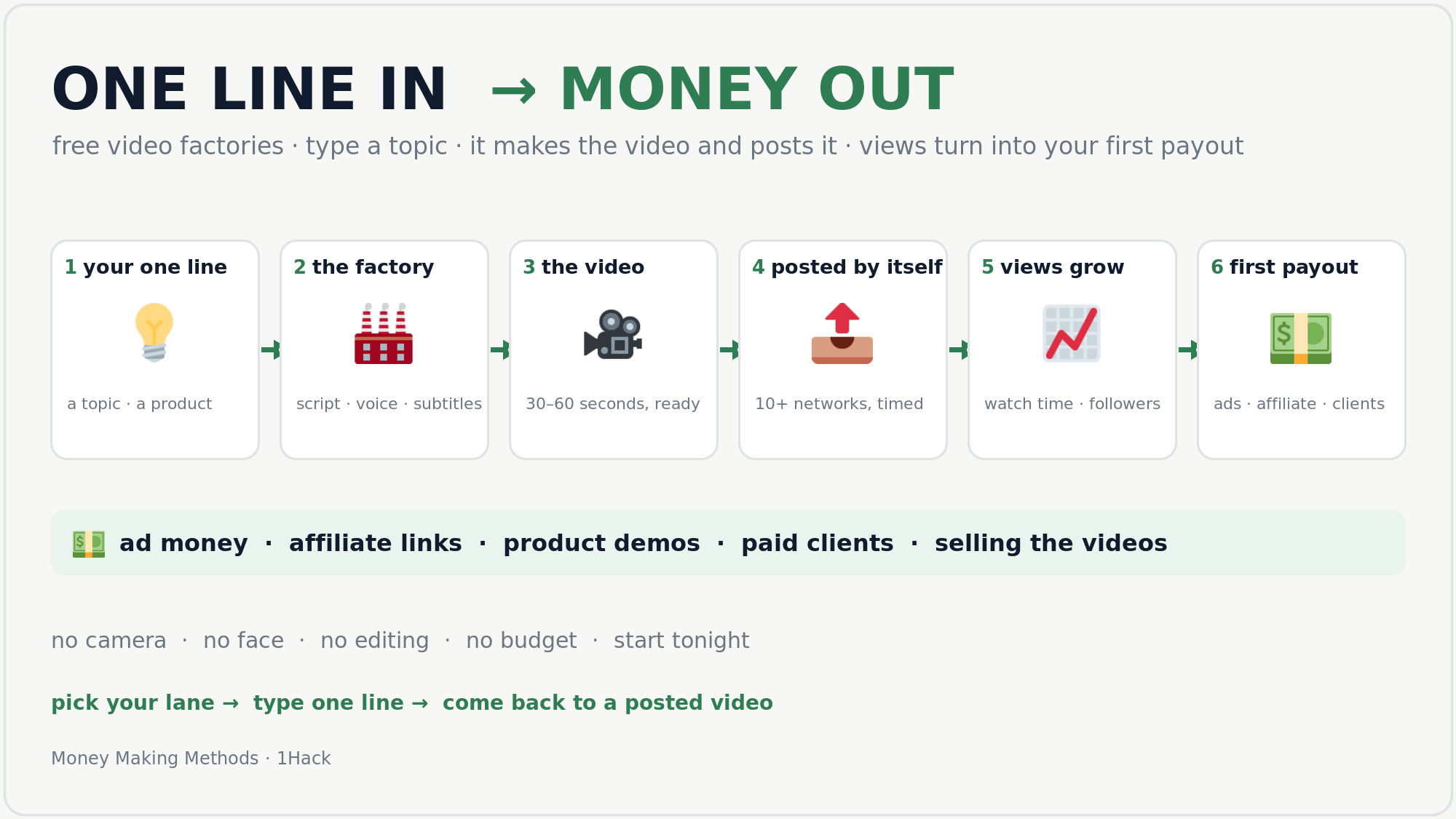
 you type a topic →
  the factory writes it →
  makes the video →
  posts it for you →
  views come →
  first payout.
 any laptop, no GPU
 a gaming PC (8 GB GPU)
 phone only
 rent a GPU (~$1.50/hr)
 views → ad money once the platform’s own gate opens ·
  affiliate links on the free tools ·
  one video per product for your shop or a shop you partner with ·
  paid clients (local shops need exactly this) ·
  sell the videos, packs or the finished channel.
 1 · Your first 7 days — do this, in this order
 2 · Pick your factory — one line in, a finished video out
 6 GB GPU + 48–64 GB RAM
 ) · LTX-Video (free open-weights; studios above $10M buy a licence) · CogVideoX (free commercial registration, up to 1M visits/month) · HunyuanVideo (licensed outside the EU, UK and South Korea).
 5 · Tonight, in three moves
 !
!