
 ACER PREDATOR HELIOS NEO 16 (i9-14900HX) RUNNING HOT — PTM7950 vs LIQUID METAL FULL GUIDE

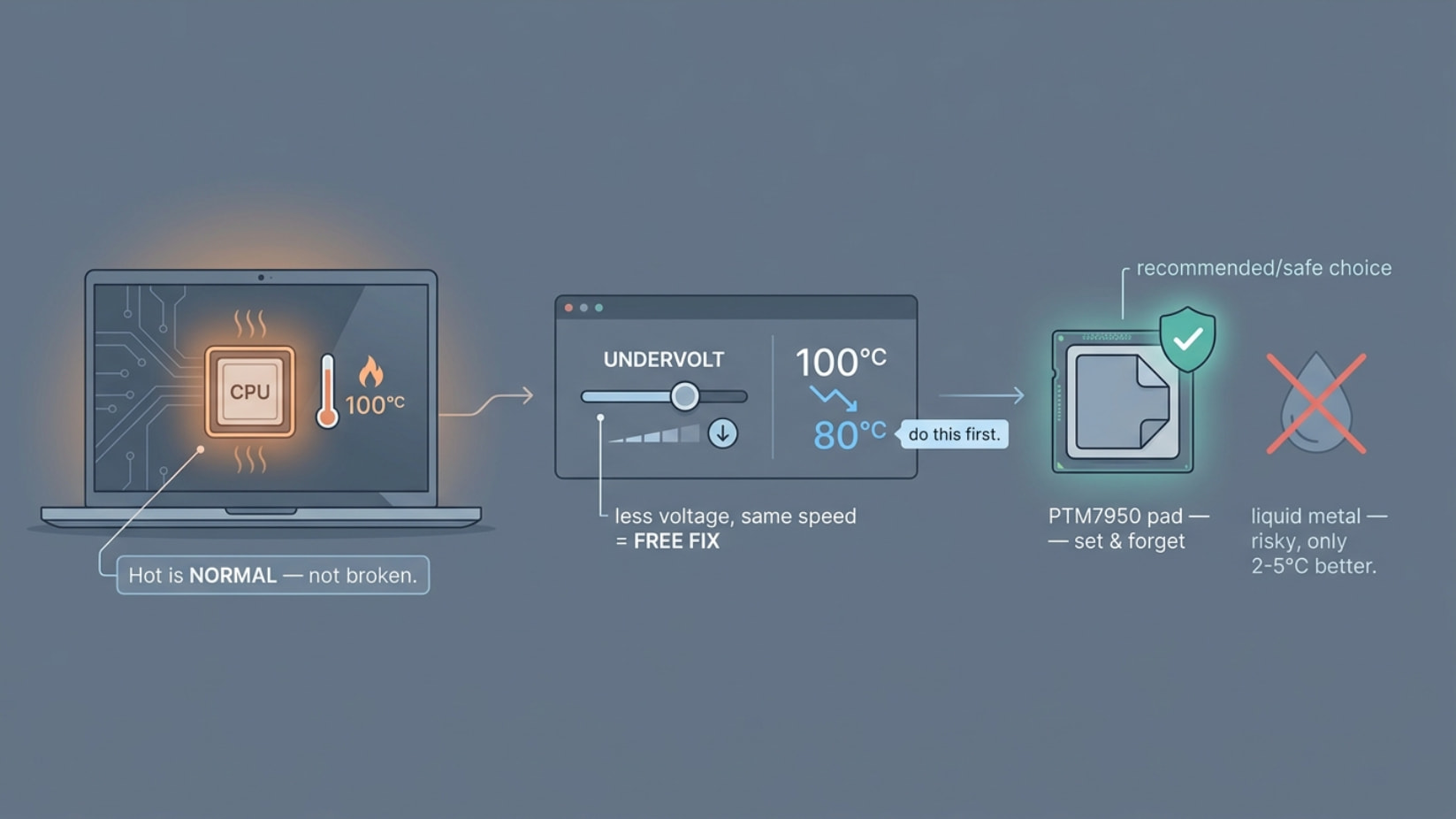
 100°C+ during benchmarks on a factory liquid metal laptop is NOT acceptable and is almost certainly caused by degraded or migrated liquid metal. Here’s the complete diagnosis, every thermal material compared, and the exact best combination for your specific laptop.
 ARE YOUR TEMPERATURES NORMAL? — HONEST ANSWER
YOUR TEMPS:
──────────────────────────────────────────────
Benchmarks:    100°C+  ❌ NOT NORMAL — too high
Normal usage:  88°C    ⚠️ BORDERLINE — should be lower

WHAT'S NORMAL FOR i9-14900HX (HELIOS NEO 16):
──────────────────────────────────────────────
Benchmarks:    85–95°C  ✅ Acceptable ceiling
Normal gaming: 75–85°C  ✅ Target range
Light use:     55–70°C  ✅ Good

VERDICT:
  → You are running 10–15°C ABOVE expected temps
  → This strongly suggests:
     ① Factory liquid metal has degraded/shifted
     ② OR liquid metal has migrated off the die
     ③ OR there is pump-out effect on the paste
  → Repasting is 100% necessary
 COULD THE FACTORY LIQUID METAL HAVE DEGRADED?
SHORT ANSWER: YES — almost certainly.

FACTS ABOUT FACTORY LIQUID METAL:
──────────────────────────────────────────────
❌ Factory LM application is done by robots
   → Often applied with LESS precision
   → Volume and spread not optimized
   → Gallium alloy can migrate over time

❌ Liquid Metal DOES degrade over time:
   → Gallium alloys react with copper over months
   → Creates a harder, less conductive layer
   → After 12–24 months, performance drops
     noticeably vs. fresh application

❌ Pump-out effect is REAL:
   → Temperature cycling (heat up/cool down)
   → Causes liquid metal to slowly migrate
   → Eventually thin spots form on the die
   → CPU temperatures spike as a result

✅ CONCLUSION:
   → Your factory liquid metal has very likely
     degraded, migrated, or spread unevenly
   → THIS explains your 100°C+ readings
   → Repasting WILL fix it
THERMAL MATERIAL COMPARISON — FULL BREAKDOWN
PTM7950 vs Liquid Metal vs Thermal Paste
 PROPERTY PROPERTY |
 LIQUID METAL LIQUID METAL |
 PTM7950 PTM7950 |
 THERMAL PASTE THERMAL PASTE |
| Thermal conductivity |
73 W/mK |
17 W/mK |
4–12 W/mK |
| Performance vs LM |
Best |
2–5°C behind |
8–15°C behind |
| Risk level |
 High (conducts electricity) High (conducts electricity) |
 Zero risk Zero risk |
Zero risk |
| Longevity |
2–3 years (degrades) |
5+ years (stable) |
1–2 years |
| Application difficulty |
Hard |
Very easy |
Easy |
| Pump-out risk |
Low |
Zero |
Medium |
| GPU safe? |
 NOT safe NOT safe |
Fully safe |
Fully safe |
| Maintenance needed |
Every 2–3 years |
5+ years |
Every 1–2 years |
PTM7950 — DETAILED ANALYSIS
WHAT IS PTM7950?
  → Phase Change Thermal Material by 3M
  → Solid pad at room temperature
  → MELTS and conforms at ~50°C (operating temp)
  → No pump-out, no migration, no mess

PERFORMANCE vs LIQUID METAL:
  → 2–5°C warmer than fresh liquid metal
  → BUT — vs DEGRADED factory liquid metal:
     → PTM7950 can actually be COOLER ✅
  → This is the key point for your situation

FOR YOUR HELIOS NEO 16:
  ✅ No risk of shorting SMD components
  ✅ No galvanic reaction with copper heatpipe
  ✅ No degradation over 5+ years
  ✅ Dead simple to apply — peel and stick
  ✅ Handles high TDP chips extremely well
  ✅ Very popular in Predator/Triton repastes

SIZES AVAILABLE:
  → 60mm x 60mm (1 sheet usually covers CPU die)
  → Cut to size with scissors
LIQUID METAL — SHOULD YOU REAPPLY IT?
LIQUID METAL PROS:
  ✅ Best thermal performance possible
  ✅ 73 W/mK conductivity
  ✅ Can give 5–10°C improvement vs PTM7950
  ✅ Worth it if you're comfortable with the risk

LIQUID METAL CONS / RISKS:
  ❌ Electrically conductive — ONE drop on PCB
     = dead motherboard immediately
  ❌ Galvanic corrosion with copper heatpipes
     over time (Gallium eats copper slowly)
  ❌ NOT safe on GPU — kills GPU VRAM
     if it migrates even slightly
  ❌ Requires careful masking of all
     SMD components around the CPU die
  ❌ Degrades again in 2–3 years — same problem
  ❌ Requires experience to apply safely

RECOMMENDED LIQUID METALS:
  → Thermal Grizzly Conductonaut
  → Dowsil TC-5026 (slightly safer)
  → Gelid GC-Extreme (NOT liquid metal but
     best conventional paste alternative)
ANSWERING YOUR SPECIFIC QUESTIONS
Q1: Are these temps normal?
❌ NO — 100°C+ benchmarks and 88°C normal
   usage are above expected range.
   The Helios Neo 16 should sit 85–95°C
   MAX during full stress tests.
   Your temps indicate a thermal issue.
Q2: Could factory liquid metal have degraded?
✅ YES — Almost certainly. Acer factory
   liquid metal application degrades after
   12–24 months of use. Migration and
   galvanic reaction with copper heatpipe
   causes performance to drop noticeably.
   Your symptoms match perfectly.
Q3: Would PTM7950 on CPU perform close to LM?
✅ YES — vs FRESH liquid metal: 2–5°C
   warmer under full load.
   vs YOUR CURRENT DEGRADED liquid metal:
   PTM7950 will likely be EQUAL or COOLER.
   For your specific situation, the performance
   gap essentially disappears.
Q4: Is PTM7950 recommended for GPU?
✅ ABSOLUTELY YES — PTM7950 on GPU is
   strongly recommended over thermal paste.
   → Better than conventional paste
   → No risk of GPU damage (unlike LM)
   → Stays effective for 5+ years
   → Standard recommendation for all Predator
     GPU repastes in the community
Q5: Best combination?
🏆 RECOMMENDED: PTM7950 CPU + PTM7950 GPU

REASONING:
  → Your degraded factory LM means you're NOT
    giving up performance vs fresh LM
  → You eliminate ALL the risks of LM
  → 5+ year longevity — no repeat repastes
  → GPU stays 100% safe
  → Dead simple application

ALTERNATIVE (for enthusiasts):
  → CPU: Fresh Liquid Metal (Conductonaut)
  → GPU: PTM7950
  → Gives 3–5°C more on CPU under full load
  → But requires skill and masking to do safely
 REPASTING GUIDE — STEP BY STEP
TOOLS YOU NEED:
  → Phillips PH0 and PH1 screwdrivers
  → Plastic spudger / pry tool
  → IPA 99% isopropyl alcohol
  → Lint-free microfiber cloth or coffee filters
  → PTM7950 pad (60x60mm sheet)
  → OR Thermal Grizzly Conductonaut (if doing LM)
  → Kapton tape (for masking if using LM)
  → Nitrile gloves
  → Good lighting + magnification helpful

STEP 1 — DISASSEMBLE:
  → Remove bottom panel screws (usually 10–12)
  → Disconnect battery FIRST before anything else
  → Remove cooling assembly screws in X-pattern
    (loosen in order — numbered if marked)

STEP 2 — CLEAN OLD THERMAL MATERIAL:
  → Remove heatpipe/cooling assembly
  → Clean CPU die with IPA 99% → lint-free cloth
  → Clean heatpipe contact surface same way
  → For LM removal: use cotton bud + IPA
    until completely silver-free
  → IMPORTANT: Check for any LM that has
    migrated — clean thoroughly

STEP 3A — APPLYING PTM7950:
  → Cut pad to match CPU die size exactly
  → Peel protective film from ONE side
  → Place pad on CPU die, film side up
  → Peel second film after placement
  → Reassemble heatsink normally ✅
  → PTM7950 will melt and self-spread
    at operating temperature

STEP 3B — APPLYING LIQUID METAL:
  → Mask ALL SMD components around die
    with Kapton tape — very carefully
  → Apply SMALL amount to CPU die center
  → Spread with cotton bud in circular motion
    until die is fully covered
  → Apply THIN coat to heatpipe contact surface
  → Reassemble carefully
  → Do NOT use on GPU under any circumstances

STEP 4 — REASSEMBLE:
  → Reconnect heatsink screws in X-pattern
  → Tighten gradually — do not overtighten
  → Reconnect battery
  → Replace bottom panel

STEP 5 — BURN-IN:
  → Run Prime95 + GPU stress for 30 minutes
  → PTM7950 needs first heat cycle to fully seat
  → Check temps after burn-in — should be
    noticeably lower ✅
 EXPECTED TEMPERATURE IMPROVEMENTS
YOUR CURRENT:         100°C+ benchmarks
                      88°C normal use

AFTER PTM7950 (CPU + GPU):
  Benchmarks:         ~85–92°C  ✅
  Normal gaming:      ~72–80°C  ✅
  Improvement:        8–15°C reduction ✅

AFTER FRESH LIQUID METAL (CPU) + PTM7950 (GPU):
  Benchmarks:         ~80–88°C  ✅
  Normal gaming:      ~68–76°C  ✅
  Improvement:        12–20°C reduction ✅

NOTE: Exact results depend on ambient temp,
      TDP settings, and fan curve config
 BONUS — UNDERVOLTING FOR EXTRA GAINS
COMBINE REPASTING WITH:
  → Intel XTU (Intel Extreme Tuning Utility)
     → Undervolt CPU by -50mV to -100mV
     → Can drop temps 5–10°C more
  → ThrottleStop (advanced users)
     → Fine-grained CPU power control
  → PredatorSense
     → Set fan curve to maximum/custom
     → Switch to Turbo cooling profile
  → Keep bottom vents clear
     → Laptop cooling stand helps significantly
 FINAL RECOMMENDATIONS
🏆 BEST COMBINATION FOR YOUR GOALS:
  CPU: PTM7950
  GPU: PTM7950

WHY:
  ✅ Long-term reliability (5+ years)
  ✅ No risk of damage
  ✅ Minimal maintenance
  ✅ 8–15°C improvement over your current state
  ✅ Performance close to LM vs your degraded LM
  ✅ Simple application — hard to get wrong

IF YOU WANT MAXIMUM PERFORMANCE AND
HAVE EXPERIENCE WITH LIQUID METAL:
  CPU: Thermal Grizzly Conductonaut
  GPU: PTM7950

WHERE TO BUY:
  → PTM7950: Amazon / AliExpress / local PC shop
  → Conductonaut: Amazon / Thermal Grizzly website
  → Price: PTM7950 ~$8–15 per sheet
           Conductonaut ~$15–20 per tube
Your Helios Neo 16 is not broken — it just has degraded factory liquid metal, which is completely normal after extended use on Acer Predator laptops. A PTM7950 repaste on both CPU and GPU will bring you 8–15°C of improvement, long-term stability, and you’ll never have to think about it again for 5+ years. It’s the single best upgrade you can do for this machine right now. 


 Windows
 Linux
Linux Skip: FanControl / NBFC / SpeedFan — they poke the EC, which Acer walls off. The tools that work go through Acer’s own WMI instead.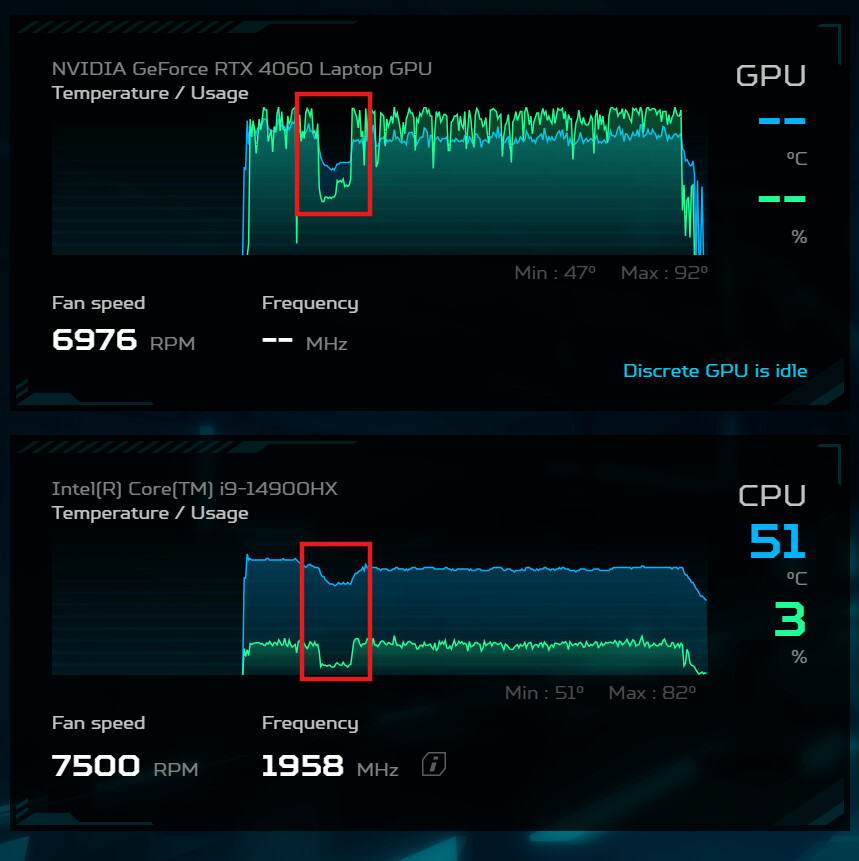
 !
!