 Three Cloud Bills Replaced by One Free Open-Source Tool
Three Cloud Bills Replaced by One Free Open-Source ToolCancel three monthly cloud bills with one open-source tool. Your files. Your devices. Your rules.
One free install replaces three monthly subscriptions. No account. No login. No company holding a copy of your files. Your phone and your laptop just talk to each other directly — like two friends passing a USB stick, except instant and over the internet.
If you can drag a folder, you can do this. Zero terminal. Zero coding. Zero “I’ll figure it out later.”
📂 What Syncthing Actually Does (In Plain Words)
Pick a folder on your laptop. Pick a folder on your phone. Tell Syncthing they’re partners. Done — they now mirror each other forever.
Add a photo on your phone → it shows up on your laptop seconds later. Edit a doc on your laptop → your tablet has the new version before you close the lid. No upload button. No “syncing 1 of 47 files.” It just happens.
| What you do | What happens |
|---|---|
| Drop a file in the folder | Every paired device gets the same file |
| Edit on one device | The change appears everywhere, automatically |
| Delete by accident | Versioning keeps a backup if you switched it on |
| Lose Wi-Fi for an hour | Devices catch up the second you reconnect |
Think of it as: Google Drive’s auto-sync, except Google never sees a single byte of your stuff.
 Get it: syncthing.net — pick your platform, install, done.
🚫 Why This Is Different From Dropbox & Friends
Every cloud company on earth pulls the same trick: your file goes to their server first, then to your other device. That detour is where they charge you, scan you, and (one day) get hacked.
Syncthing skips the detour entirely. Your devices call each other direct — like two phones on speakerphone, no operator listening in.
| The cloud guys | Syncthing |
|---|---|
| File goes to their server, then to you | Phone → laptop. Direct. |
| Storage costs them money → bills you | Lives on hardware you already own |
| Account required (and trackable) | No account exists to track |
| Can shut down / raise prices / leak | Nothing to shut down — it’s just your devices |
| Reads your filenames for “indexing” | Files travel in sealed envelopes between your own gear |
🔒 The Privacy Stuff — Translated For Humans
The official site uses three big words. Here they are in normal English:
TLS encrypted. Every transfer travels in a sealed envelope. Anyone watching the wire — the café Wi-Fi, your ISP, your sketchy neighbour with Wireshark — sees scrambled noise.
Perfect forward secrecy. Each envelope uses a fresh, throwaway key. Even if someone steals tomorrow’s key, they still can’t open yesterday’s mail. The keys don’t stack — they evaporate.
Cryptographic certificate. Every device has a unique fingerprint ID. You add a new phone by literally approving its fingerprint — no random stranger can sneak in pretending to be your laptop.
📲 What Devices It Runs On
| Platform | Status |
|---|---|
| Windows | Native app, free |
| macOS | Native app, free |
| Linux | Native app, free (most distros have it in their package manager) |
| Android | Native app — F-Droid + Play Store |
| FreeBSD / OpenBSD / Solaris | Yes, really — they ported it everywhere |
| iPhone / iPad | No free native app. Möbius Sync is the paid third-party route |
Run it on your home server, your old laptop, your phone, your work computer — they all sync to each other, no service in the middle.
🚀 How To Actually Start (5-Minute Version)
Step 1 — Download for both your devices. Grab it from syncthing.net. Pick your platform. Install like any other app.
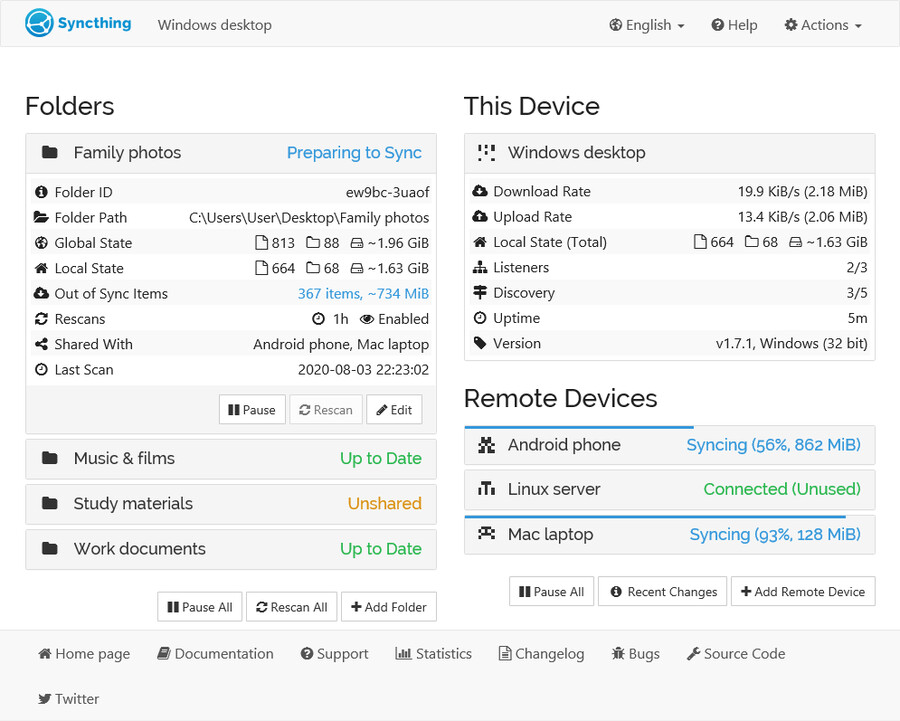
Step 2 — Open it on Device A. It pops a tab in your browser. That tab IS the control panel — boring-looking, but everything happens there.
Step 3 — Open it on Device B. Same thing. Same browser tab look.
Step 4 — Pair them. On Device A, hit Add Remote Device. It shows you a long ID (a code that says “this is me”). Copy it. Paste it on Device B. Click approve on both ends. They now know each other.
Step 5 — Share a folder. Right-click any folder on Device A → tell Syncthing “share this with Device B.” Device B asks “do you want it?” → yes. Done. They sync from this second forward.
💡 Real Things People Actually Use This For
Not “use cases” — actual setups people run today:
- Phone camera roll → home laptop, automatically. Stop emailing yourself photos.
- Backup the work laptop to the home PC. Set the home PC to “receive only” — it gets your stuff, but nothing on the home PC ever gets pushed to work.
- Sync notes / Obsidian vault across every device. No subscription, no “couldn’t reach the cloud” errors on a flight.
- Move 200 GB of video between your machines without touching a USB stick or paying for a tier upgrade.
- Run a tiny home file server on a Raspberry Pi. Every device in the house syncs to it. The Pi never goes down. You never lose a file.
- Share a project folder with a friend. They get every update the second you save. No Dropbox seat.
 Quick Hits
| Want | Do |
|---|---|
 Free Dropbox replacement Free Dropbox replacement |
→ Install Syncthing on every device, share one folder |
 Work laptop → home PC backup Work laptop → home PC backup |
→ Pair them, set home PC to “receive only” |
 Phone photos auto-save to laptop Phone photos auto-save to laptop |
→ Android app auto-syncs your DCIM folder |
 Cloud-grade privacy with zero cloud Cloud-grade privacy with zero cloud |
→ Default behaviour. Nothing to configure. |
 Build a home cloud from an old laptop Build a home cloud from an old laptop |
→ Wipe it, install Linux + Syncthing, pair everything |
One install. Your devices. Your files. Your rules. 100% open-source — and no company on earth can shut it down.
 Mostly fair — gaps named below
 Depends who — see closer
 Real concern, just renamed
 Folklore for most, sharp for CGNAT
 !
!