 Cerberus Just Got 3 Big Upgrades — Same App, Sharper Brain, Still Free
Cerberus Just Got 3 Big Upgrades — Same App, Sharper Brain, Still FreeChapter 4 in the saga. New file manager, bring-your-own-AI imports, and a pocket-sized 800 MB model.
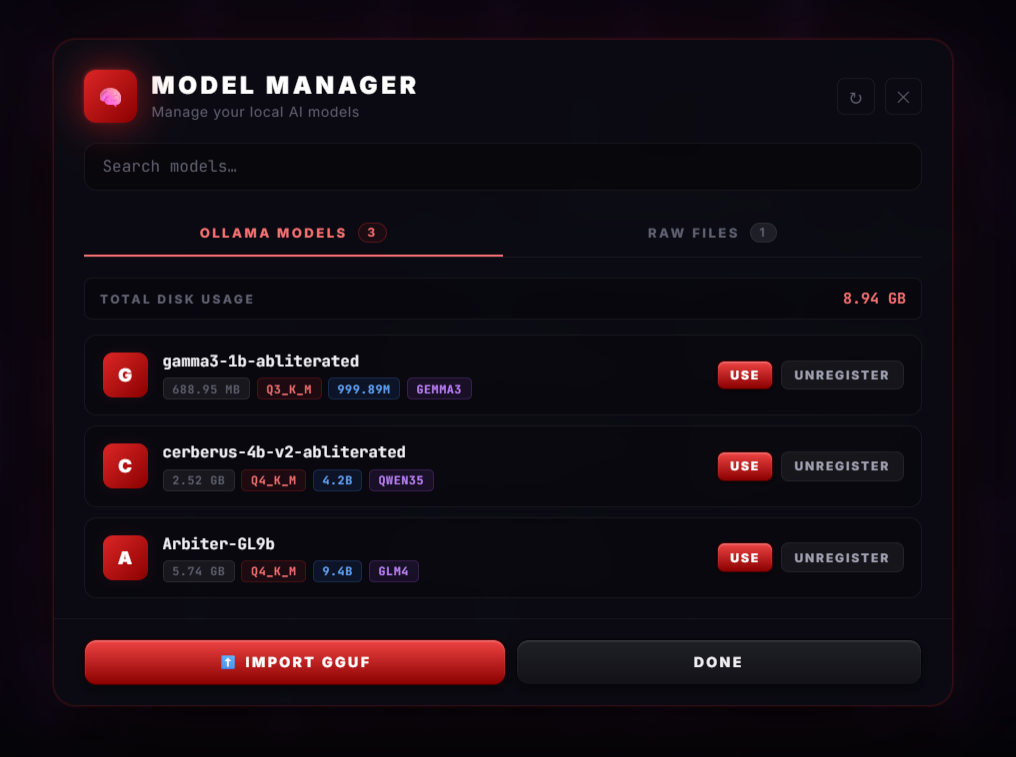
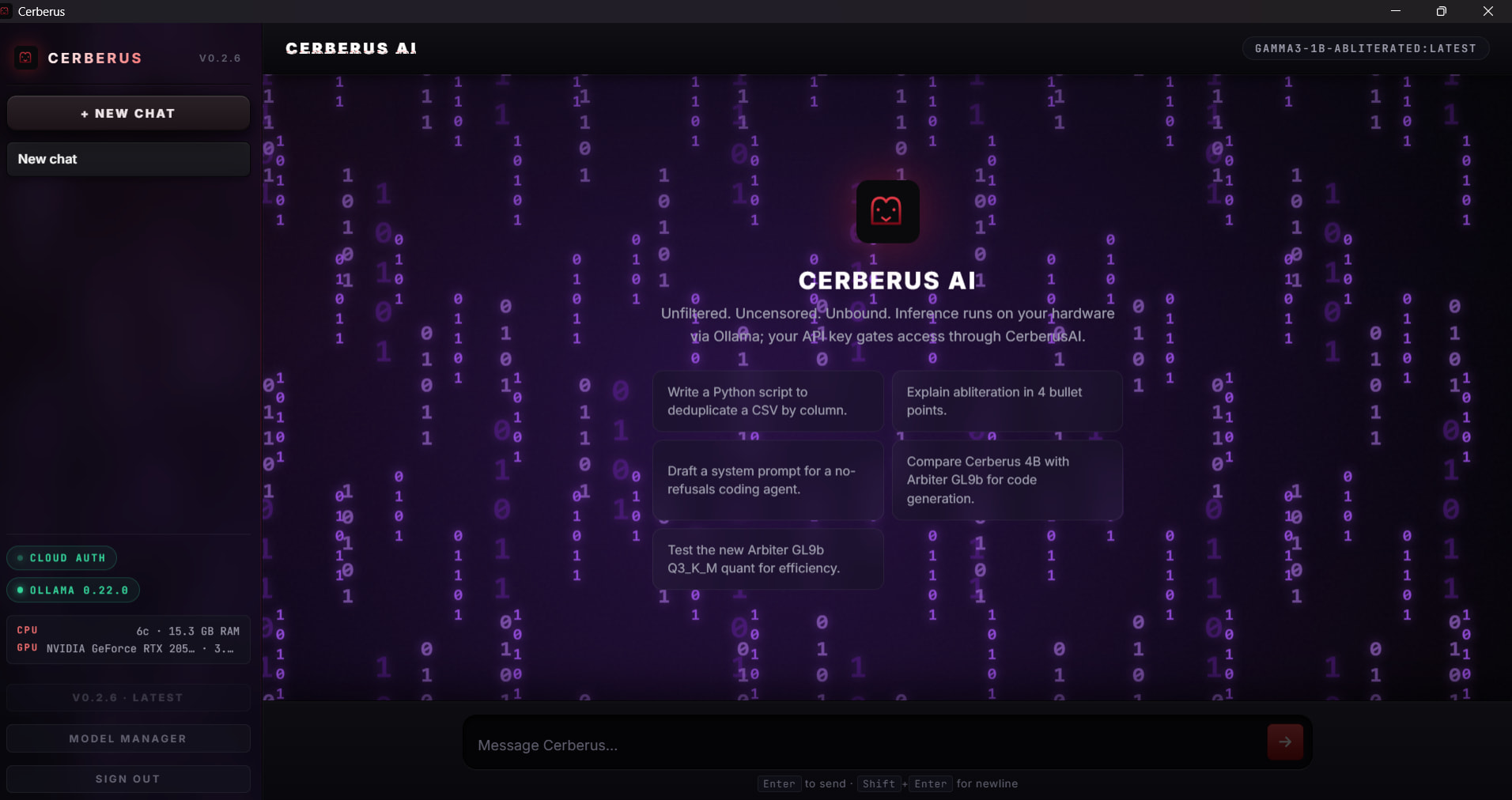
Three things changed in this update — and one of them is genuinely big. A new “file manager” finally shows you what’s eating your disk. You can now drag any open-source AI brain into the app. And there’s a brand-new pocket-sized model that runs on basically any laptop.
Already running Cerberus from earlier? Same install, same key — just pull the update and you’ll see the new panel. Brand new? The links are below. Still 100% free.
🗂️ Update 1 — The Model Manager (finally, a real view of your AIs)
Until now, the AI models you downloaded lived as invisible files somewhere on your disk. You knew you had them. You just couldn’t see them. The new Model Manager fixes that.
| What it shows you | Why you’ll actually use it |
|---|---|
| Every model you’ve pulled | One clean list — no hunting in folders |
| Total disk usage (e.g. “8.94 GB”) | Know exactly what’s eating your storage before you grab a 5 GB model |
| OLLAMA MODELS tab | The standard ones from Cerberus’s catalog (the “store-bought” AIs) |
| RAW FILES tab | Custom AI files you imported yourself (your own additions) |
| Search bar | Find a specific model in two seconds when you’ve got 10 |
Bridge: Think of it like the Storage settings on your phone — that screen that finally shows you which apps are hogging space and lets you yank the ones you don’t open anymore. Same idea, but for AI brains instead of TikTok and Candy Crush.
📦 Update 2 — GGUF Import (bring your own AI brain)
This is the genuinely big one. You’re no longer stuck with just Cerberus’s models.
A GGUF file is the standard “single-file” format for local AI models — picture it as the .mp4 of the AI world. One file = the whole AI’s brain, ready to run. Hugging Face (the GitHub-of-AI website) has thousands of them, free to download.
| Where to grab GGUF files | What kind of AI you’ll find |
|---|---|
 Hugging Face Hugging Face |
The biggest catalog — millions of models, every flavor |
 TheBloke’s collection TheBloke’s collection |
The legendary uploader — almost everything popular pre-converted |
 bartowski’s quants bartowski’s quants |
High-quality recent quantizations of the latest models |
How to actually use one:
- Download a
.gguffile from any of those sites - Open the Cerberus app → Model Manager → RAW FILES tab
- Drag the file in (or use the import button)
- It shows up in your model list. Click. Chat. Done.
🐣 Update 3 — Gamma3 1B (an uncensored AI that fits in 800 MB)
The new tiny model. 806 MB at the smallest size. Smaller than a single high-res movie. Built on Gemma3 architecture (Google’s open-source AI design — the bones of the brain) with the abliteration treatment applied (= the “I can’t help with that” surgically removed, covered in chapter 2).
| Size variant | File size | What it costs you | Best for |
|---|---|---|---|
| Gamma3 Q4_K_M | 806 MB | Tiny | Older laptops, low-RAM machines |
| Gamma3 Q8_0 | 1.07 GB | Small | Most setups — recommended default |
| Gamma3 F16 | 2.0 GB | Modest | Anyone who wants peak quality |
📥 How to Get the Update (30 seconds)
Already have Cerberus installed?
- Open the app
- Hit the PULL button on whichever new model you want (
gamma3-1b-abliteratedis the smallest) - Or drop a
.gguffile you already have into the new Model Manager - Done
Brand new? Two-stop setup:
| Step | Where |
|---|---|
 Grab the desktop app Grab the desktop app |
access.cerberusai.dev (full install walkthrough in chapter 3) |
 Browse all available models Browse all available models |
llm.cerberusai.dev — direct downloads + total downloads counter (currently almost 5,000) |
For terminal nerds (optional power-user move):
The whole thing also has a public API — you can pull models with one curl or wget command, no app required:
wget https://llm.cerberusai.dev/models/gamma3-1b-abliterated/gamma3-1b-abliterated-Q4_K_M.gguf
wgetforwget -cand the same URL — it picks up exactly where it stopped. No starting from zero.
📚 The Cerberus Saga — All the Chapters
If you missed earlier chapters, here’s the reading order:


 Quick Hits
| Want | Do |
|---|---|
 Smallest possible AI Smallest possible AI |
→ Pull gamma3-1b-abliterated (806 MB) |
 Daily-driver, balanced Daily-driver, balanced |
→ Pull cerberus-4b-v2-abliterated (2.6 GB) |
 Beast mode, 9B brain Beast mode, 9B brain |
→ Pull Arbiter-GL9b (5.8 GB) |
 Bring your own AI Bring your own AI |
→ Drag a .gguf into Model Manager → RAW FILES |
 See what’s eating disk See what’s eating disk |
→ Model Manager → top of the panel |
 Just browse all models Just browse all models |
→ llm.cerberusai.dev |
Chapter 4 dropped. Your install just got smarter — and it still belongs to you and your hardware only. What are you pulling first?
 !
!