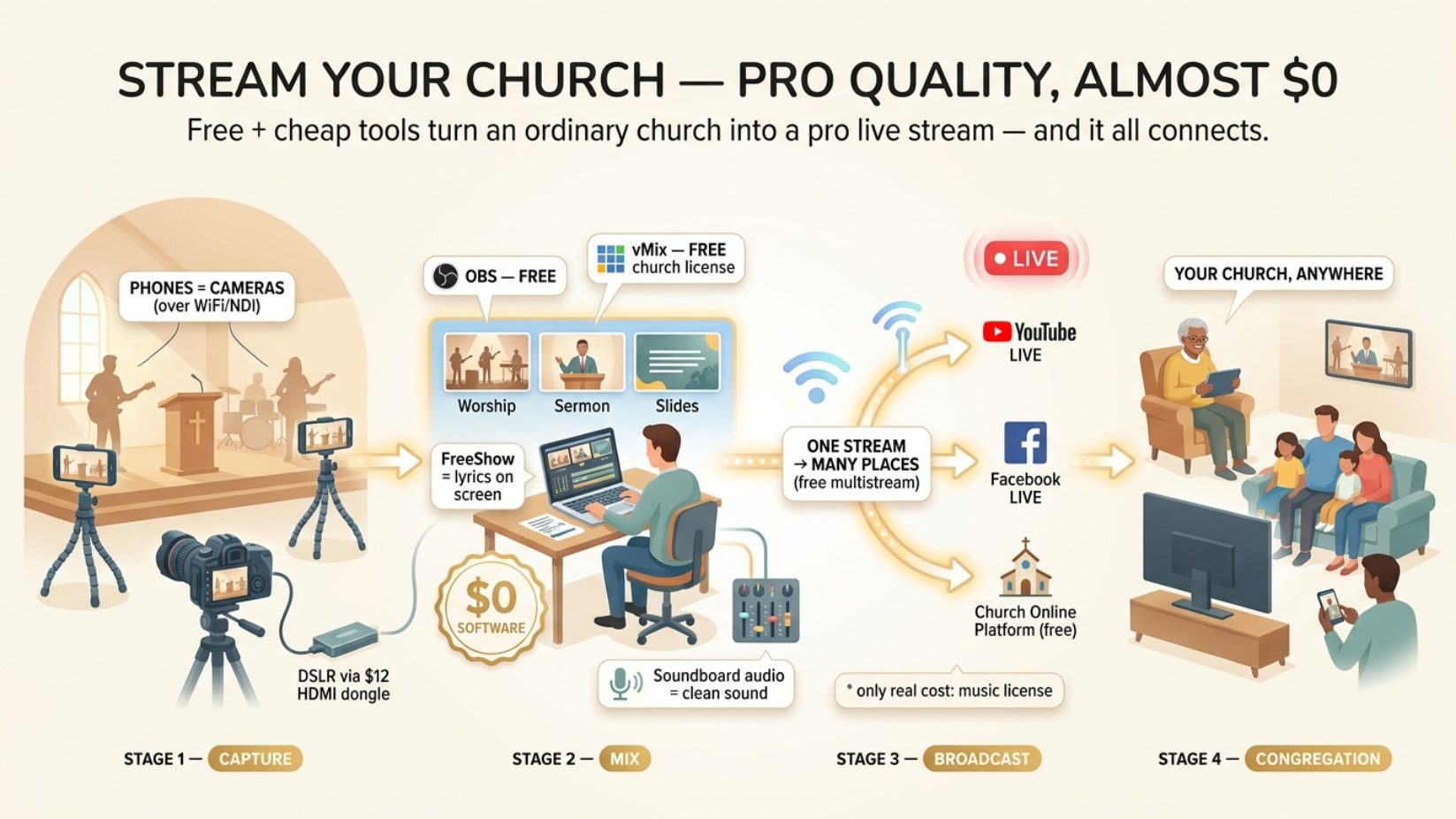
You don’t pay for any of this. vMix hands churches the paid license free, and if it doesn’t land, OBS + a stack of free tools runs a broadcast your congregation will never know was free.
Below is the whole kit — lyrics, scripture overlays, multicam off phones, clean audio, multistream, the lot. Skim the headers, open what you need 
 vMix quietly gives churches the $350 license for free — most never apply
Official program. Apply with a church website + church email (not Gmail), get a free vMix HD license — no subscription, no expiry.
→ https://www.vmix.com/purchase/churches.aspx
NEED:  church site + church email ([email protected]) + 1 line about your ministry
REPLY: ~7 days if approved. No reply = limited batch → retry in 3–6 months (people get in round 2)
 Run the full Pro free for 60 days while you wait
Every feature unlocked, no watermark. Use it to train volunteers on the real thing before the license lands.
→ https://trial.vmix.com
 Buying instead? One tier covers a normal Sunday
vMix is one-time (pay once, keep forever) — not monthly.
| Tier |
Price |
Covers |
| Basic |
free |
2 cams, 768p — learn on it |
| Basic HD |
$60 once |
3 cams, 1080p, stream YT+FB at once — the sweet spot |
| HD |
~$350 once |
unlimited cams |
| 4K / Pro |
~$700 / ~$1,200 |
multi-campus broadcast tier |
| Max |
$50/mo |
only if you hate one-time buys |
Skip everything above Basic HD unless you run two campuses.
 The free stack that quietly runs thousands of churches
OBS Studio — free, open-source, forever. Not a watered-down vMix; the real thing.
→ https://obsproject.com
Scene switching (1-click worship→preacher→slides) · logo/scripture overlays
record-to-MP4 while streaming · picture-in-picture · green screen · audio mixer
4K local recording · runs on a 2015 laptop · YT + FB + Twitch built in
Want it easier? Same family, gentler face:
| Tool |
Link |
Why |
 Streamlabs Streamlabs |
https://streamlabs.com |
OBS power, drag-and-drop. Overlays, alerts, themes baked in |
 StreamYard StreamYard |
https://streamyard.com |
Browser only, zero install. Up to 10 remote guests join by link. Free tier = small watermark |
 Restream Restream |
https://restream.io |
One stream → YouTube + Facebook + church site at once |
 Every phone in the building is already a camera
Phones on cheap tripods at different angles = instant multi-cam into OBS/vMix.
| App |
Where |
Note |
| NDI Camera |
iOS+Android |
Best quality, lowest delay. NDI = video sent over your WiFi/LAN |
| DroidCam |
https://droidcam.app |
WiFi or USB cable, free |
| EpocCam |
iOS |
Auto-detected, stable on WiFi |
NDI is cleanest on wired Ethernet + a 5GHz router, all on one network.
Now the deep cuts — the stuff nobody hands a small church
 Free lyrics on screen — the ProPresenter you don’t pay for
Free apps that throw song words + scripture on the stream. The trick is sending a clean text-only feed, not filming your projector.
📖 The 5 free presenters + the clean-feed trick
| App |
Link |
Why it’s worth it |
| FreeShow |
https://freeshow.app |
Top pick — native NDI output. Sends lyrics straight to the streaming PC, no cables, no color-key. Modern ProPresenter-style UI, mobile remote |
| OpenLP |
https://openlp.org |
Rock-solid since 2004, Win/Mac/Linux. Dated UI, but free forever. Imports EasyWorship/OpenSong songs |
| Quelea |
https://quelea.org |
Multilingual, has a stage view (chords for the band, hidden from the crowd) |
| VideoPsalm |
https://videopsalm.org |
Windows-only. Ships one-click OBS integration + lower-third mode + 330+ Bible translations |
| OpenSong |
http://www.opensong.org |
Simple lyrics/chords/scripture, runs anywhere |
The clean-feed trick (any app): set all slide backgrounds to black, capture the window in OBS, add a Color Key filter → Similarity ~1000. Black vanishes, only the words sit over your camera. Full method: https://www.worshiptools.com/en-us/docs/10-livestream
Even cleaner: if the app does NDI (FreeShow), use that and skip the color-key entirely.
 Drop Bible verses on the stream without typing live
Free OBS overlays that show scripture as a lower-third while you stay on the camera.
🔖 4 free scripture overlays
Get plugins only from the official OBS resources page — never random sites.
 The free church platform nobody tells you exists
Don’t just dump people on a bare YouTube link. Church Online Platform is built by Life.Church (the YouVersion Bible app team) and 100% free since 2011 — no tiers, no limits, used by 38,000+ churches.
→ https://churchonlineplatform.com
You embed your free YouTube/Facebook feed into it and get live chat with auto-translation, live prayer requests, “I decided today” moments, and your own branding. Best free upgrade over a plain embed, full stop.
💸 Paid church platforms — what's actually free vs not (so you don't overpay)
All of these are paid, trial-only — only reach for one when you need ad-free embedding or rock-solid weak-internet delivery:
Verdict: stream free to YouTube/Facebook → embed in Church Online Platform. Pay only when you’ve genuinely outgrown that.
 NDI Tools — the free glue that chains it all together
One free download from https://ndi.video/tools turns your normal network into a video pipeline. No capture cards, no long HDMI runs.
🧰 What's in the free NDI box + the killer church move
NDI Scan Converter → put your LYRICS computer's screen on the network as a clean
                     source. The streaming PC just pulls it in. No cable. (killer use)
NDI Virtual Input  → make any NDI feed show up as a "webcam" in Zoom/Teams
NDI Studio Monitor → view any network feed as a confidence monitor / signage
NDI VLC Plugin     → pre-roll videos straight off the network
Run cameras + PC on wired Ethernet — NDI hates WiFi for the main feeds. On a LAN you can push huge bitrates with zero lag.
 Turn a real camera into a webcam — free, plus the $12 trick
A DSLR/mirrorless looks 10× better than a webcam. Two routes, both cheap.
🎥 DSLR-as-webcam + cheap capture + clean audio
Free manufacturer apps (USB, no capture card):
- Canon EOS Webcam Utility — https://www.usa.canon.com/digital-cameras/eos-webcam-utility
 Canon discontinued the free standalone version on Aug 20, 2025 (last free build v1.3.16; new one is paid). If you’ve still got the free installer, keep it.
- Sony Imaging Edge Webcam — free, 35+ models
- Nikon Webcam Utility — free
- None of these carry audio over USB — get sound separately (below).
The more future-proof route — clean HDMI + a ~$10–15 dongle: generic HDMI-to-USB capture sticks are plug-and-play, show up in OBS as “USB Video,” and give full 1080p from any camera with clean HDMI output (google your model + “clean HDMI”). Gotchas: usually 1080p30; won’t grab copy-protected sources; if audio rasps, set the source’s HDMI audio to PCM.
The single biggest quality jump — clean audio from the soundboard: never use the camera mic. Run a spare output from your mixer into a cheap USB audio interface (2-channel Behringer-class) → into OBS as its own audio input. Instantly broadcast-grade sound.
 Make the audio sound pro — free plugins + the legal bit nobody mentions
Stream audio fails more than video. All fixable for free.
🔊 Free audio chain + the CCLI license reality
Free OBS filter chain (in this order on your audio source):
Noise Gate → ReaFIR (noise removal) → EQ → Compressor → Limiter (last)
ReaPlugs (free VST suite) → https://www.reaper.fm/reaplugs/ — its ReaFIR in “Subtract” mode auto-learns your booth’s hum/fan noise and erases it. Church AV folks swear by it for killing HVAC drone.
The legal part — you cannot stream worship music for free, even with your projection license: you need a CCLI Streaming License → https://ccli.com/us/en/streaming — covers 450,000+ worship songs performed live by your musicians. From $84/yr if already CCLI-licensed, ~$108/yr for an average 100–199-person church. Streaming Plus adds backing tracks/multitracks. It does not cover playing others’ recordings or movie clips on the stream. Show your license number on screen. (US terms; check your country. Hymns published before 1931 are public domain as of Jan 2026.)
 The free gems pros hoard
⚡ Remote guests, auto-start, PTZ control, the plugin pack
- VDO.Ninja → https://vdo.ninja — 100% free, browser-based, no install. Brings a remote guest’s phone/laptop camera into OBS with near-zero lag. Also a free wireless phone-cam-to-OBS tool. Tip: add
&buffer=0 for lowest latency.
- vMix Call — free inside the vMix trial / church license. Remote guests join via a link, auto mix-minus kills echo.
- PTZOptics control app + OBS plugin → https://ptzoptics.com/app-download/ — free; drive up to 8 PTZ cameras, auto-recall presets when you switch OBS scenes = one volunteer “operates” every angle. Cross-brand free option: PTZ Controls → https://obsproject.com/forum/resources/ptz-controls.1284/
- OBS plugins churches love (all free, from obsproject.com/forum/resources):
- Advanced Scene Switcher → auto-start the Sunday stream on a schedule + automate scene changes (needs OBS 31.1.1+)
- Move Transition → smooth animated camera/lower-third moves
- Source Record → record an ISO of the pulpit cam / clean program while you stream, for re-use
- Background Removal → free AI green-screen-free background knockout
- Performance check: open View → Stats, watch “time to render frame.” Over ~10 ms = dropped frames coming. Add plugins one at a time.
 Free overlays, motion backgrounds & countdown timers
🎨 Free worship media + pre-service countdowns
Free motion backgrounds / loops: Life.Church Open Network (https://open.life.church), Motion Worship (https://www.motionworship.com/free-download/), Igniter Media (https://www.ignitermedia.com/free-worship-backgrounds), Church Motion Graphics (https://www.churchmotiongraphics.com/free-worship-media/). General stock: Pexels, Pixabay, Mixkit, Coverr.
Free countdown timers (the “Starting Soon” screen): H2R Graphics (https://h2r.graphics — free core, drops into OBS as a browser source), Ashmanix Countdown Timer (OBS resources), or a no-install web one: https://www.danielchi.live/timer/
 Stream to YouTube AND Facebook at once — free
Skip paid Restream tiers: Aitum Multistream → https://aitum.tv — free OBS plugin, pushes to YouTube + Facebook + more from one OBS, no monthly fee. Each extra destination doubles your upload load — test it first if your internet is tight.
 The numbers that stop your stream buffering
🚦 Bitrate, upload speed & weak-internet survival
720p30  → 2,500–4,000 Kbps   (start here if upload is tight)
1080p30 → 4,500–9,000 Kbps
RULE: keep upload headroom ≥ ~1.4× your bitrate, tested at speedtest.net
      (a 6 Mbps stream wants ~8.4 Mbps reliable UPLOAD)
A clean 720p beats a stuttering 1080p every time. Weak internet kit: wire the PC, drop to 720p/30fps, lower bitrate; if it’s chronically bad, use Resi’s packet recovery or pre-record and upload slightly delayed. Keep a phone hotspot as failover.
 The whole $0 setup, copy-paste
SOFTWARE   OBS (free)
LYRICS     FreeShow → NDI into OBS (free)
SCRIPTURE  Bible Plugin for OBS (free)
CAMERAS    phones via NDI Camera app + 1 DSLR via HDMI dongle (~$12)
AUDIO      soundboard → cheap USB interface → OBS + ReaFIR (free)
PLATFORM   YouTube Live → embedded in Church Online Platform (free)
MULTISTREAM Aitum → also hits Facebook (free)
LICENSE    CCLI Streaming (~$84–108/yr) ← the one real cost
ARCHIVE    OBS records locally while streaming (free upload copy)
 Where this actually pays off
 The shut-in who hasn’t reached a pew in two years watches live from bed — close-up on the preacher’s face, lyrics on screen
 Guest preacher stuck three states away joins the stream from a link — nobody knows he wasn’t in the room
 Easter, building’s packed — overflow crowd in the car park watches the same feed on their phones
 A dead-slow 2015 laptop runs the full multi-cam broadcast because OBS sips hardware
 Record-while-streaming means the sermon’s uploaded and shareable before everyone’s home for lunch
 Find your row, go straight to it
| You are… |
Do this |
| Want the “proper” tool, have a church site + email |
Apply for the free vMix church license → train on the 60-day trial meanwhile |
| Need it running this Sunday, $0 |
OBS + 2 phones (NDI) + FreeShow lyrics + soundboard audio → YouTube |
| Volunteers scared of software |
StreamYard in a browser, anyone can run it |
| Want YT + Facebook at once |
Aitum Multistream (free) in front of OBS |
| Internet keeps dropping mid-service |
720p, wired PC, or Resi packet recovery |
| Happy to spend a little, want it simple forever |
vMix Basic HD, $60 once |
Order of operations: apply for the license today (10 min), set up OBS tonight, FreeShow for words, pull audio off the soundboard, grab the CCLI Streaming License so the music’s legal, run one private YouTube test before Sunday. Either way, the people watching from home get a broadcast worth sharing.
A church too broke for a camera still has fifty in its pockets, the best software in the room costs nothing, and the only bill left is the one that keeps the music honest. 
 !
!